











PMISuite Glassworking
Glass production workflows for Odoo 18 Community, from measured quotations and custom sheet drawings to component planning, manufacturing reports, and Opty-Way Maver exports.
Start here
| Your role | Guide | What you will find |
|---|---|---|
| Sales, planning, and workshop users | User manual | Illustrated workflows for quotations, drawings, approvals, production, deliveries, invoices, planning, and exports. |
| Administrators and implementation teams | Administrator manual | Installation, dependencies, access, companies, products, units, BoMs, pricing, manufacturing profiles, and operating limits. |
Both manuals cover all five addons and include screenshots from a synthetic training company.
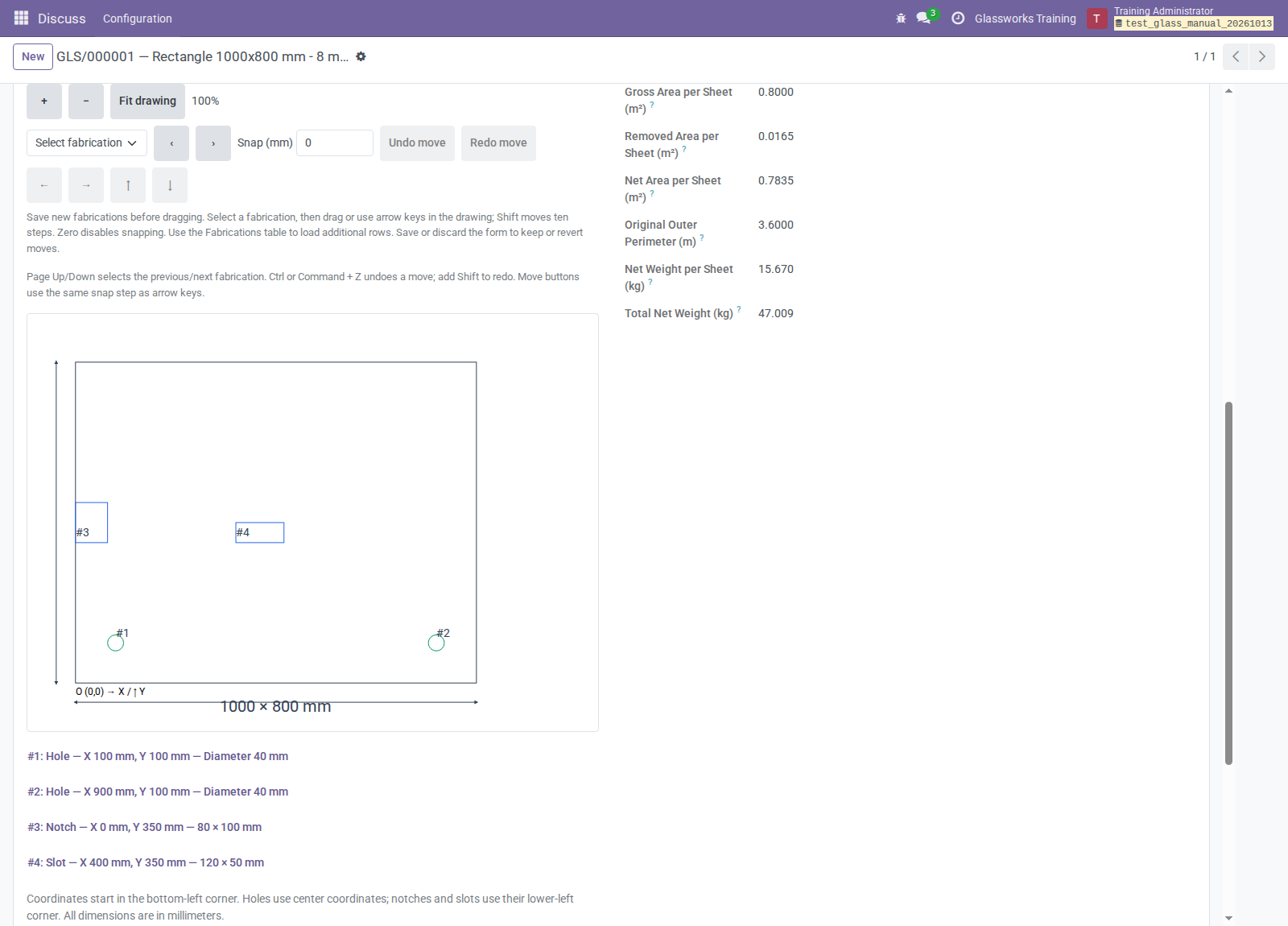
Configure the sheet, review its fabrications and material summary, and preserve the approved drawing for production.
What you can do
- Quote cut glass: enter physical pieces and rectangular dimensions, review area and perimeter, and apply formula-pricelist or variant perimeter charges.
- Design and approve sheets: configure rectangles, circles, ellipses, and trapezoids with holes, notches, and slots; add finishing instructions, reuse templates, and retain numbered approval PDFs.
- Prepare production: dispatch eligible approved Unit-based designs, track completion and backorders, and replace canceled unfinished quantities.
- Plan component demand: group raw-material moves and assign sequential work-order dates within work-center planning windows.
- Report and export: download customer-grouped manufacturing reports, component spreadsheets and worklists, and material-specific Maver ASC V4 files.
Addons
Each addon README provides its detailed scope, configuration, and limitations.
| Addon | Purpose | License |
|---|---|---|
| pmis_quant_measurements | Pieces, rectangular dimensions, area/perimeter, and perimeter pricing across commercial and operational records. | LGPL-3 |
| pmis_sheet_configurator | Sheet drawings, fabrications, specifications, approval revisions, and optional direct manufacturing. | LGPL-3 |
| pmis_mrp_production_planning_group | Component-demand groups, sequential work-center planning, and analysis. | LGPL-3 |
| pmis_mrp_reports | Filtered manufacturing-order PDF and XLSX reports grouped by customer. | LGPL-3 |
| pmis_export_asc_v4 | Maver ASC ZIP downloads, component XLSX exports, and PDF worklists. | AGPL-3 |
Get started
- Make this repository available on the Odoo addons path and provide each selected addon's manifest dependencies.
- Provide
mrp_sale_infofrom OCAmanufactureandreport_xlsxfrom OCAreporting-enginewhere required. See oca_dependencies.txt and requirements.txt for repository dependencies. - Follow the administrator's installation and setup guide to configure products, units, access, BoMs, work centers, and reports.
- Start with the user workflows for the roles and addons installed in your company.
Measurements is required by Planning and Maver Export, optional for Manufacturing Reports, and independent of the Configurator's drawing workflow.
Plan your workflow
Native Odoo quantities remain authoritative for stock, reservations, consumption, valuation, and invoicing. Drawing geometry does not automatically configure BoMs, routes, sibling-addon measurements, pricing, or machine instructions.
Direct configurator dispatch requires a stockable product in exact standard Units. Planning assigns sequential dates rather than calendar-aware capacity optimization. Maver exports are downloadable files; importing them into cutting software is a separate operation.
Review the administrator manual for multi-company planning access, report prerequisites, export allowances, and current limitations before deployment.
Support and credits
See the addon READMEs for support contacts, authors, contributors, and maintainers. Addon manifests declare the licenses listed above; preserve their license and attribution notices.