Financial ledgers by fiscal date
This manual is for accountants preparing financial ledgers and reconciling stock
valuation with the books. pmis_account_financial_report extends the existing OCA
accounting reports. Slovenian manual.
Before you begin
Install account, date_range, report_xlsx, account_financial_report, and
pmis_account_dates. Use an accounting role with normal OCA report access
(Show Accounting Features – Readonly, also included in full Accounting access).
Company, account and journal-item access still apply. Accounting Manager is
needed to change posted recognition, not simply to run an accessible report.
Open Accounting / Invoicing > Reporting > OCA accounting reports. Select Trial Balance, General Ledger, or Journal Ledger. There is no PMIS date-mode toggle: the supported fiscal overrides apply when the addon is installed. Fiscal-month ranges are a convenient way to fill dates, not a prerequisite for daily fiscal-date selection. A company must have one unaffected-earnings account for Trial Balance; correct that setup if its wizard blocks reporting.
Understand the example
All examples use fictional Alder Workshop Ltd, EUR, and posted entries.
| Transaction | Accounting date | Fiscal date | Inventory effect |
|---|---|---|---|
| First Panel A receipt: 2 × €10 | April 10, 2026 | March 29, 2026 | +€20 |
| Second Panel A receipt: 3 × €20 | April 10, 2026 | March 29, 2026 | +€60 |
| Product correction, outgoing/incoming | April 10, 2026 | March 29, 2026 | −€80 / +€80 |
| Separately approved daily recognition | April 2/3, 2026 | March 15/20, 2026 | +€30 / +€40 |
| Separately corrected legacy value | April 4, 2026 | April 30, 2026 | +€50 in April |
March 15/20 are separately approved daily accounting decisions, not automatic migration output. An April posting preserved in March migrates to March 31, unless a later authorized decision changes it.
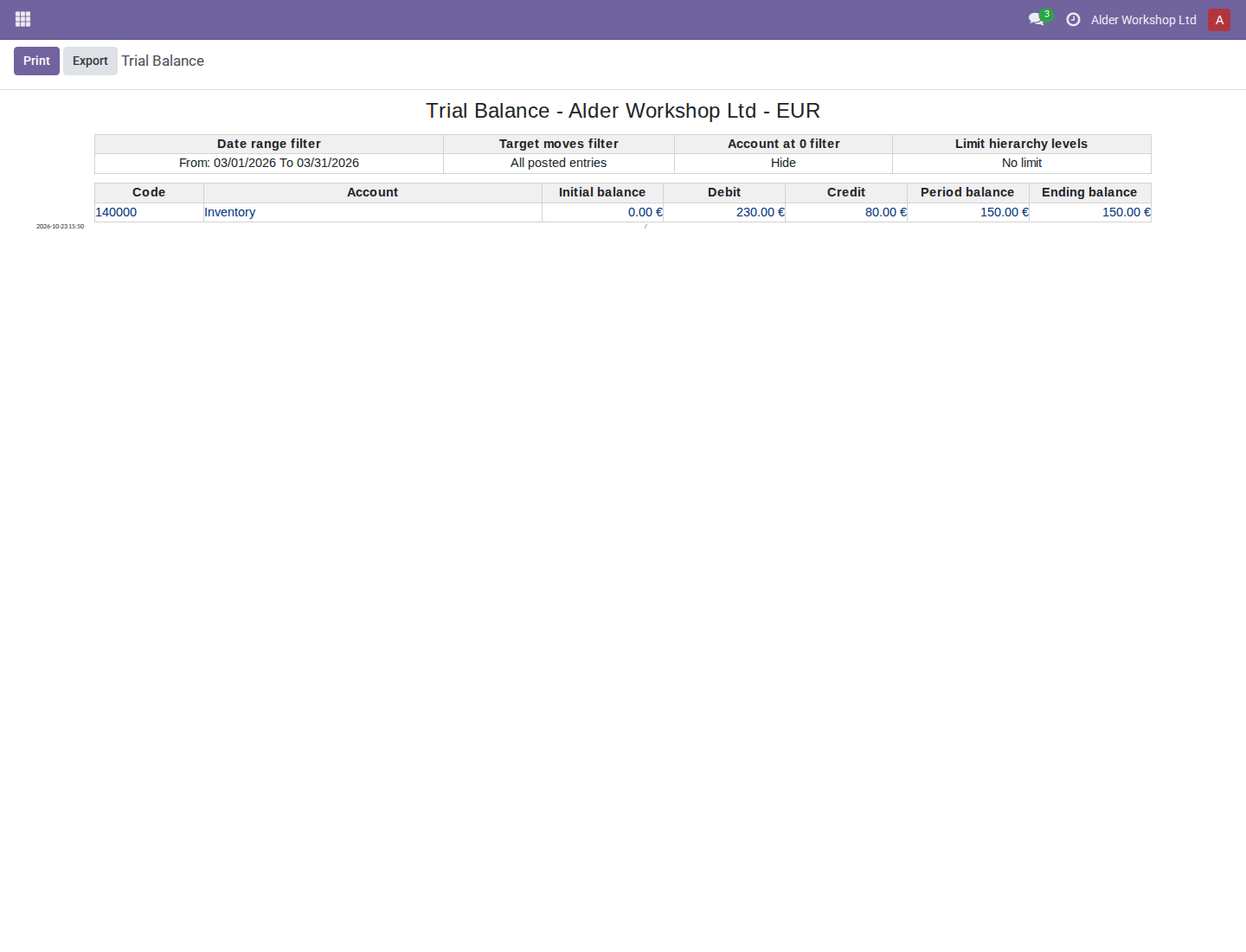
March inventory therefore ends at €150: €230 debits minus €80 credits. April starts with €150, then includes €50 legacy value and €20 tracked fittings, with a net-zero fittings product correction, ending at €220. The January 2027 receipt used in the stock-period manual is outside these fiscal periods even though it was processed in October 2026.
1. Prepare a March Trial Balance
- Open Reporting > OCA accounting reports > Trial Balance.
- Select the company and Date range: 2026-03, or enter Date From March 1 and the paired end date March 31. Verify both dates; choosing a range fills them.
- Use All Posted Entries for comparison with posted books. Select 140000 Inventory under Filter accounts. Leave partner/journal filters empty unless the comparison intentionally requires them. Review zero-balance, hierarchy, partner and foreign-currency options before generating.
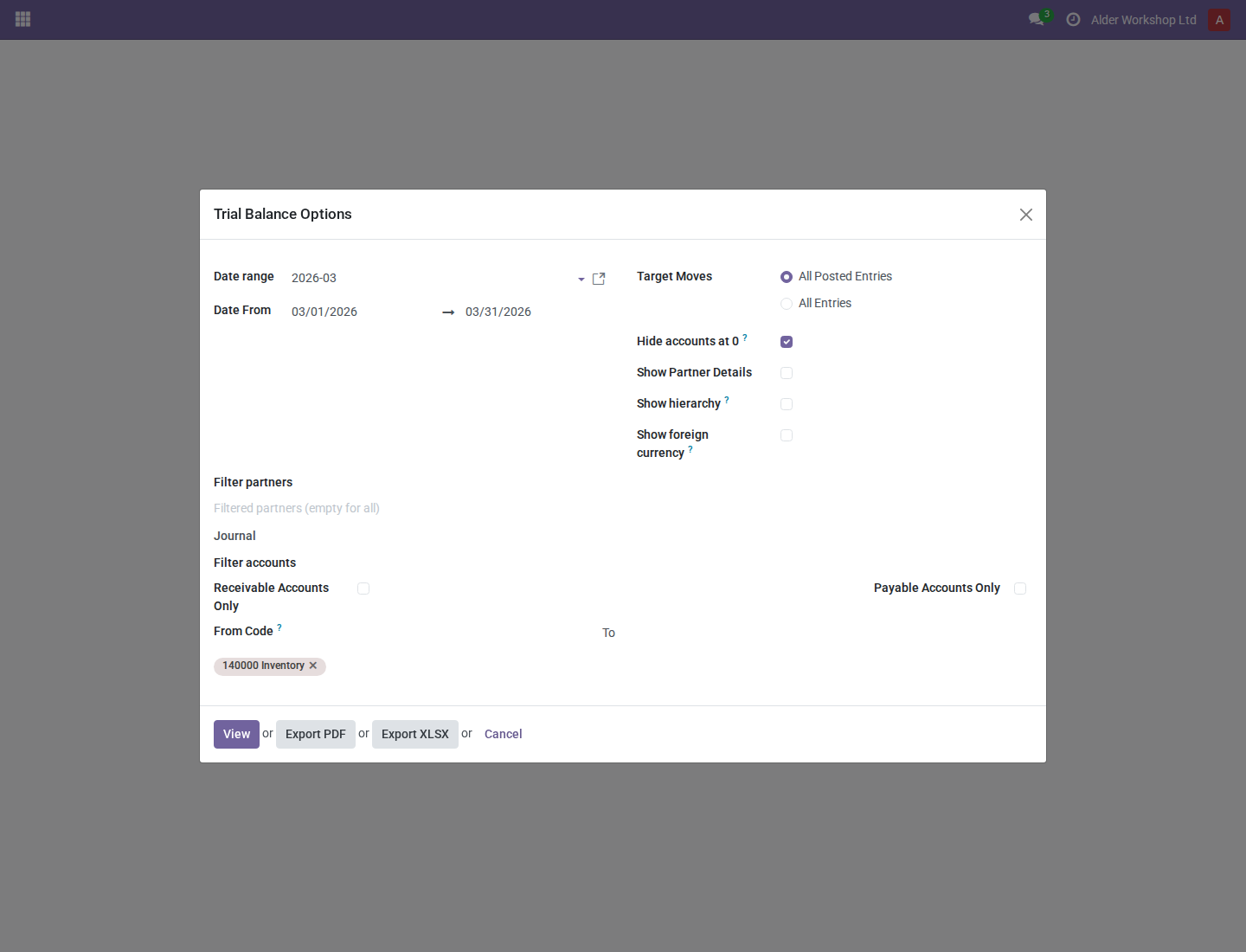
- Click View. Confirm initial balance €0, period debit €230, credit €80, period balance €150, and ending balance €150.
- Click a linked amount to inspect the contributing journal items. Initial, debit, credit, period-balance and ending-balance drilldowns use fiscal dates. Check the company, posting status and selected scope in the resulting items. A journal item's native Date column can show April while Fiscal Date shows March; this is the expected distinction.
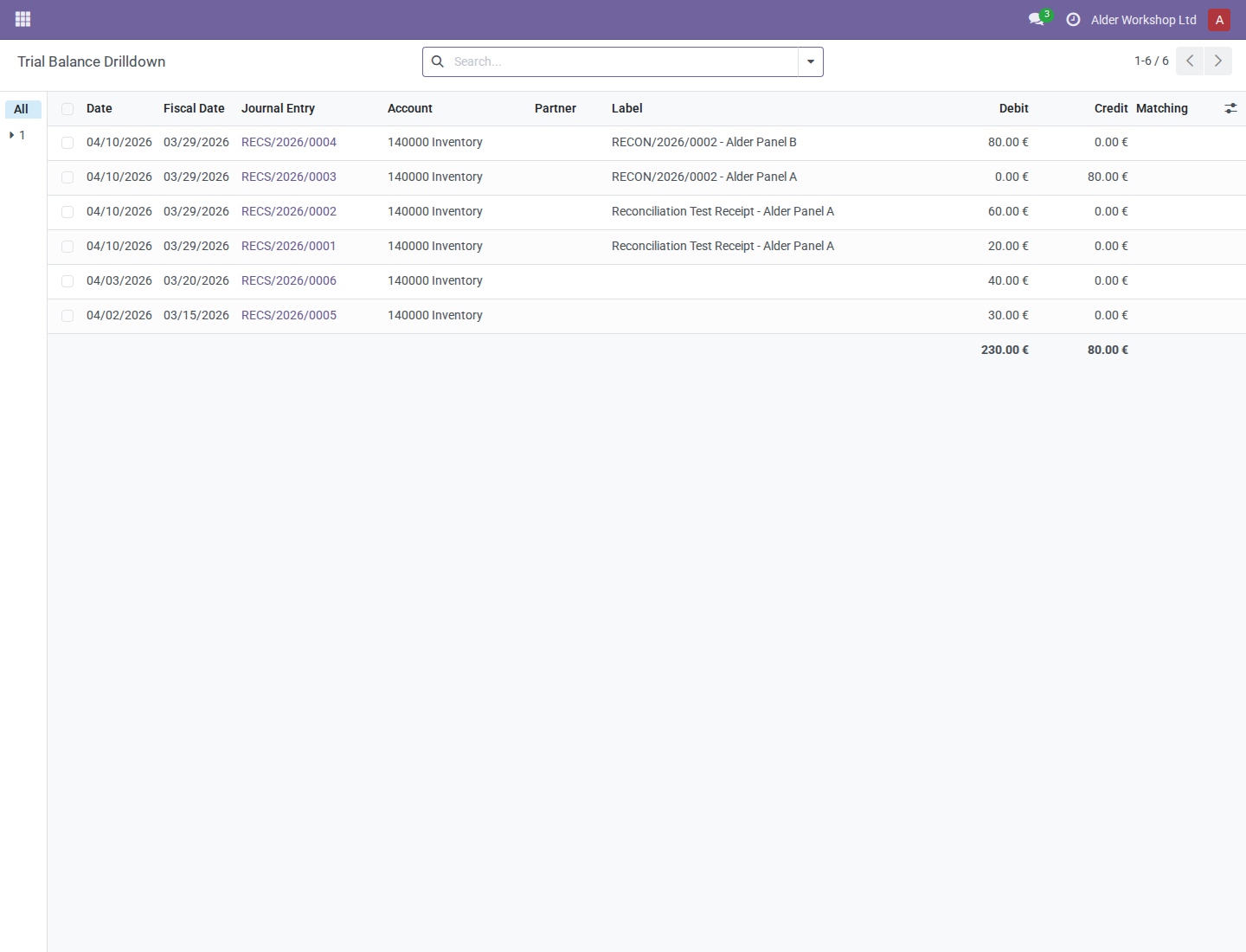
Opening balances and period movements use fiscal dates, including the relevant balance-sheet/profit-and-loss fiscal-year calculations. Existing OCA hierarchy, grouping and accounting options retain their meaning. Changing an option can change the comparison scope; do not compare differently filtered totals.
2. Inspect March movements and April opening in General Ledger
- Open General Ledger, choose March 1–31, All Posted Entries, and account 140000 Inventory. Choose the required grouping and centralization options; the example uses no partner/tax grouping.
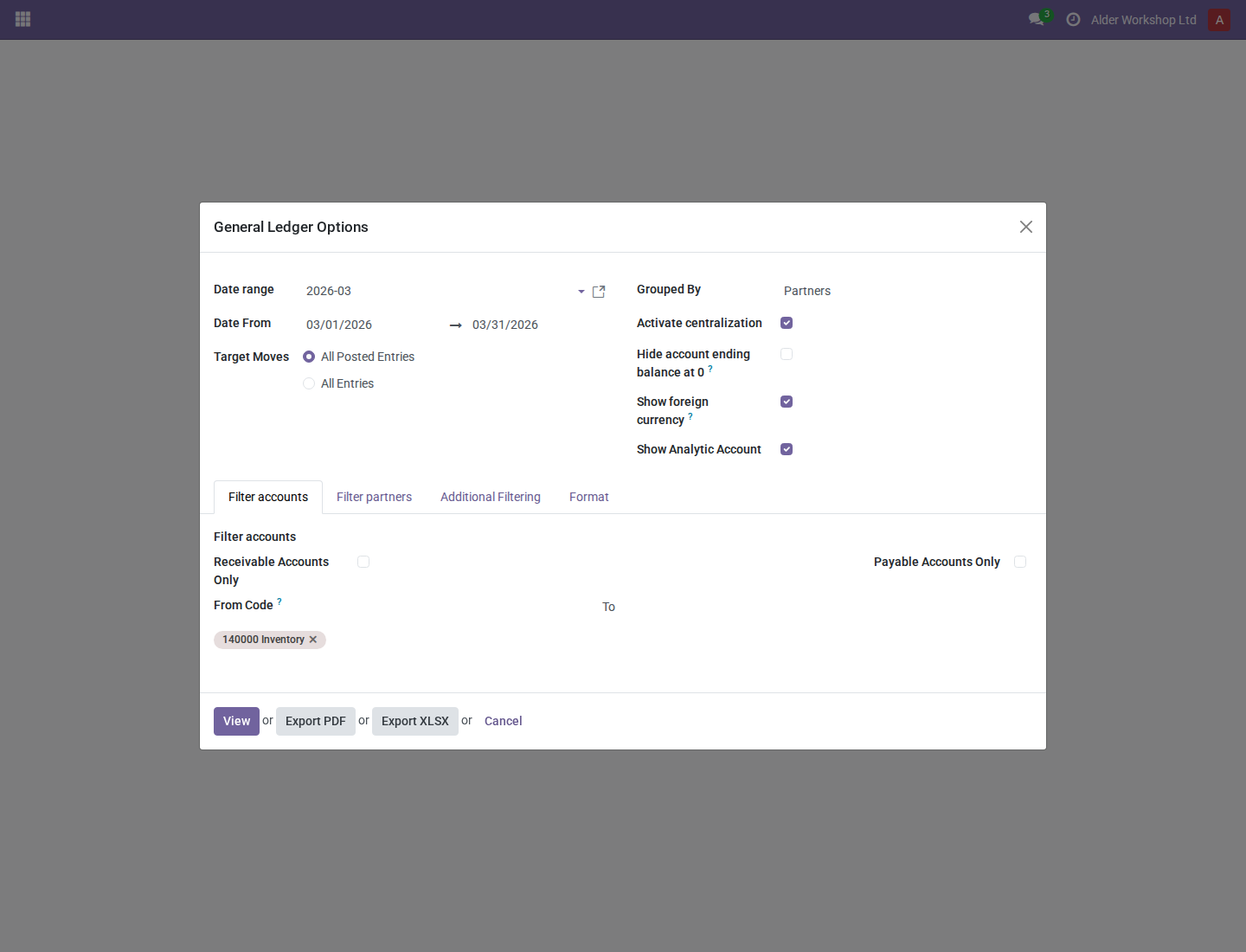
- Click View. Opening calculations, prior-year earnings selection, period selection, displayed dates and chronological output use fiscal recognition. The example lists March 15, March 20 and March 29 entries, including receipts actually posted April 10, and ends at €150.
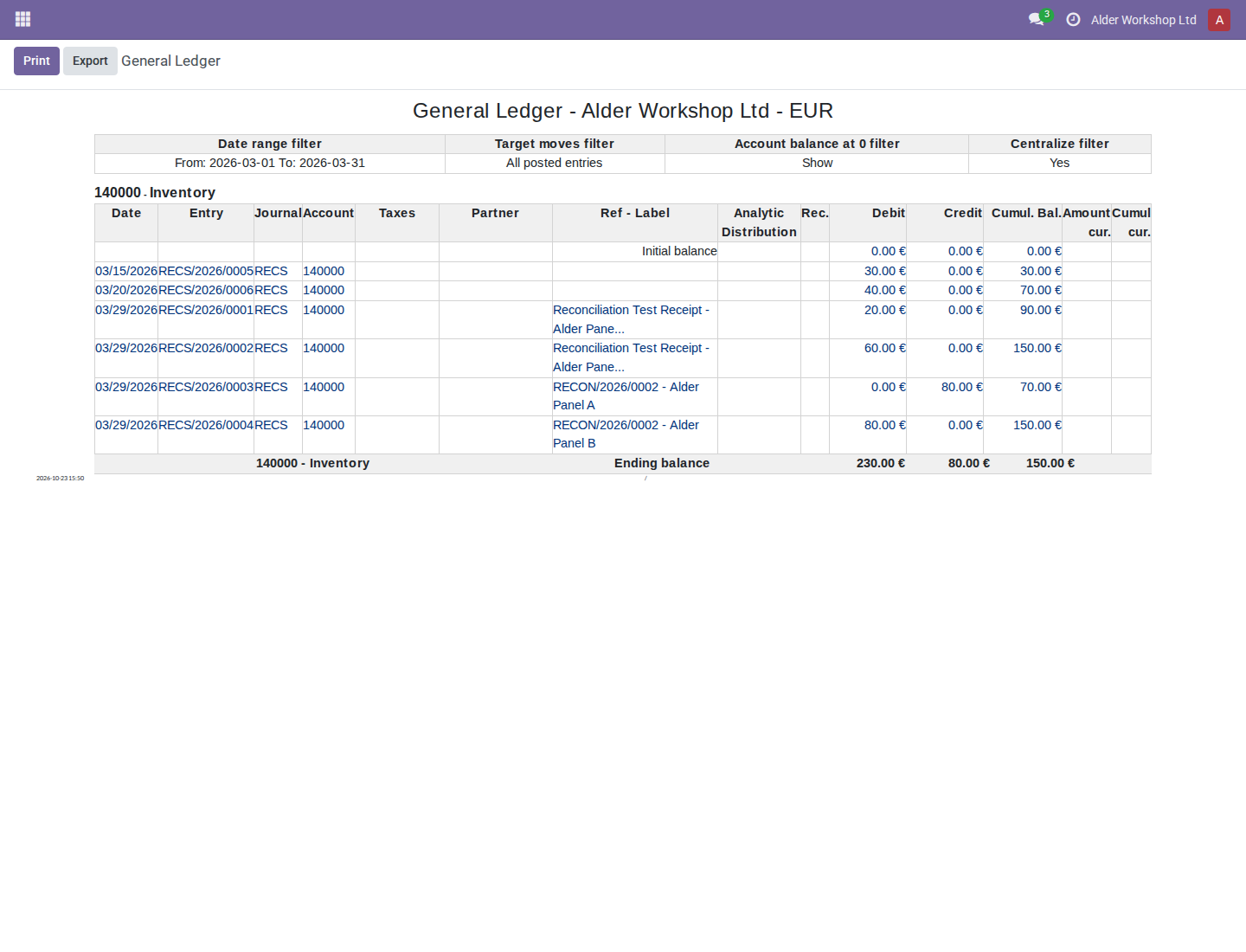
- Follow available entry/line links to inspect the underlying records. Opening balance drilldowns use fiscal dates and retain the report's company, posting and selection scope. Read the entry's accounting date separately from the fiscal date displayed in the report.
- Run the same account for April 1–30. Verify €150 opening, rather than treating April-posted March transactions as April movements. In this dataset, April ends at €220.
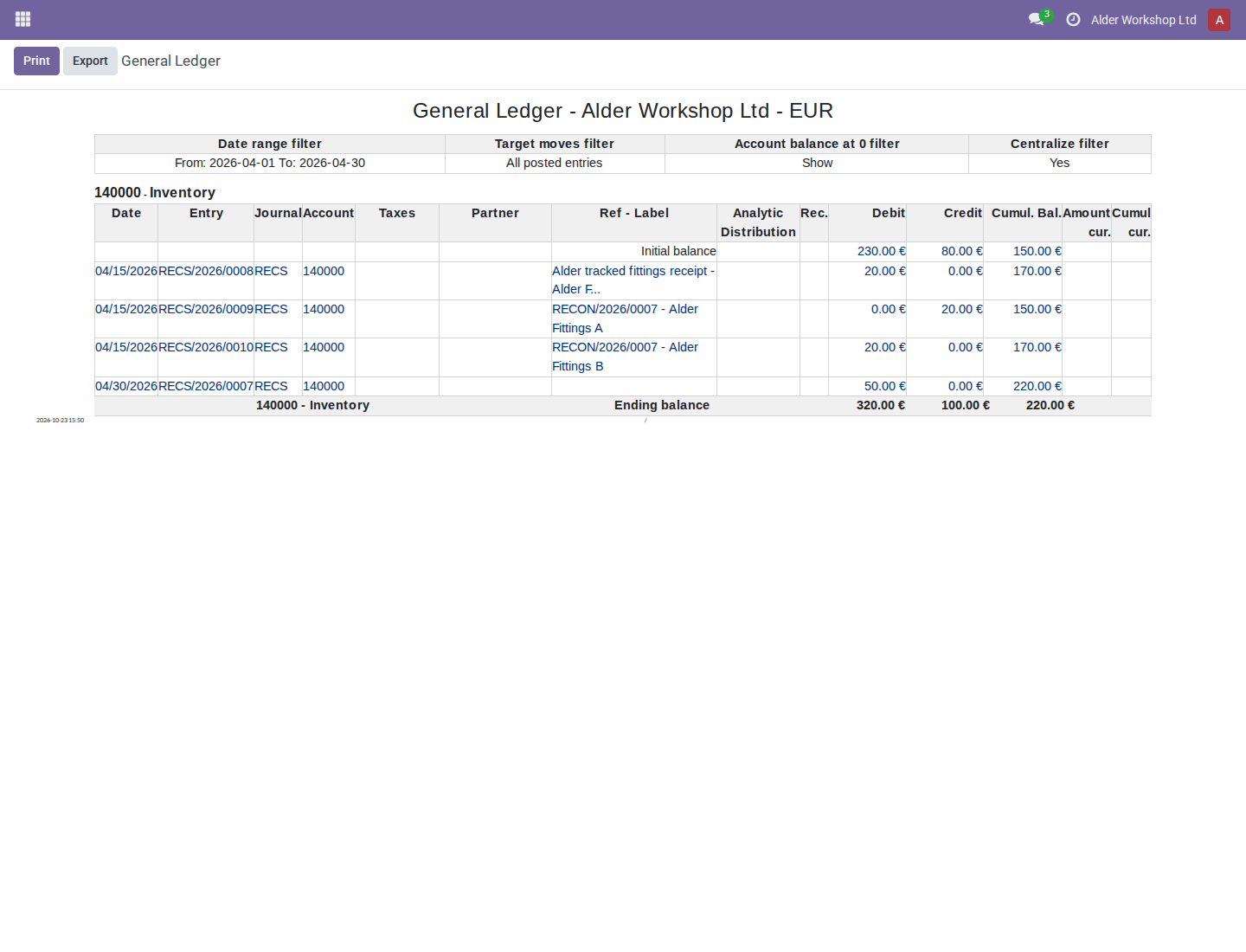
3. Produce a chronological Journal Ledger
- Open Journal Ledger and select March 1–31.
- Set Target Moves to Posted, Sort entries by to Date, and Group entries by to Journal (or No group when appropriate).
- Select Inventory Recognition under Journals so unrelated journals do not obscure the example. Review account-name, auto-sequence and currency options.
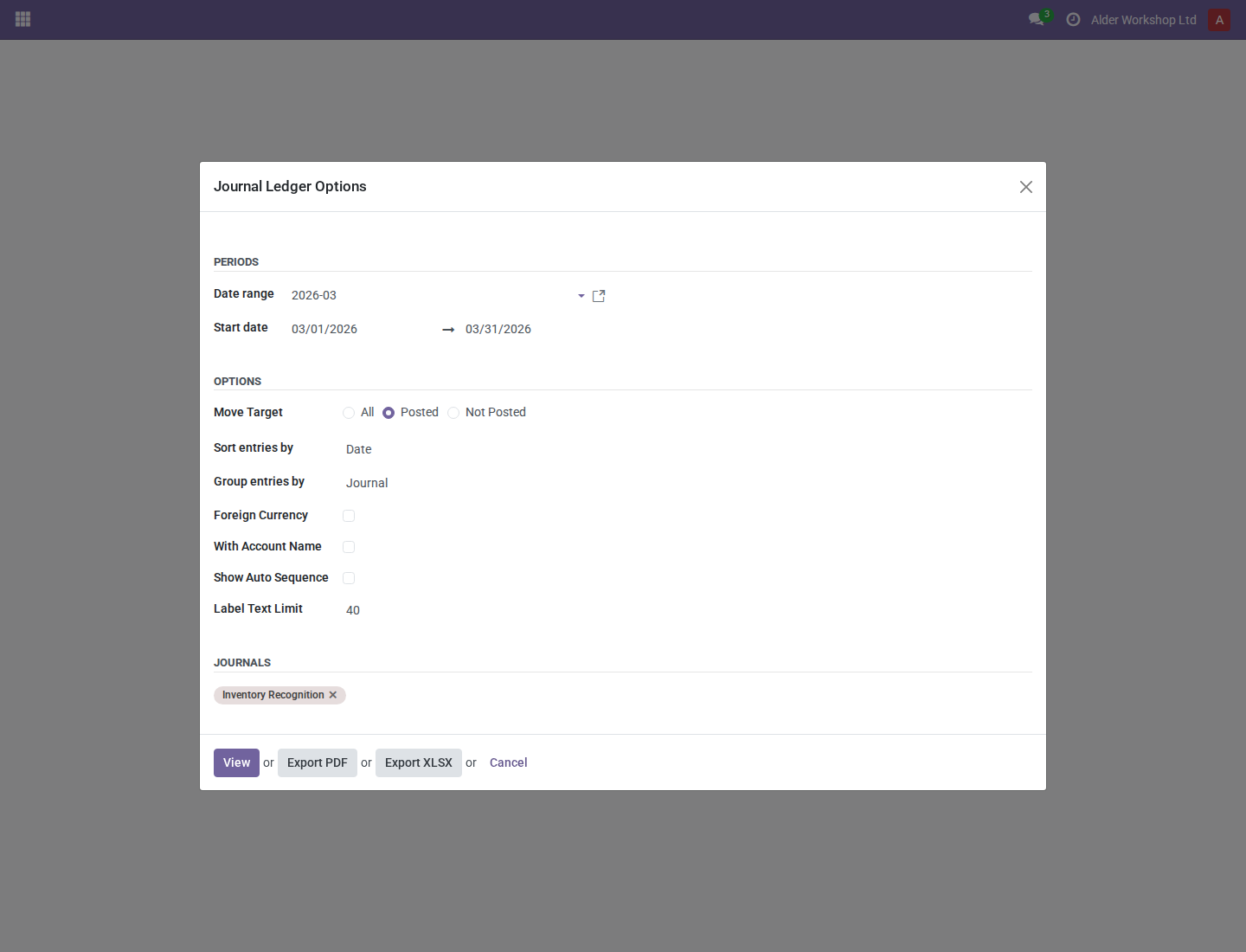
- Click View. Entry selection uses fiscal dates. With Date sorting, entries are ordered by fiscal date, then entry name and ID. QWeb/PDF and XLSX display the fiscal date. Entry number sorting remains a separate option; recognition dates do not renumber journal entries.
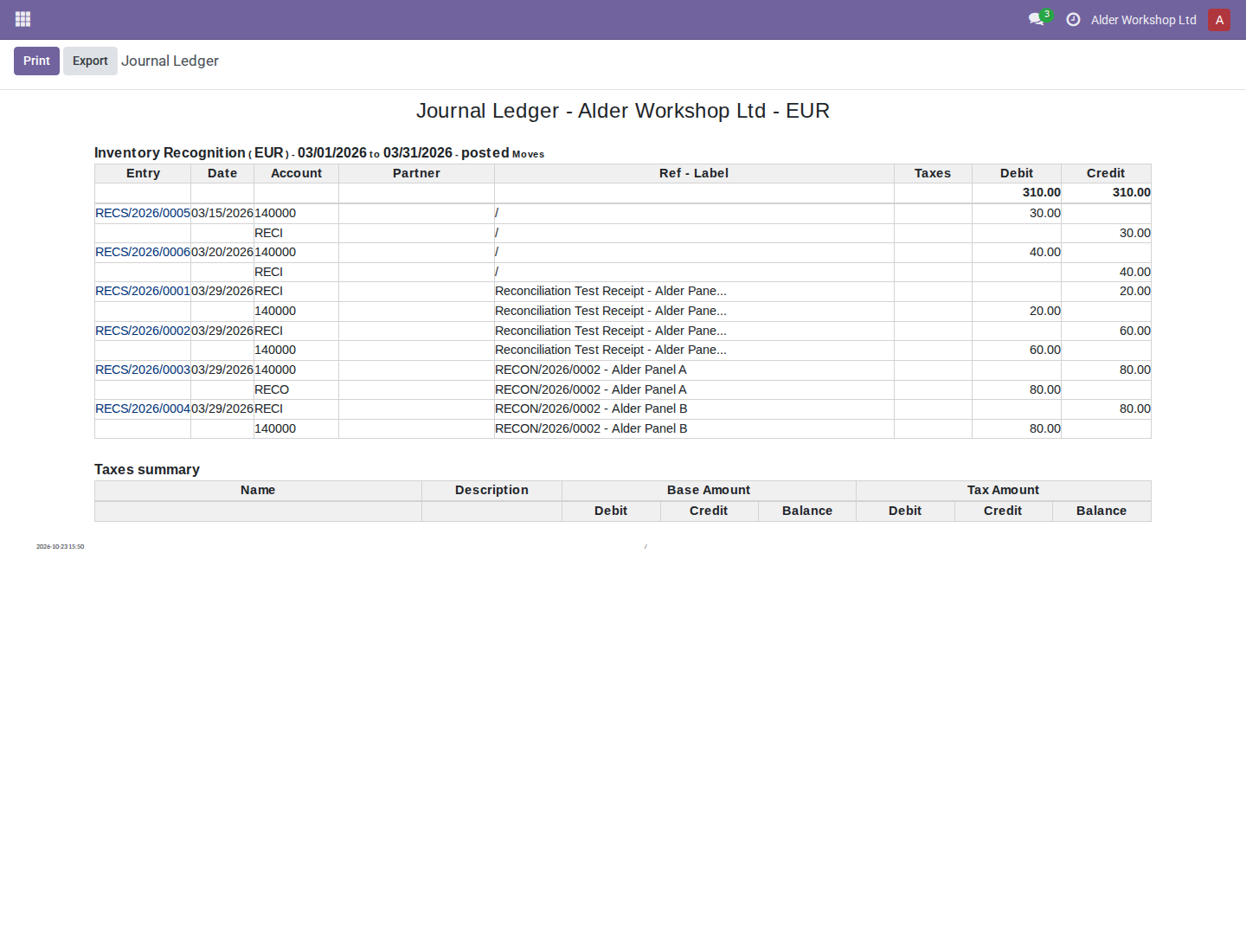
Journal Ledger includes all relevant journal lines, not only the inventory account. Its balanced debit/credit totals therefore are not the inventory ending balance. Use Trial Balance or General Ledger for the €150 account comparison.
4. Export PDF and XLSX
- Configure and review the report as above. In the wizard choose Export PDF or Export XLSX, or use Print / Export in the displayed HTML report. The report toolbar's Export produces XLSX.
- Allow the browser's normal download/open behavior and inspect the resulting file. Print uses the PDF report action; browser handling can differ from an XLSX download. PDF generation requires the installed server PDF renderer.
- Check company, currency, dates and selected scope in each output. The three supported ledgers use shared report data for HTML/QWeb/PDF and XLSX; General Ledger and Journal Ledger export fiscal dates rather than replacing them with native posting dates. The XLSX wrapper resolves company currency from report data.
- Regenerate after an accounting decision changes recognition. An old PDF or spreadsheet remains a snapshot and does not update itself.
5. Reconcile with fiscal inventory valuation
- In Inventory > Reporting > Valuation > Valuation at Date, choose Inventory Valuation at Fiscal Date: March 31, 2026.
- Compare its €150 Total Value with the March ending balance of account 140000 Inventory. The real valuation screenshot and procedure are in the valuation manual.
- Investigate differences by product, layer, stock move and entry. Check matching company/currency, posting status, accounts, cutoff, manually valued/unlinked layers, pending historical holds and accounting adjustments without stock layers. Valuation is not automatically restricted to the ledger's accounts/status filters.
- Review historical proposals before resolving them. A proposed March layer held in April can explain a rollout difference; it is not proof that costs should be recalculated. Fiscal dating does not reconstruct FIFO or warehouse quants.
Exact reporting boundaries
| Report or concept | Current behavior |
|---|---|
| Trial Balance | Fiscal opening and period computations and supported amount drilldowns |
| General Ledger | Fiscal opening/prior-year selection, period selection, displayed dates, chronological data and opening drilldowns; shared HTML/PDF/XLSX data |
| Journal Ledger | Fiscal entry selection, Date ordering and QWeb/XLSX dates; entry-number ordering remains available |
| VAT Report | Net/tax totals still use native accounting dates; QWeb net/tax drilldowns use fiscal dates and can show different lines |
| Open Items | The shared optional unreconciled-line date_from lower-bound domain uses fiscal_date; other native date/reconciliation logic and XLSX date behavior remain |
| Aged Partner Balance | The same shared lower-bound hook is affected, but later accounting-date cutoff, maturity/aging buckets, reconciliation timing and XLSX date behavior remain upstream |
| Tax Date | No universal switch to tax_date; localization/tax-policy addons own its reporting use |
| Other reports and operational dates | No general conversion; due dates, exchange-rate logic, posting sequences and warehouse chronology keep their own meanings |
The VAT total/drilldown mismatch is a current limitation, not a fiscal VAT policy. Do not use these ledger overrides as evidence that VAT, aging or open-item output has been completely converted to recognition dates.
Troubleshooting
| Problem | Recovery |
|---|---|
| April posting is missing from March report | Verify its fiscal date is in March, posted status, company and account/journal filters. |
| April opening differs from March ending | Match scope and entry status, review fiscal-year/account-type treatment and recent recognition changes. |
| Report date seems different from entry | The report displays fiscal recognition; inspect native Accounting Date separately. |
| PDF fails but HTML works | Report the actual renderer/setup failure; do not assume PDF success from HTML alone. |
| XLSX currency seems wrong | Verify the selected report company and its currency. |
| VAT drilldown does not match its total | This implementation deliberately retains different VAT date paths; refer to the responsible tax-policy owner. |
Related: accounting date decisions, stock instructions, and product correction.