PMIS project delivery: scope, daily evidence, sign-off, and material cost
Joint user manual for pmis_assessment, pmis_field_service, pmis_signoff, and
pmis_situation_stock on Odoo 18 Community.
Edition: October 6, 2026. Source: branch 18.0; inspected starting at
revision e7177596, with no differences in the four addons at e02a0042.
This edition combines source inspection with a running, isolated synthetic Odoo
demo. The screenshots show actual application screens, not mockups. Measurement
issuance, sale completion/retry, delivery valuation, draft invoicing, daily-log
correction, and internal consumption were exercised. The diagram remains a
workflow illustration. See demo evidence for verification scope.
October 11 addendum: external Control Officers can approve through OCA's
PDF/portal signing without an internal Odoo account. The workflow below reflects
the current 18.0 worktree, including the new sign_oca dependency.
Choose your role: project manager: work preparations · construction operative: execution and measurements · Control Officer: review and signing. These illustrated guides follow each person's tasks and handoffs; this manual remains the shared cross-role reference.
Media: October 11 PDF reading copy · Narrated workflow overview · English captions. The PDF includes the October 11 OCA signing addendum; the video does not. The overview is a 3-minute 56-second diagram/text explainer with local synthesized narration. The manual now includes real Odoo screenshots. Video work is paused; the existing overview is unchanged and is not an Odoo screen recording.
Contents
- How the four addons work together
- Words and quantities
- People and access
- Prepare the configuration
- Worked example
- Verified demo
- 1. Define project scope
- 2. Record daily activity
- 3. Measure and issue work
- 4. Prepare a temporary sale Situation
- 5. Sign and complete the Situation
- External Control Officer: OCA PDF/portal signature
- 6. Review costs and invoices
- Alternative: internal purchase consumption
- Corrections and recovery
- Reports and retained evidence
- Implementation boundaries
- Source map
- TODO
How the four addons work together
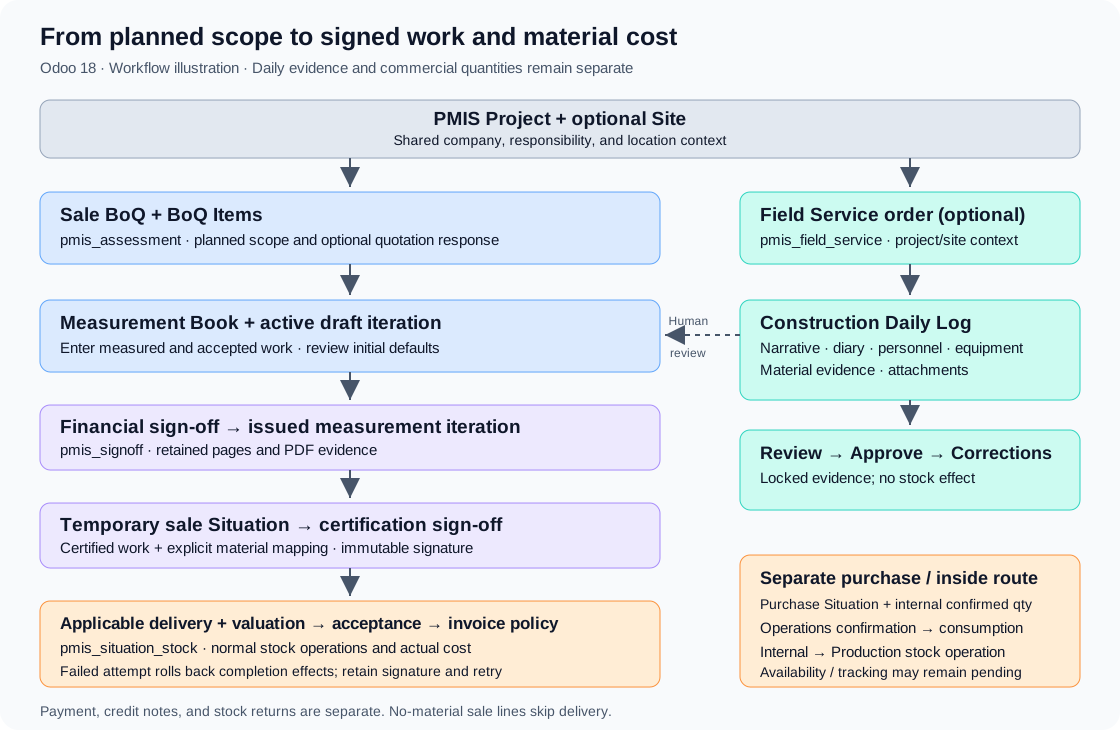
A PMIS Project, optionally divided into Sites, provides shared context. The commercial workflow plans scope, measures work, and certifies it in a Situation. Daily logs preserve the parallel operational story. Sign-off connects the reviewed document to its controlled completion actions.
| Addon | User responsibility | Integration |
|---|---|---|
pmis_assessment |
Projects, sites, Bills of Quantities, BoQ Items, commercial responses, measurements, Situations, and invoice policy | Common context and commercial/valuation documents. |
pmis_field_service |
Field Service order context, Construction Daily Logs, diary, personnel, equipment, material evidence, and corrections | Same project/site; optional reference to an existing stock picking. |
pmis_signoff |
Workflows, authorities, document cases, declarations, signatures, and evidence | Issues measurement iterations and completes temporary sale certification. |
pmis_situation_stock |
Explicit sale Situation material delivery and internal purchase consumption | Normal stock operations and valuation before applicable sale acceptance/invoicing. |
The customer flow is:
Project/site → sale BoQ → BoQ Items → Measurement Book → financial sign-off → issued iteration → temporary sale Situation → certification sign-off → applicable material delivery/valuation → acceptance → configured invoice action.
Daily-log approval does not create measurements, certify work, or move stock. A supervisor uses daily evidence when preparing and reviewing measurements; there is no automatic daily-log-to-Measurement-Book conversion.
Quotations/RFQs are commercial responses created from BoQ Items. Confirmation and ordinary order fulfillment remain separate workflows. Situation delivery uses its own explicit material mapping; an ordinary Sales delivery does not automatically fulfill that mapping.
Words and quantities
| Interface term | Meaning |
|---|---|
| PMIS Project | Common project container (pmis.project). |
| Site | Optional subdivision of one PMIS Project. |
| Bill of Quantities (BoQ) | Sale / Outside or Purchase / Inside scope; internally a CRM record of type demand. |
| BoQ Item | Planned product/service, quantity, price/cost, section, and downstream links (pmis.assessment). |
| Construction Daily Log | Dated operational narrative and supporting evidence. |
| Measurement Book | Current measured and accepted quantities against BoQ Items. |
| Iteration | Draft or issued measurement pages; issuance retains immutable line/PDF evidence. |
| Situation | Work valuation/certification document with contractual work and adjustments. |
| Sign-off case | One prepared document revision, workflow steps, and immutable evidence. |
Keep these quantities separate:
- Planned: original BoQ scope.
- Measured: work recorded in the Measurement Book.
- Accepted: measurement quantity retained in issued evidence.
- Certified: work included in Situation lines; contractual work derives from linked accepted measurements.
- Delivery Material Quantity: explicit stock quantity on a temporary sale Situation line; product and unit may differ from the certified work.
- Internal Confirmed Quantity: Operations-approved consumption quantity on a purchase Situation, independent of customer certification.
- Daily-log material quantity: informational delivery/consumption/return/waste/ storage evidence; it does not execute a transaction.
People and access
| Task | Access and assignment |
|---|---|
| Project/BoQ and sales response | Sales user; Program Estimation exposes restricted financial estimation fields/report values. Purchase responses also need Purchase permissions. |
| Record/read daily logs | PMIS Field Service User / read-only PMIS Field Service Viewer. |
| Review/approve/correct daily logs | PMIS Field Service Manager. |
| Prepare/send book sign-off | Measurement Operator, with operational responsibility resolved from document/project/site. |
| Prepare/send Situation sign-off | Situation Operator, with the corresponding operational responsibility. |
| Direct Control Officer signature | PMIS Sign-off Officer, live project/site signing authority, and user contact matching the document's Control Officer. |
| External Control Officer signature | Assigned contact with an email address and no active internal Odoo account; signs the case-created OCA invitation. A portal account is optional. |
| Represented Situation signature | PMIS Represented Sign-off Presenter, with separate project/site presenter authority. |
| Configure workflows/authorities | PMIS Sign-off Manager. |
| Retry signed sale completion | Configured Situation Completion Responsible, with PMIS Operations Manager, Stock User, and invoice permissions for the selected draft/posting policy. |
| Confirm internal consumption | PMIS Operations Manager and Stock User; acting user responsible on both project and selected site, if present. |
Companies, projects, sites, and linked documents must be consistent. Direct signers and presenters are internal company-allowed users. Represented Situation signing can record the assigned Control Officer's signature without giving that person an Odoo signing account. Alternatively, the external Control Officer can sign remotely through OCA's PDF/portal invitation; no internal signing authority or PMIS case access is granted to that contact.
Invoice-permission handoff: automatic completion first runs in the final signing actor's context for internal signatures, or the requesting internal operator's context for OCA portal signatures. With a draft/posting invoice policy, that internal actor needs the applicable Accounting access for immediate completion. A sign-off-only Control Officer can retain a valid positive signature while completion fails. The configured, properly authorized completion responsible can then retry without a new signature. This exact handoff was observed in the demo; do not grant the Control Officer broad Accounting permissions merely to hide the distinction.
Case/evidence access is scoped to effective signers, presenters, operational users, and eligible completion responsibles. Manager membership, company membership, or following chatter does not alone grant case access. Daily logs instead use company rules and Field Service groups; within an allowed company, they are not restricted to project members.
The Bills of Quantities → Operations → Field Operations menu also requires Sales user access through its parent menu. Accessible FSM orders provide a Daily Logs smart button.
Prepare the configuration
Addons
Have an administrator install the four addons and their declared dependencies in the intended environment. All four were installed in the isolated synthetic demo for this edition; no existing business database was modified.
| Addon | Declared dependencies |
|---|---|
pmis_assessment |
sale_crm, account, purchase, product |
pmis_field_service |
pmis_assessment, OCA fieldservice, stock |
pmis_signoff |
pmis_assessment, OCA sign_oca |
pmis_situation_stock |
pmis_signoff, stock_account |
Assessment alone does not install sign-off. Situation Stock brings sign-off through its dependency; Field Service remains a separate branch.
Workflows and signing authority
- Open Bills of Quantities → Configuration → Sign-off Configuration → Sign-off Workflows.
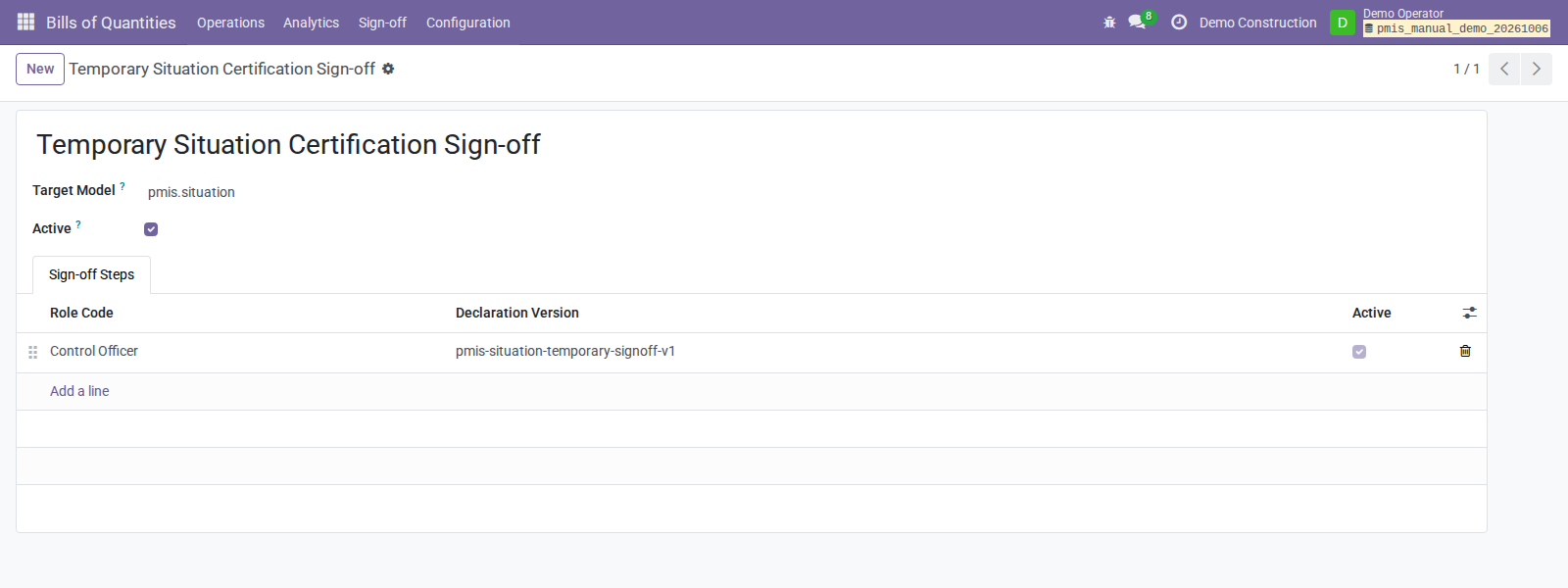
- Check the company-specific Measurement Book Financial Sign-off for target
pmis.measurement.book. - Check Temporary Situation Certification Sign-off for target
pmis.situationand target keysituation_sale_temporary. - Configure active ordered steps, role, declaration, and declaration version. Supplied workflows target the main company and each have one Control Officer step. Configure other companies explicitly.
- Open Sign-off Authorities. Assign active workflow-signing authority to the internal Control Officer for the project, optional site, and role.
- For represented Situation signing, assign purpose
represented_presenterto the internal presenter, without a role. - Set Responsible and Control Officer on the documents.
- For OCA PDF/portal signing, assign an external Control Officer contact with a
valid email address. Keep OCA Sign and its dependencies in the addon paths;
have an administrator upgrade
pmis_signoffbefore using this option. Internal Control Officers continue to use the authority workflow above.
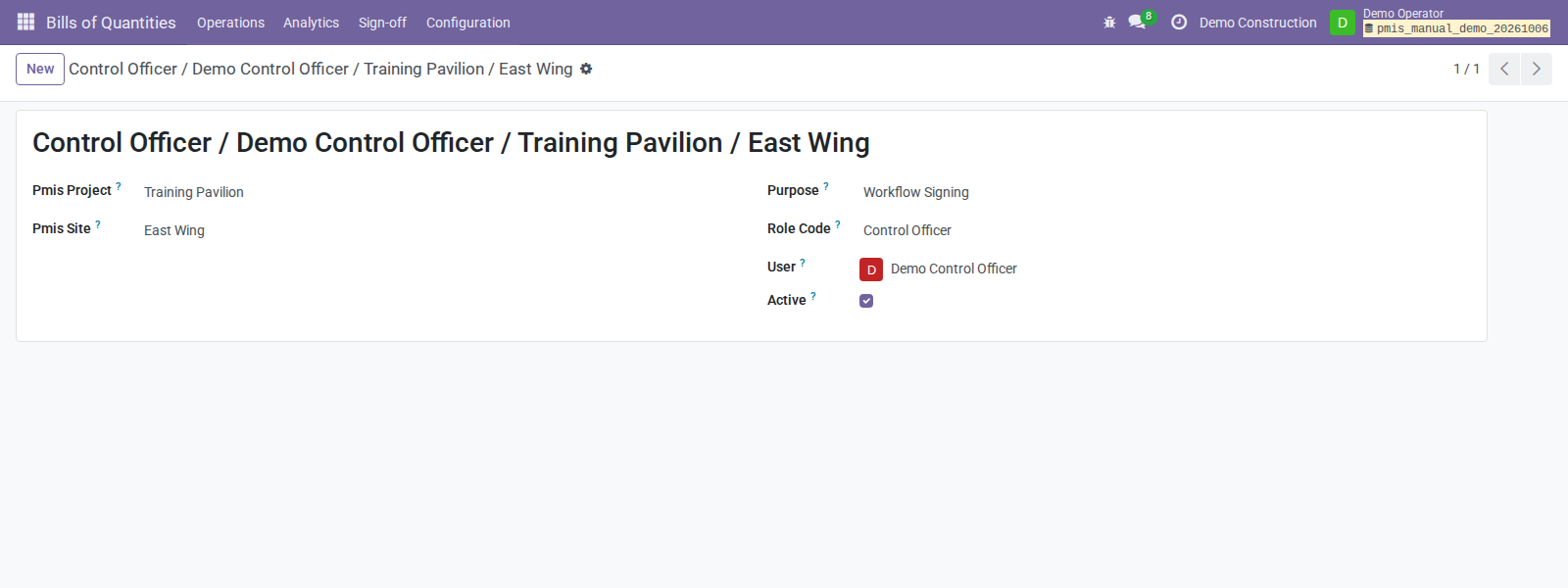
Eligible exact-site authority takes precedence for the same purpose/role; eligible project authority is the fallback. Groups alone do not establish authority.
Material routes
Open the project's Material Consumption tab. Each populated site value overrides its matching project default; blank values use project defaults.
| Setting | Internal purchase consumption | Temporary sale delivery |
|---|---|---|
| Source | Company-owned Internal location | Company-owned Internal location |
| Destination | Company-owned Production location | Company-owned Customer location |
| Operation type | Company-owned consumption operation type | Company-owned outgoing operation type |
| Responsible | Project/site responsible user | Situation Completion Responsible |
Shared destinations without a company do not satisfy these explicit route checks.
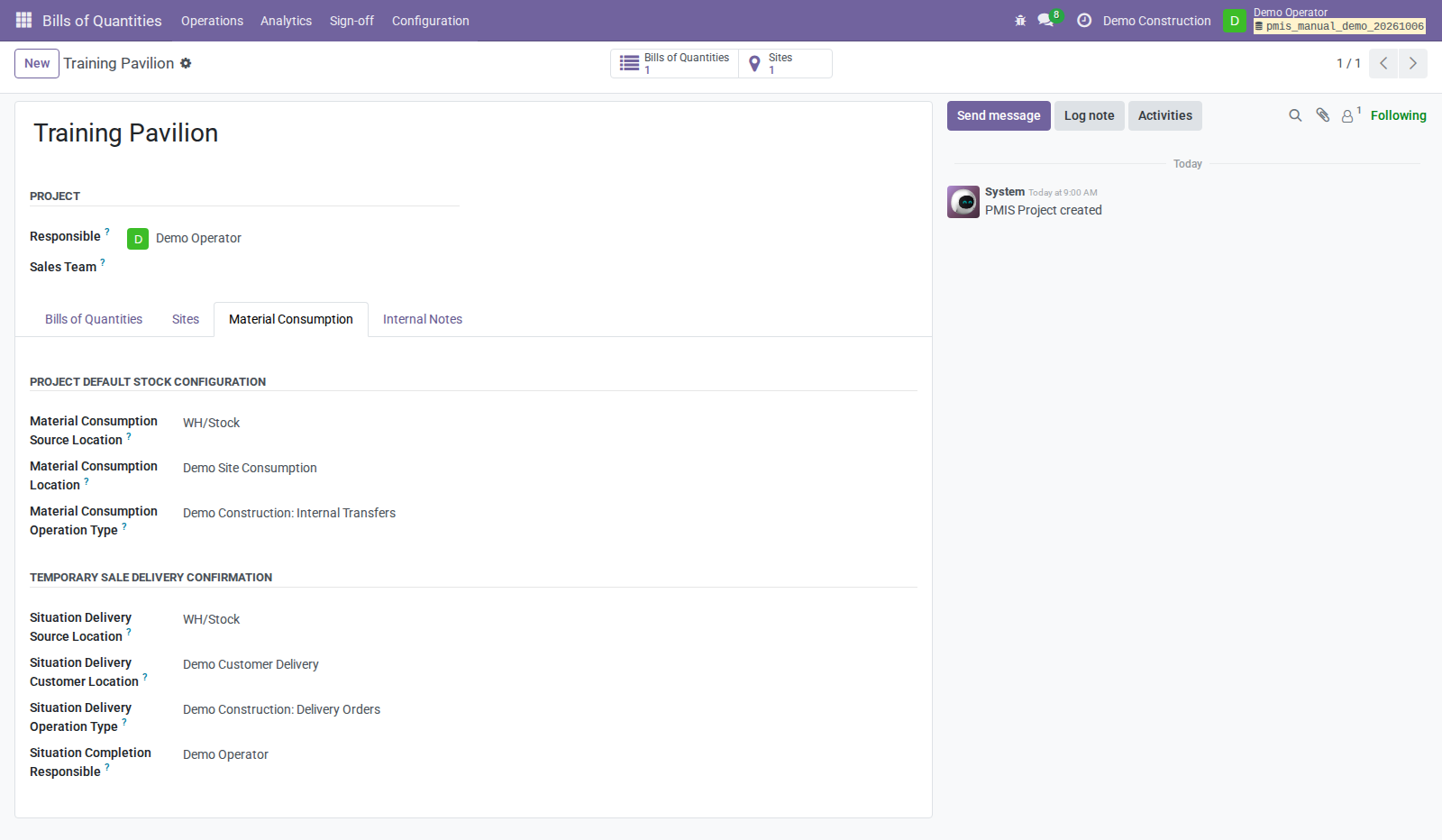
Delivery material must be storable/stock-tracked, with compatible unit and positive quantity. Ensure availability at the source; tracked products need normal lot/serial reservation allocation. Automated valuation needs stock valuation/output accounts and a stock journal. The addon verifies normal Odoo valuation/accounting.
Invoice policy
Open Settings → PMIS Bills of Quantities → Temporary Situations → Invoice policy for the active company.
| Policy | After successful certification and applicable stock completion |
|---|---|
| Certification only | No automatic invoice; the default. |
| Prepare draft invoice | Create or rebuild the reusable linked draft. |
| Prepare and post invoice | Prepare/post with the completion responsible's accounting permissions. |
A posted linked invoice is reused. Payment is separate. For the tutorial, Prepare draft invoice gives a visible accounting handoff without automatic posting.
Worked example
The authorized demo uses the following synthetic records. Monetary screenshots use USD, with the same company/document currency, no product taxes, standard material cost, and automated inventory valuation. This is a training accounting configuration, not a jurisdiction-specific tax or statutory-accounting example.
| Record/quantity | Example |
|---|---|
| Company | Demo Construction |
| Project / Site | Training Pavilion / East Wing |
| Customer / sale BoQ | Demo Customer / East Wing installation scope |
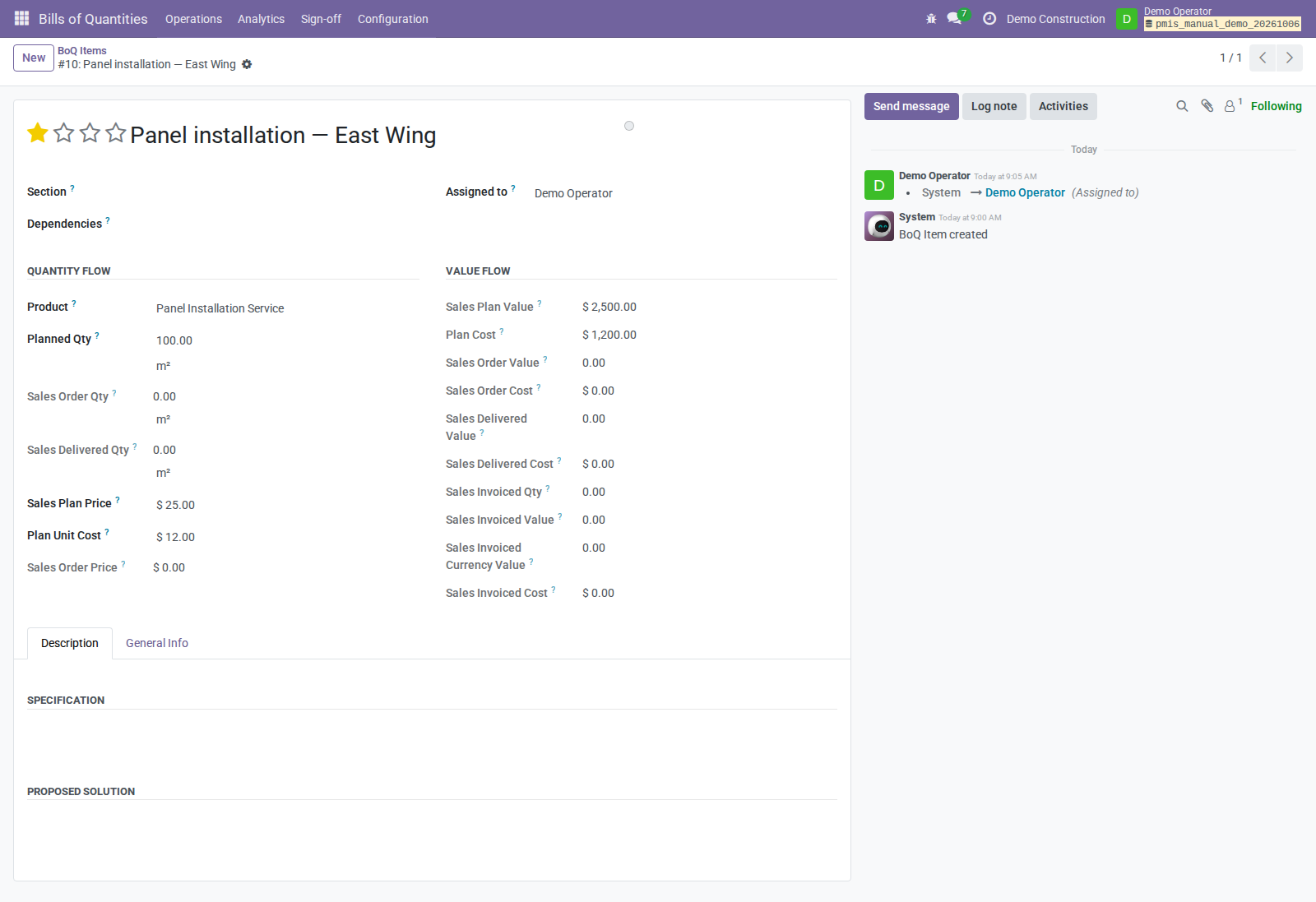
| BoQ Item | Panel installation service: 100 m² at 25 currency units/m² |
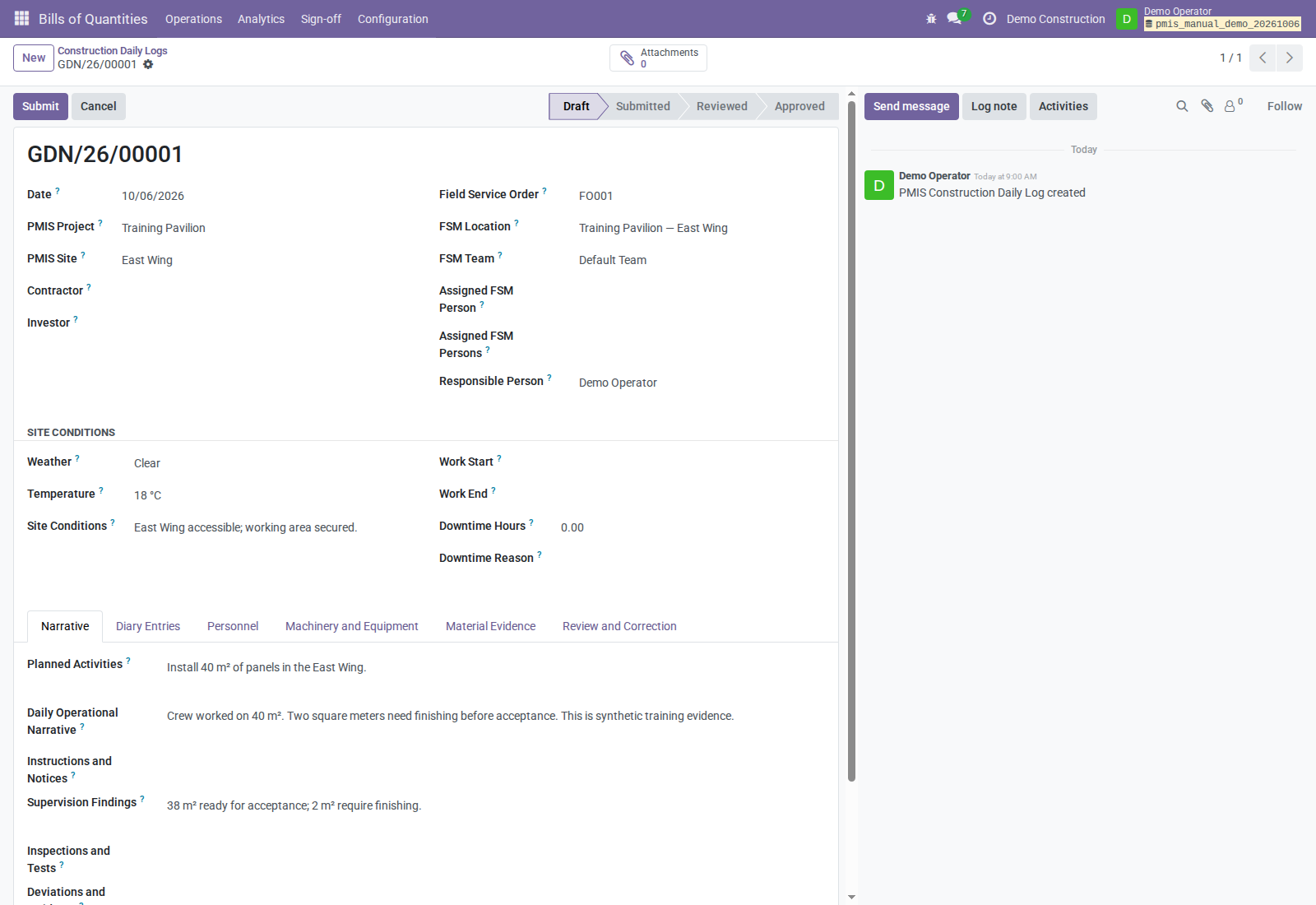
| Daily narrative | Crew worked on 40 m²; 2 m² need finishing before acceptance. |
| Measurement | Current measured 40 m²; current accepted 38 m² |
| First Situation | Current certified 38 m²; current value 950 before taxes/adjustments |
| Explicit material mapping | 2 units of Demo Mounting Plate |
| Observed stock cost | USD 7 per plate; delivery cost USD 14 |
| Remaining work | 62 m², valued at 1,550 at unchanged planned price |
The 38 m² of service, 2 stock units, and stock cost 14 are different measures. Cost comes from Done stock valuation layers, not service selling price. Taxes, variations, and retention are omitted in this example.
Verified demo
Captures were taken on October 6, 2026, from Odoo 18 Community using the current four-addon checkout. Demo Operator combines estimation, measurement, Situation, daily-log management, Stock, and Accounting permissions for this training exercise. Demo Control Officer is a separate authenticated signer with site-specific authority, without Accounting access. Separate users should be configured according to real responsibilities outside the demo.
| Check actually performed | Observed result |
|---|---|
| Daily log Submit → Review → Approve | Approved evidence; stock move count unchanged. |
| Measurement sign-off | Book accepted; iteration issued; real PDF snapshots retained. |
| Generate Situation lines | Issued measurement supplied 38 m² at 25, totaling USD 950. |
| First positive Situation signature | Signature stored; completion failed because the signing actor lacked invoice-create access; no delivery picking or invoice remained. |
| Responsible user's completion retry | Same revision, signature count, content hash, and snapshot hash; case accepted and completion completed. |
| Customer delivery | Done picking for 2 plates; valuation quantity −2 and value USD −14; posted stock entry. |
| Invoice policy | Draft invoice, 38 × 25 = USD 950; tax zero; not posted or paid. |
| Approved-log correction | Revision 2 approved; original remained approved and linked to its superseding correction. |
| Separate internal consumption | 3 plates consumed; cost USD 21; Done internal picking; no linked invoice/bill. |
Record setup and preparatory transitions used the Odoo ORM and authenticated JSON-RPC; sign-off confirmation and sale retry were also exercised through the actual UI. Screenshots are browser captures of persisted records. This is scoped runtime evidence, not an automated test-suite pass or proof of every edge case. The screenshot evidence manifest records assets and observed outcomes without credentials or customer data.
The October 11 OCA screenshots use a separate disposable database with synthetic Training Pavilion — External Signature, Demo Operator, and Demo External Control Officer records. The company uses Certification Only invoice policy; this is a signature-workflow demonstration, not the earlier monetary valuation example. The report is rendered by Odoo, and invitation creation, anonymous portal signing, and PMIS acceptance were exercised through the actual browser UI. No material delivery or invoicing is demonstrated by this addendum. Cron was disabled, and email delivery was not tested. See the OCA screenshot evidence.
1. Define project scope
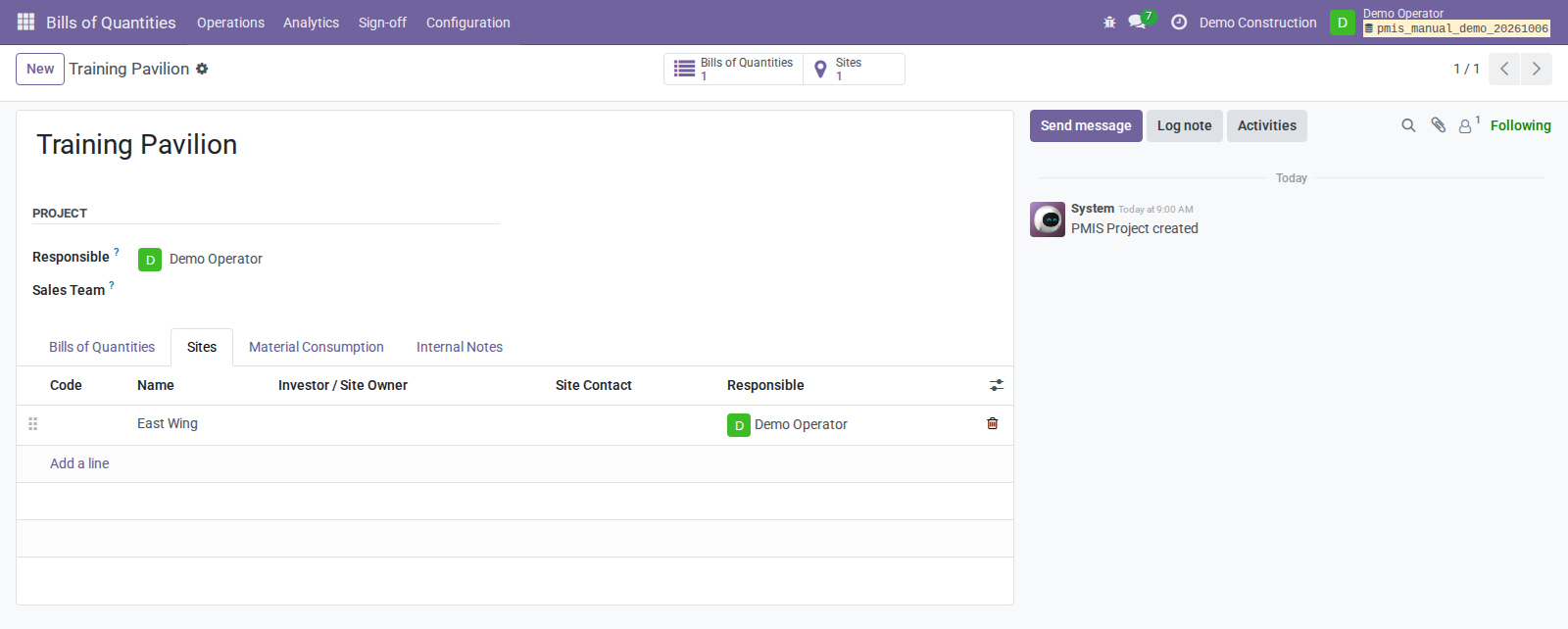
- Open Bills of Quantities → Operations → Projects. Create Training Pavilion with company and responsible user. Remove the default current-user project filter if another responsible person's project is missing.
- Create East Wing under the project or Analytics → Sites. Set responsibility and applicable stock overrides.
- Use the project's Bills of Quantities smart button. Create a same-company BoQ, select Sale / Outside, and set the customer.
- Add the service BoQ Item, section, description, unit, planned quantity 100, and unit price 25.
- If needed, use the sale creation wizard to select items/sections and create a draft quotation. Confirm through normal Sales.
Alternatively, use Convert to Bill of Quantities on a CRM Opportunity; a Lead must first become an Opportunity. Existing sale orders can use Create Bill of Quantities, with project assignment, when they share company/commercial customer and are not already linked to a BoQ.
Compatible item dependencies can consolidate into one commercial response line. The wizard checks demand, company, section, product, unit, and common sale price or purchase cost. Use standard quantity/unit-price mode for this example.
Checkpoint: planned scope exists; creating it does not create accepted work, Situation stock delivery, or a Situation invoice.
2. Record daily activity
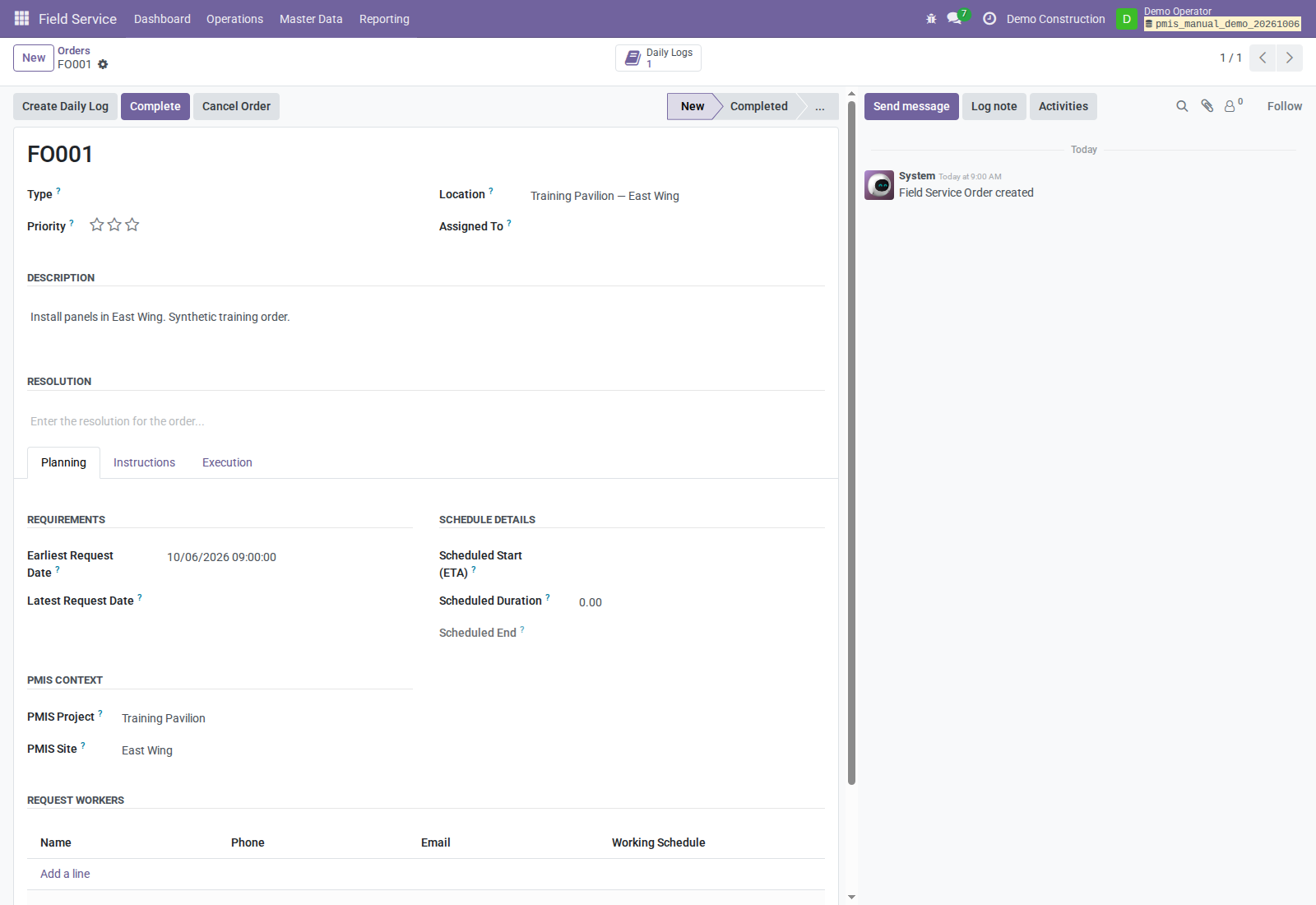
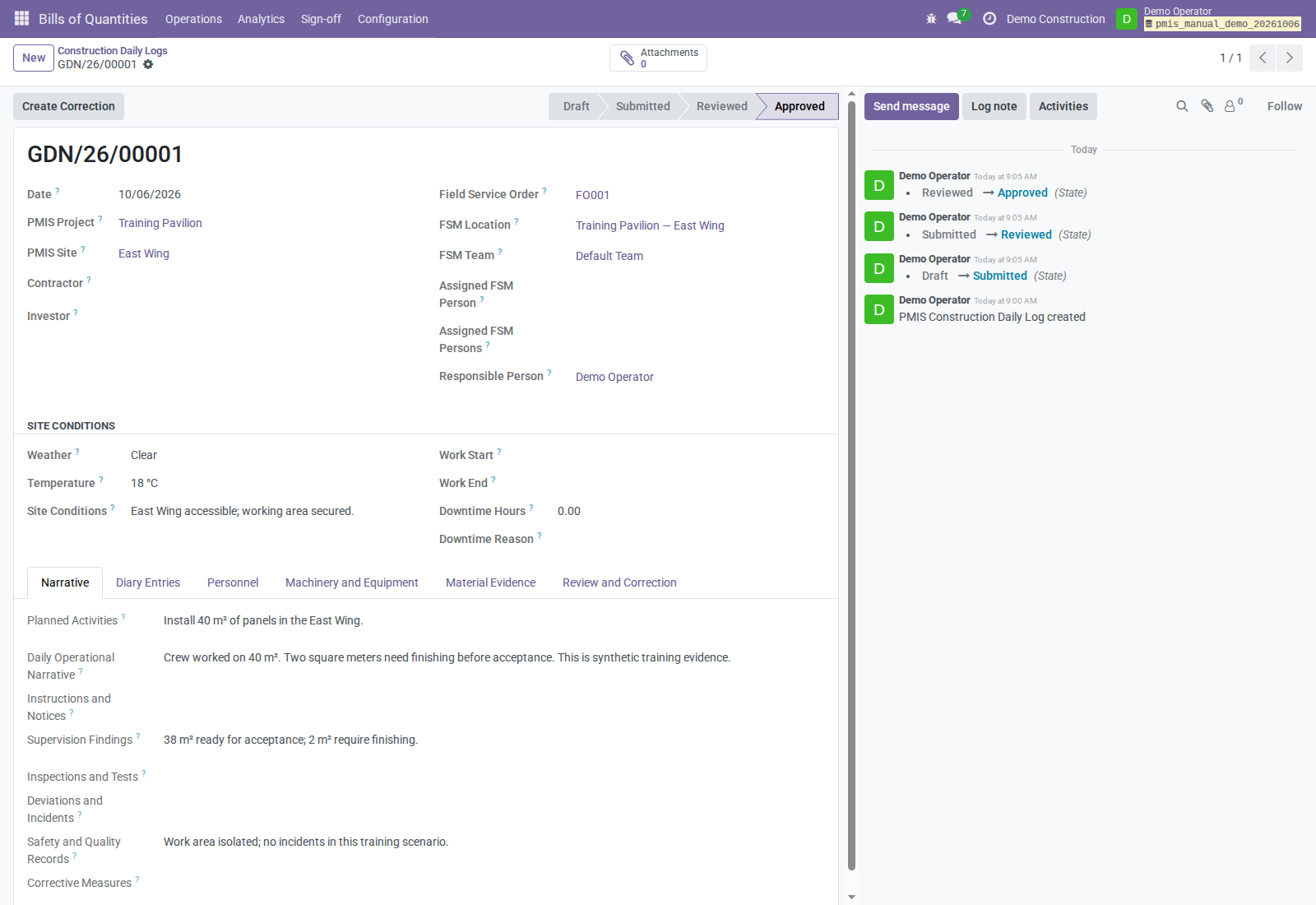
- Open an FSM order, set PMIS Project and optional PMIS Site, then use Create Daily Log. It reuses the newest visible same-day draft for that order/company, or creates one with context prefilled.
- Review date, company, project/site, responsibility, and conditions.
- Record the narrative and diary, including the 40 m² worked and unfinished 2 m².
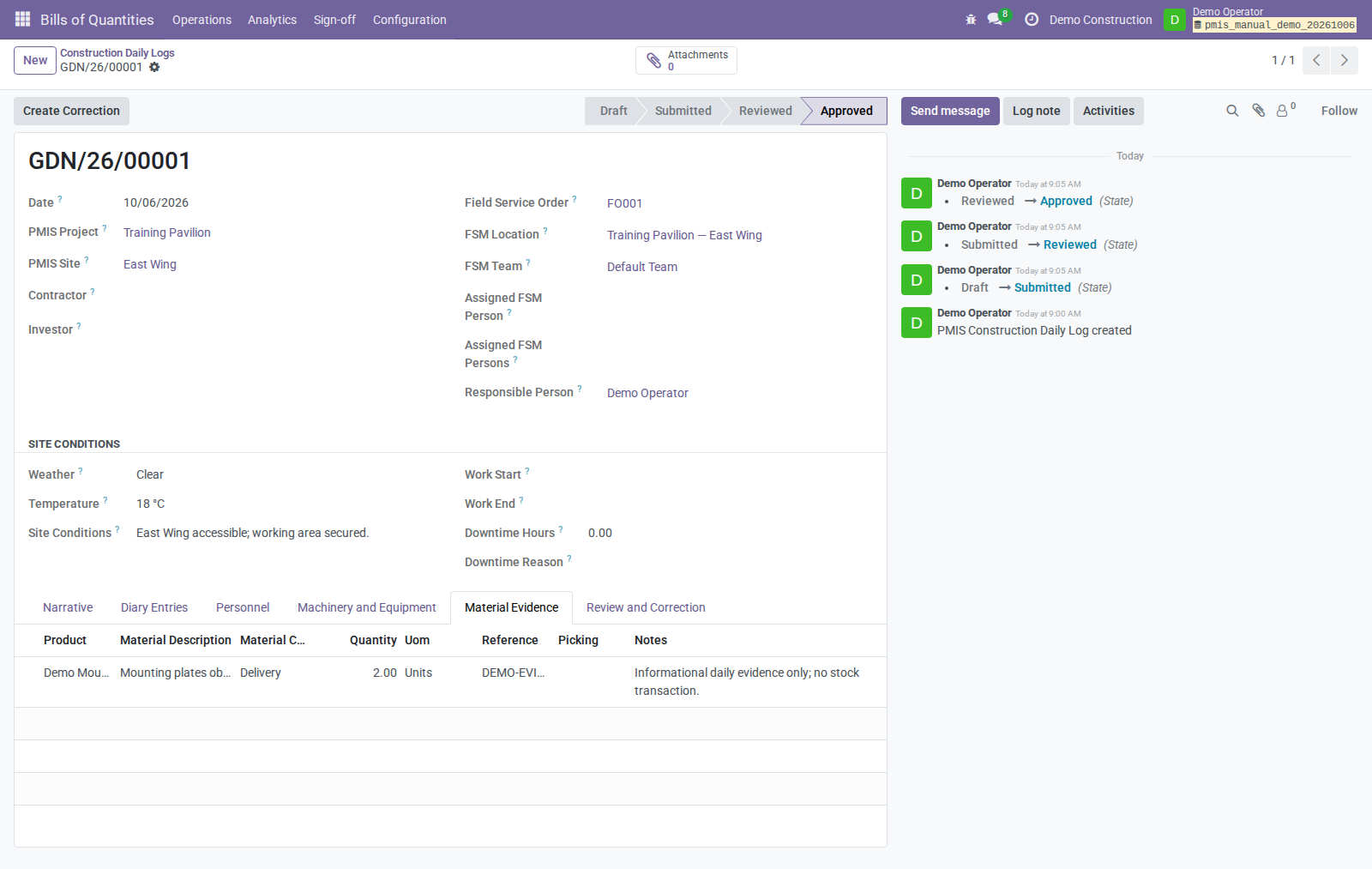
- Add personnel, equipment, material evidence, and attachments as needed. An optional picking link references an existing stock document as evidence only.
- Use Submit; a narrative or at least one diary entry is required.
- As a PMIS Field Service Manager, use Review, then Approve.
A standalone log is available at Bills of Quantities → Operations → Field Operations → Construction Daily Logs. Project is required; site/FSM order are optional. Same-day draft reuse is not a uniqueness constraint.
Checkpoint: approval locks business content, child evidence, and attachments. It has not created measured/certified quantities, stock moves, or invoices.
3. Measure and issue work
- Open Bills of Quantities → Analytics → Measurements → Measurement Books.
- Create a book for the BoQ, project/site, period, responsible operator, and Control Officer.
- Review the active draft iteration. Initial measured/accepted quantities default to remaining planned scope, not actual daily work. Replace them with measured 40 and accepted 38. Changing measured quantity in the form defaults accepted quantity to the same value; set the final accepted value afterward.
- Enter basis, calculation, drawing reference, and notes. Update Lines from Bill of Quantities adds missing items without overwriting existing draft quantities.
- Use Submit, then Financial Sign-off as a responsible Measurement Operator.
- On the case, use Prepare for Sign-off, then Send for Sign-off.
- The authorized Control Officer opens Bills of Quantities → Sign-off → Pending Sign-offs, reviews evidence, uses Record Sign-off, and confirms a positive outcome.
If the assigned Control Officer has no active internal account, use the OCA PDF/portal option instead of step 7. The requesting internal operator needs PMIS Valuation Manager permissions for Measurement Book issuance; the external signature grants none.
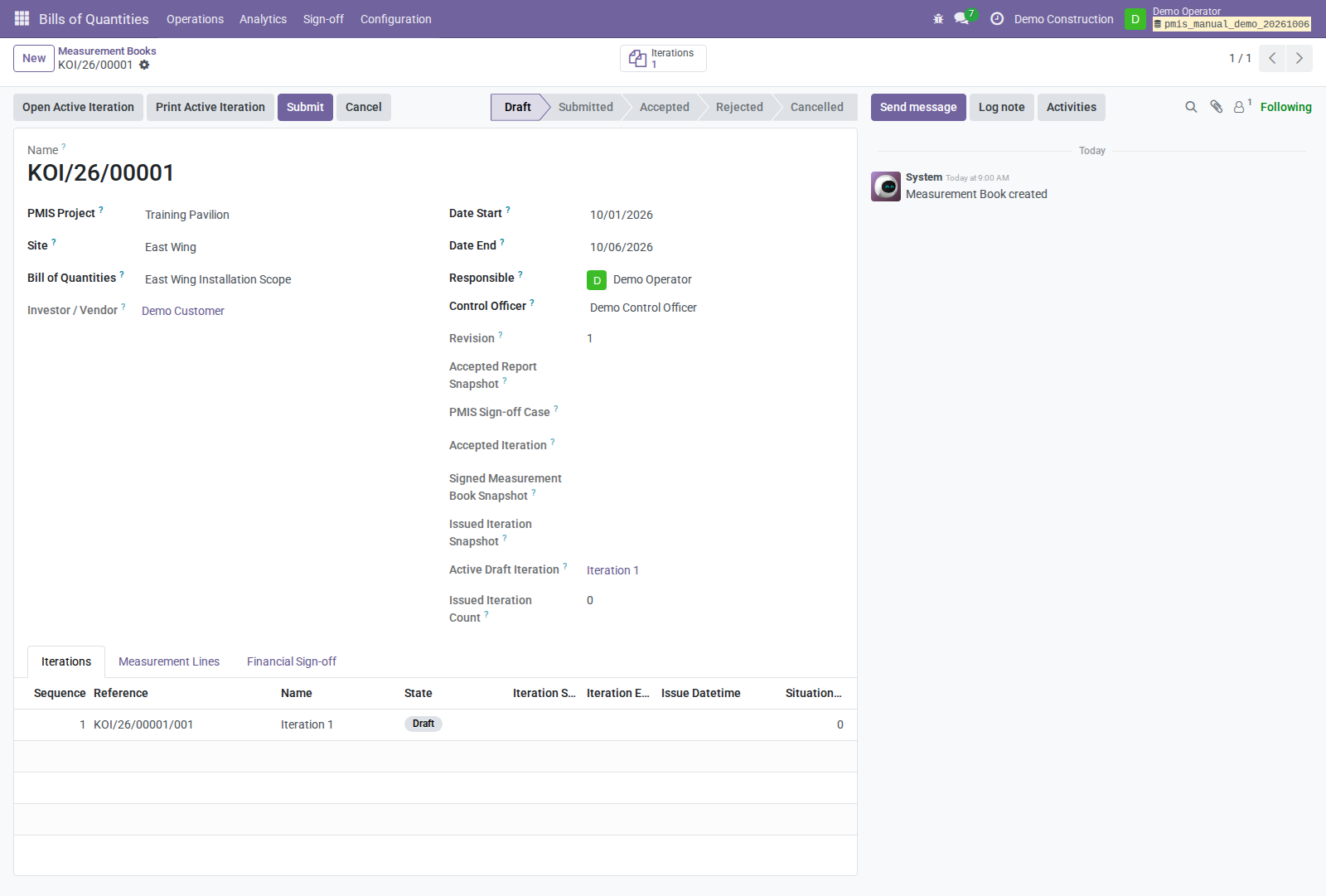
Use Open Active Iteration or the Measurement Lines tab to enter quantities; the initial book overview opens on Iterations, not on the quantity editor.
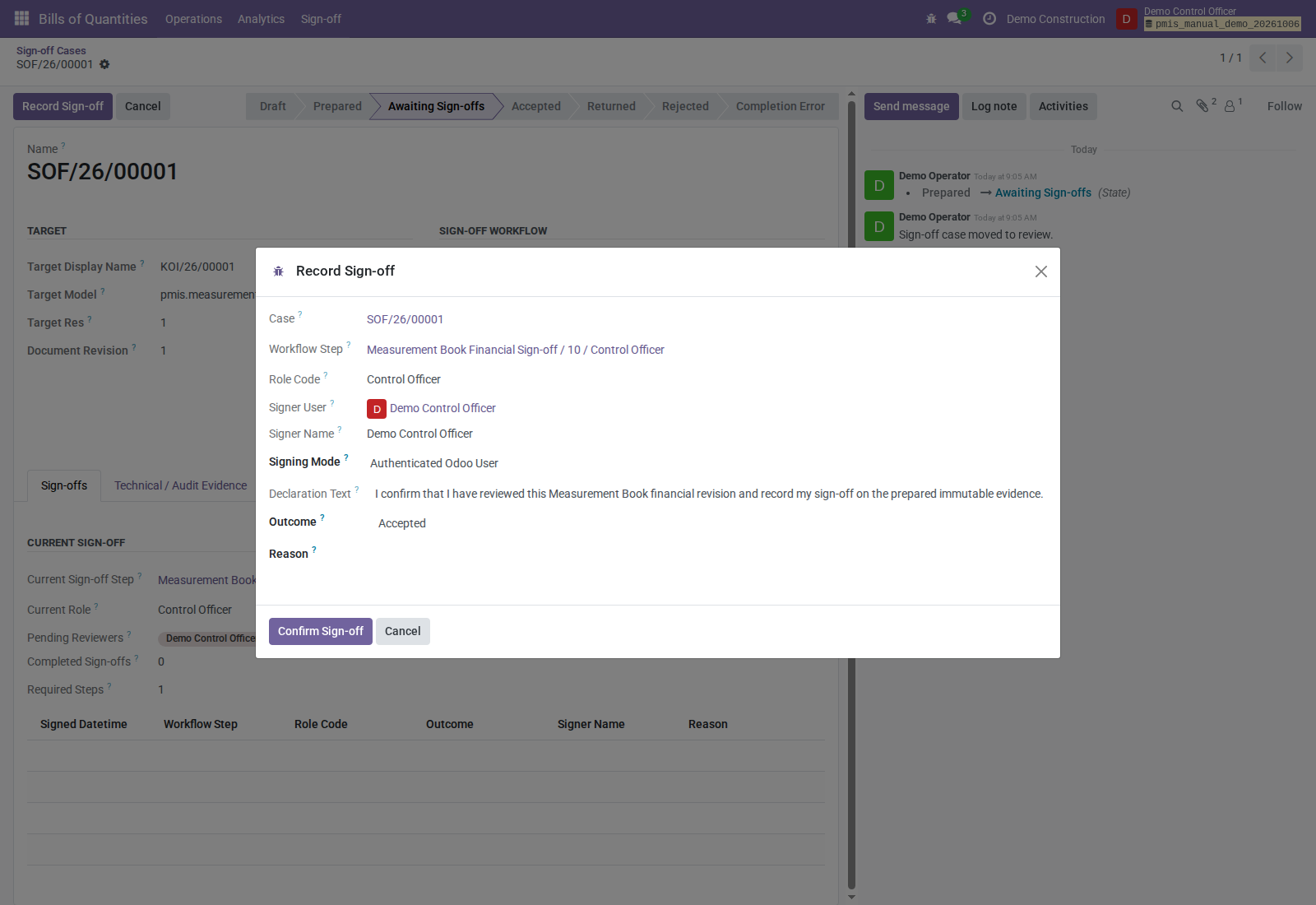
Checkpoint: completion accepts the book, issues the iteration, retains line/PDF snapshots, and creates the next empty draft iteration. Issued pages are eligible for Situation certification. Direct issuance is blocked; completion must use sign-off.
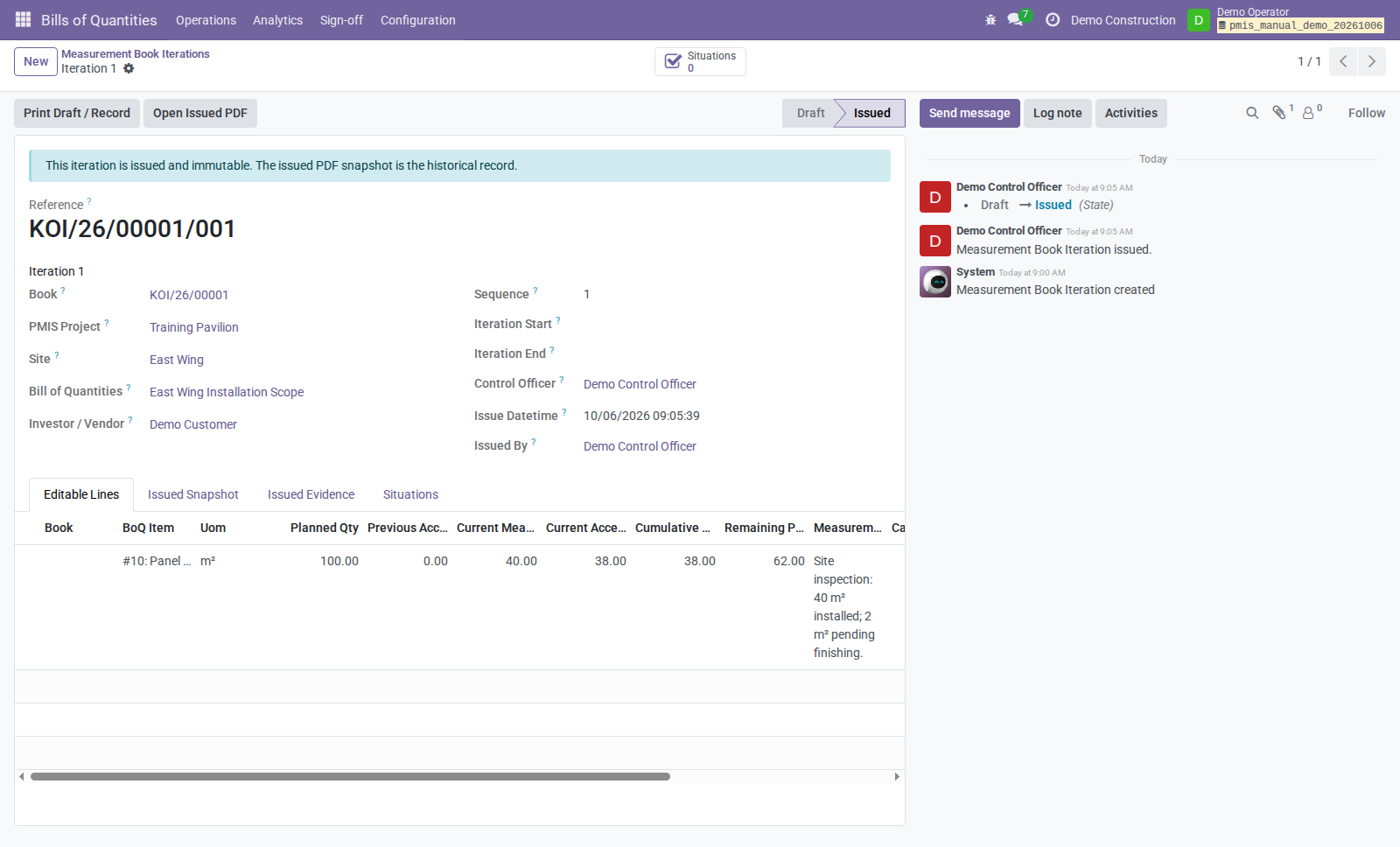
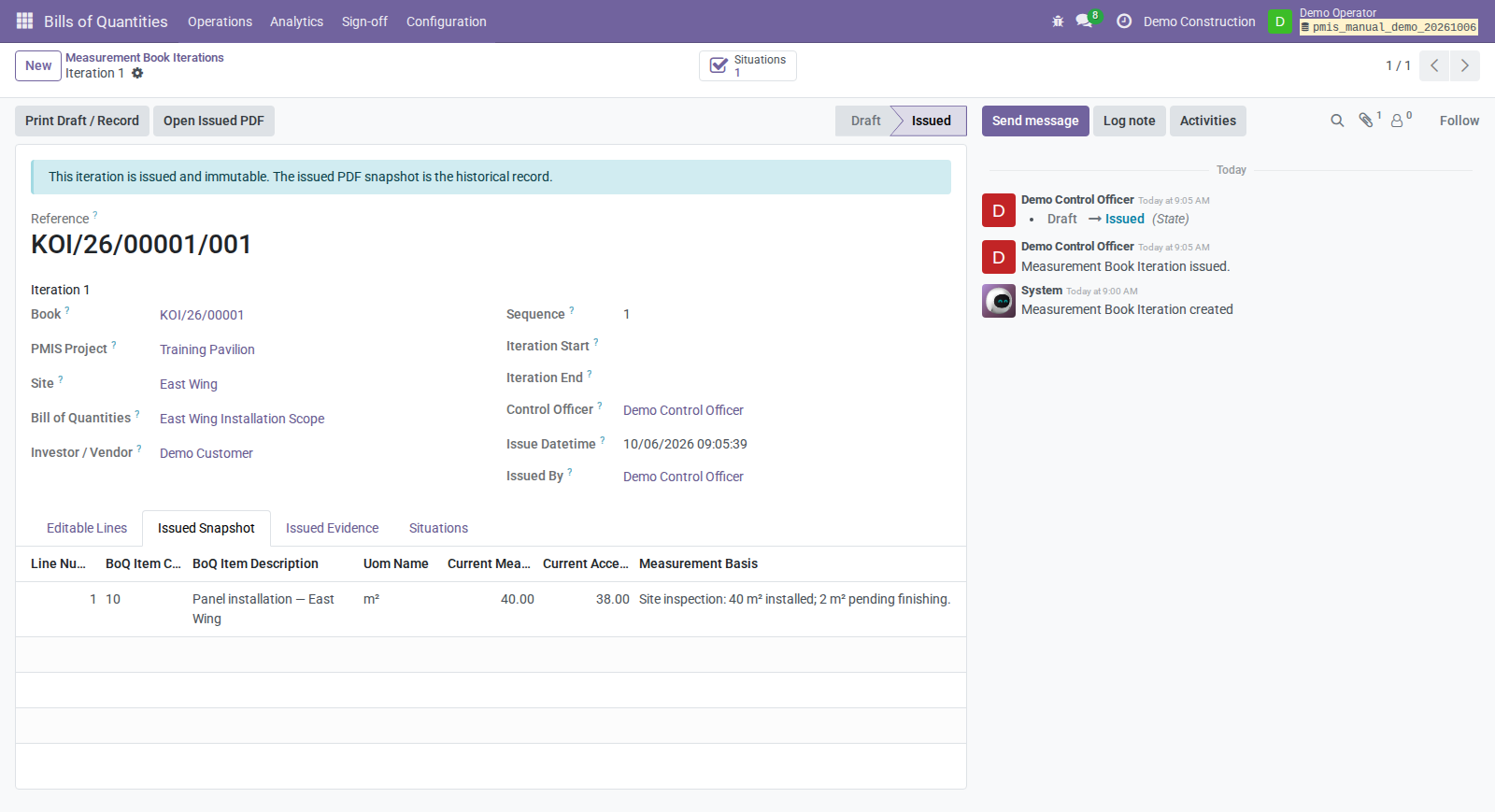
An overrun needs a qualifying accepted variation. The next draft's existence does not itself establish a repeat-period editing/submission workflow for an accepted book; that interaction needs demo verification. Use a new Measurement Book for the next period in this guide.
4. Prepare a temporary sale Situation
- Open Bills of Quantities → Analytics → Valuation → Situations.
- Create a Temporary Situation for the same sale BoQ/company/project/site. Set period, issue date, Responsible, and Control Officer.
- Use Generate Lines to link eligible issued measurements and their iterations.
- Verify current certified quantity 38, price 25, and value 950. Contractual work quantities derive from linked accepted measurements.
- Classify every included work line and accepted variation line: - Material delivery applies: select Delivery Material, compatible Delivery Material Unit, and positive Delivery Material Quantity. Enter 2 Demo Mounting Plates for the example. - No material applies: clear delivery product/unit/quantity. Enter a useful No Material Reason; the code does not currently require the reason.
- Resolve draft variations before submission; only accepted variations feed invoice lines. This guide does not define a variation acceptance route.
- Use Submit, then Certification Sign-off as a responsible Situation Operator.
- On the case, use Prepare for Sign-off, then Send for Sign-off.
Checkpoint: the immutable canonical manifest includes explicit material classification and mapping. The retained PDF shows certification values, but the current report does not print the material mapping. Review the Situation Lines and Technical / Audit Evidence → Canonical Manifest as well as the PDF. Unclassified included lines block preparation. Submission alone moves no stock and posts no accounting entries.
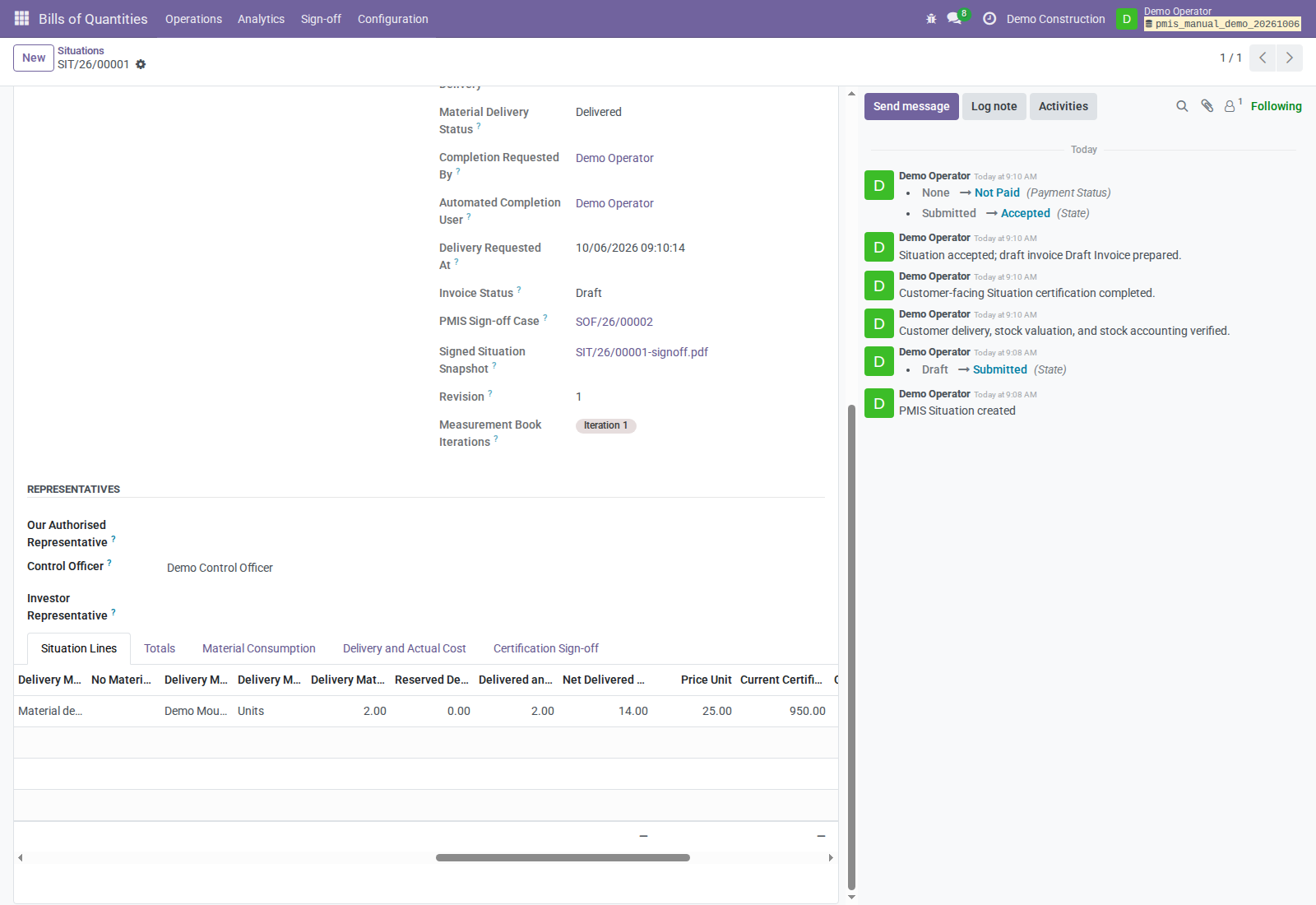
The Situation Lines table is wider than the form. Scroll it horizontally to see the material classification/product/unit/quantity fields, then review Totals. The material screenshot shows the completed record: delivered quantity 2 and net material cost 14 are results, not values to type during preparation.
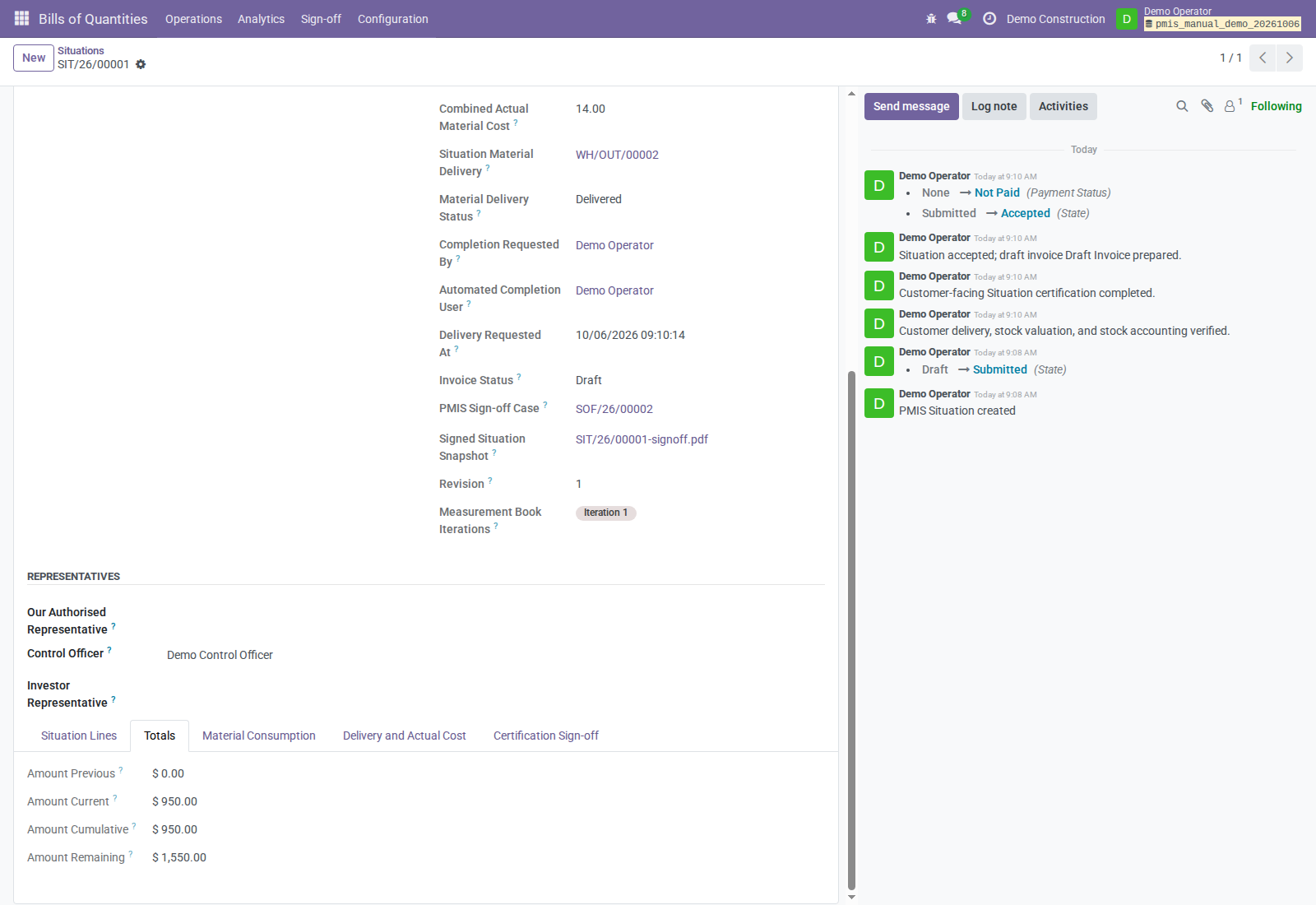
A measurement line cannot appear in multiple non-cancelled Situations. Generate Lines filters by BoQ/company and by site when specified; it does not filter by Situation period dates. Review the actual measurement selection for the period.
5. Sign and complete the Situation
Direct signature
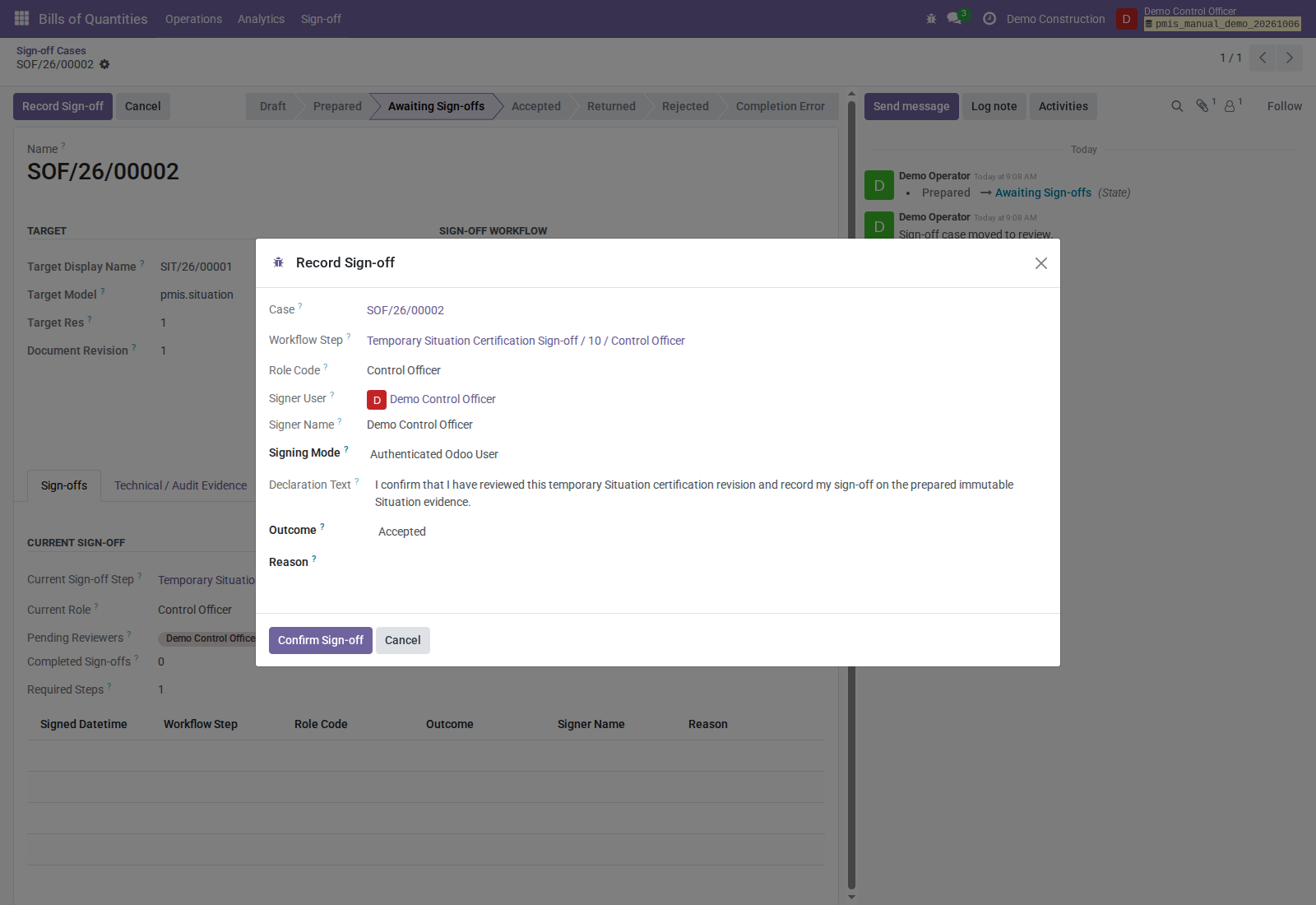
The authorized internal Control Officer opens the pending case, reviews the Situation and declaration, uses Record Sign-off, selects an outcome, and uses Confirm Sign-off.
Accepted and Accepted with Reservations are positive. Reservations, returns, and rejections require a reason. Active steps execute sequentially; all must have positive outcomes for completion. Reservations do not pause stock delivery: the final positive step attempts completion.
Represented Situation signature
An authorized internal presenter chooses In-person Device Signature or Uploaded Paper Signature, captures the signature or uploads the primary signed paper in the current wizard, and supplies actor attestation. Supporting evidence is optional. Unknown original paper-signature datetime/timezone remain empty; a supplied datetime needs a valid timezone and cannot be in the future.
The record distinguishes signer from authenticated presenter. The supplied Measurement Book adapter uses authenticated signing, not this represented route.
External Control Officer: OCA PDF/portal signature
This option applies to both Measurement Book financial sign-off and temporary sale Situation certification. Use it when the assigned Control Officer is an active contact with no active internal Odoo user. A portal user still qualifies; the email invitation also works for a contact without any Odoo account.
- Assign the external contact and its email address on the source document.
- As the responsible internal operator, prepare the case and use Send for Sign-off. Complete any preceding workflow steps first.
- At the pending Control Officer step, click Send Control Officer Signature. This creates a bound OCA request for the assigned contact. Clicking again opens that invitation without sending another one.
- The Control Officer opens the invitation link, reviews the prepared PDF and appended declaration, selects the declaration acceptance checkbox, and captures a signature in OCA's portal. Complete OCA's signing confirmation.
- Review the PMIS case afterward: a completed OCA signature records an Accepted Control Officer sign-off with mode OCA PDF / Portal Signature. The signed PDF is retained separately; the original prepared snapshot does not change. Review signature status and completion status separately.
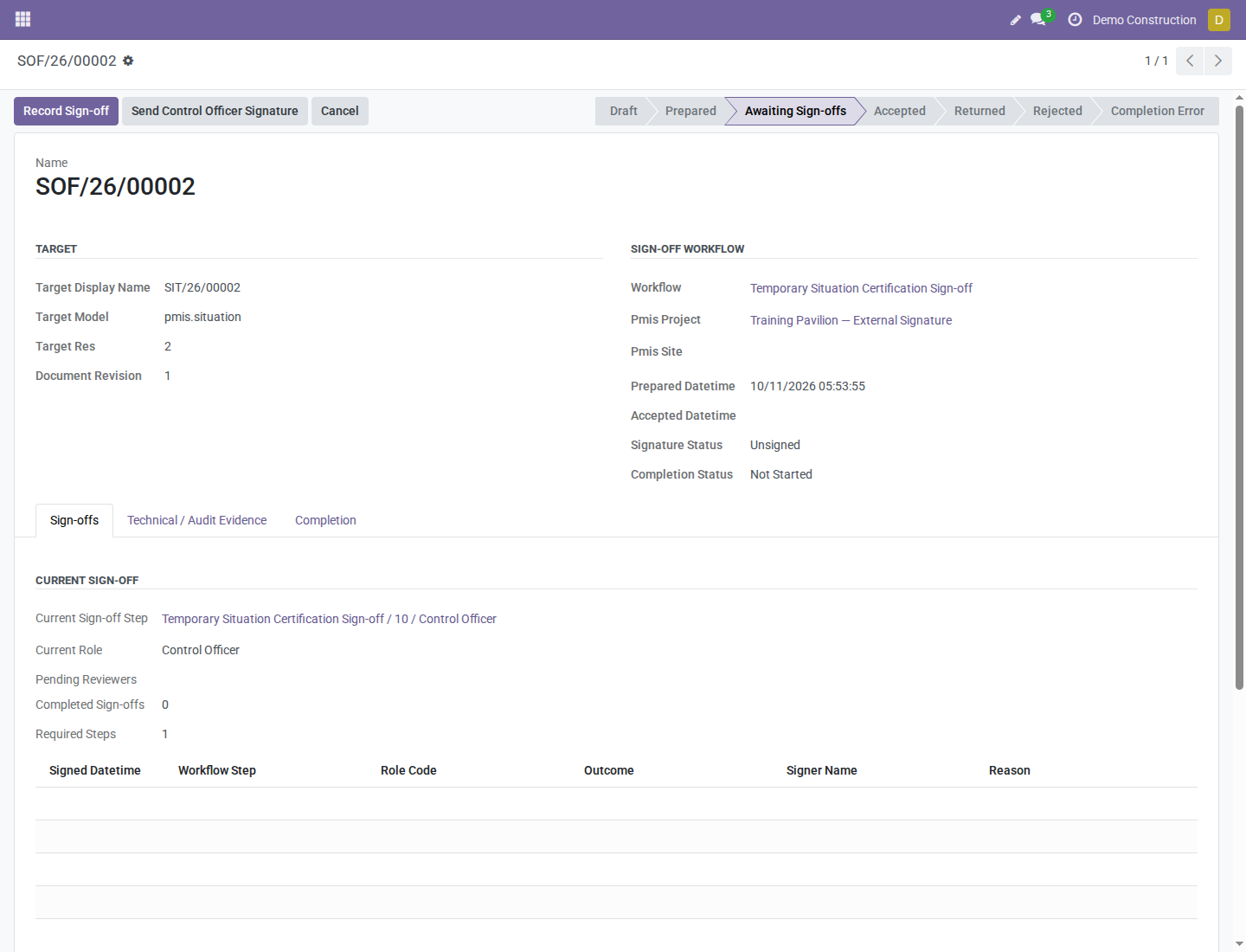
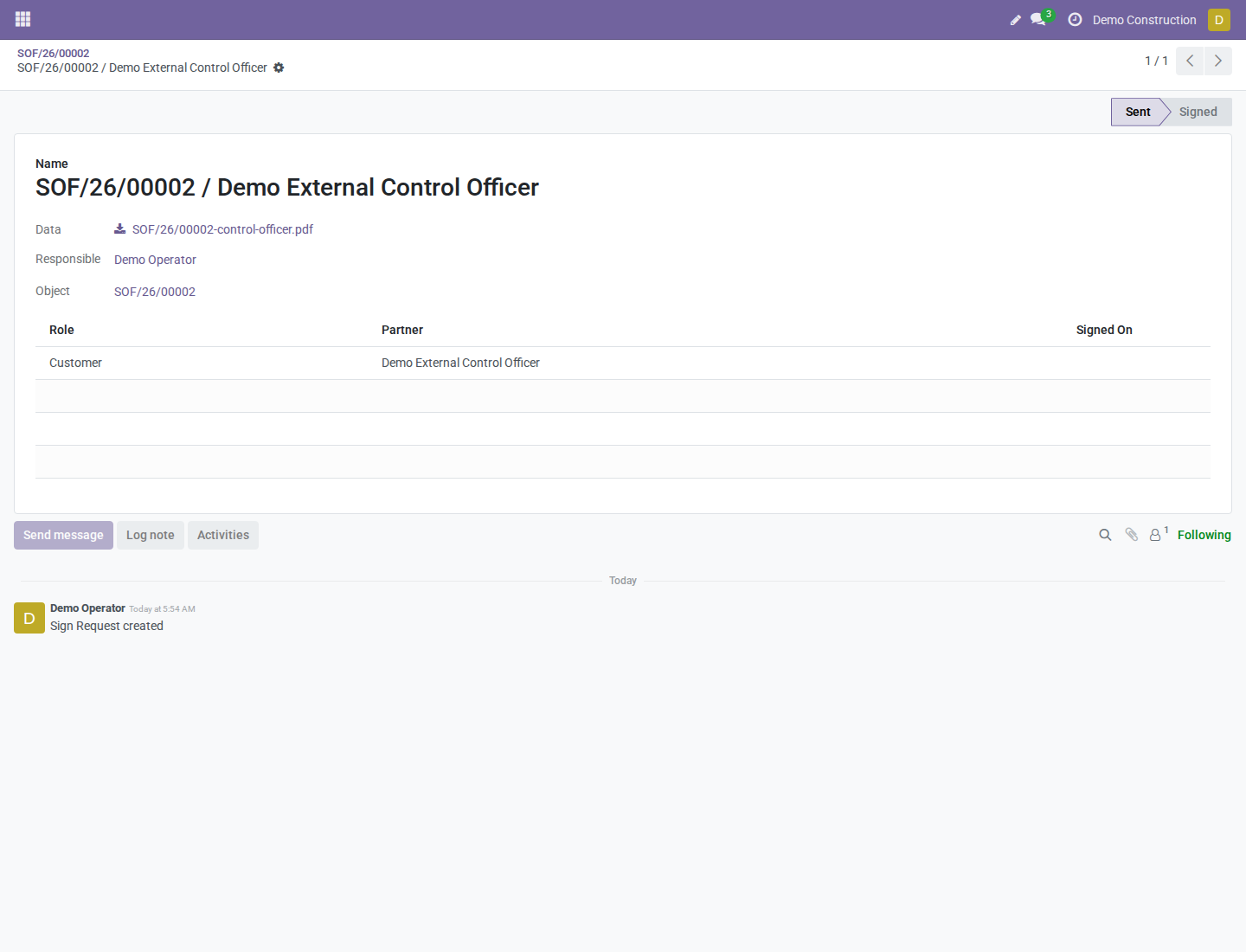
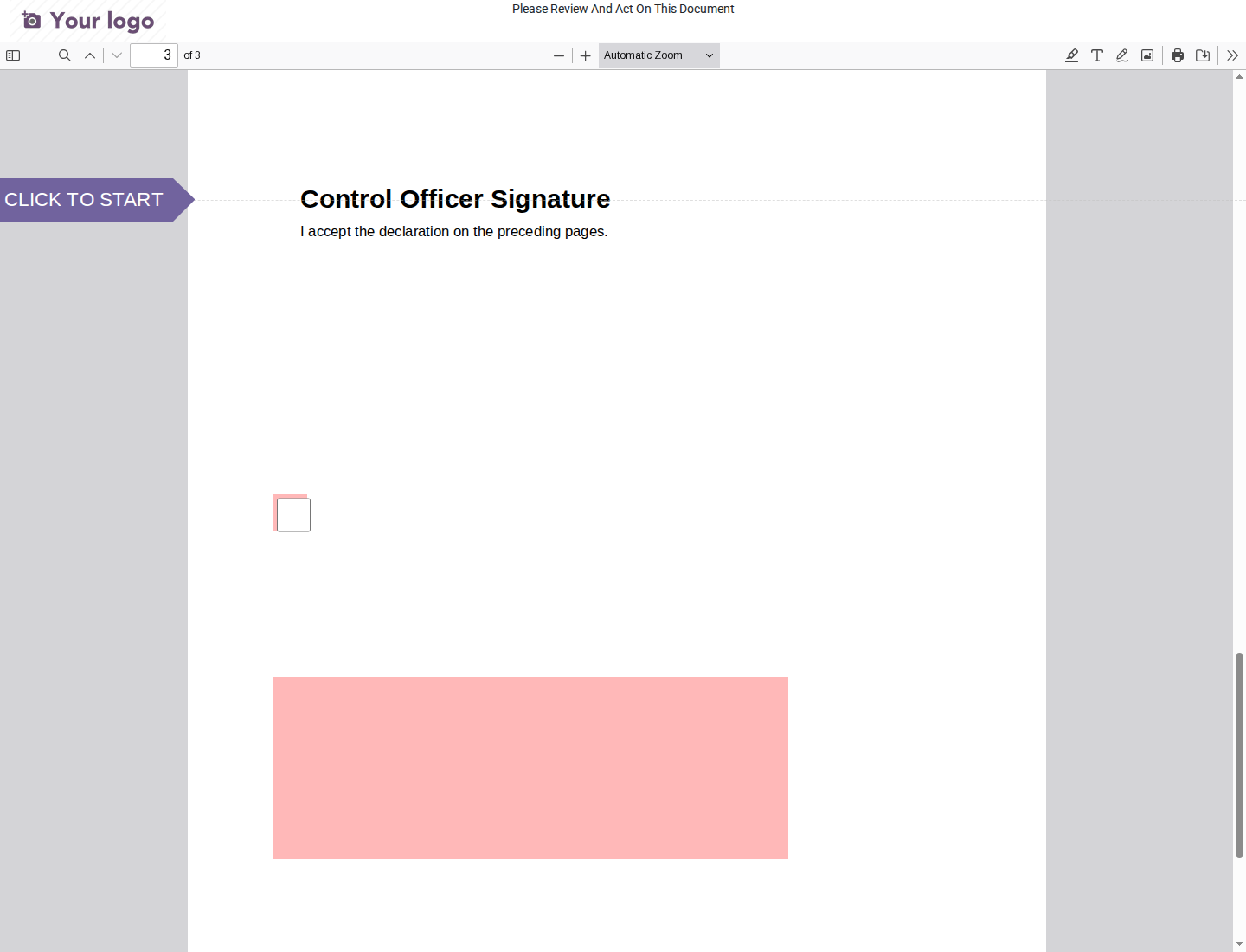
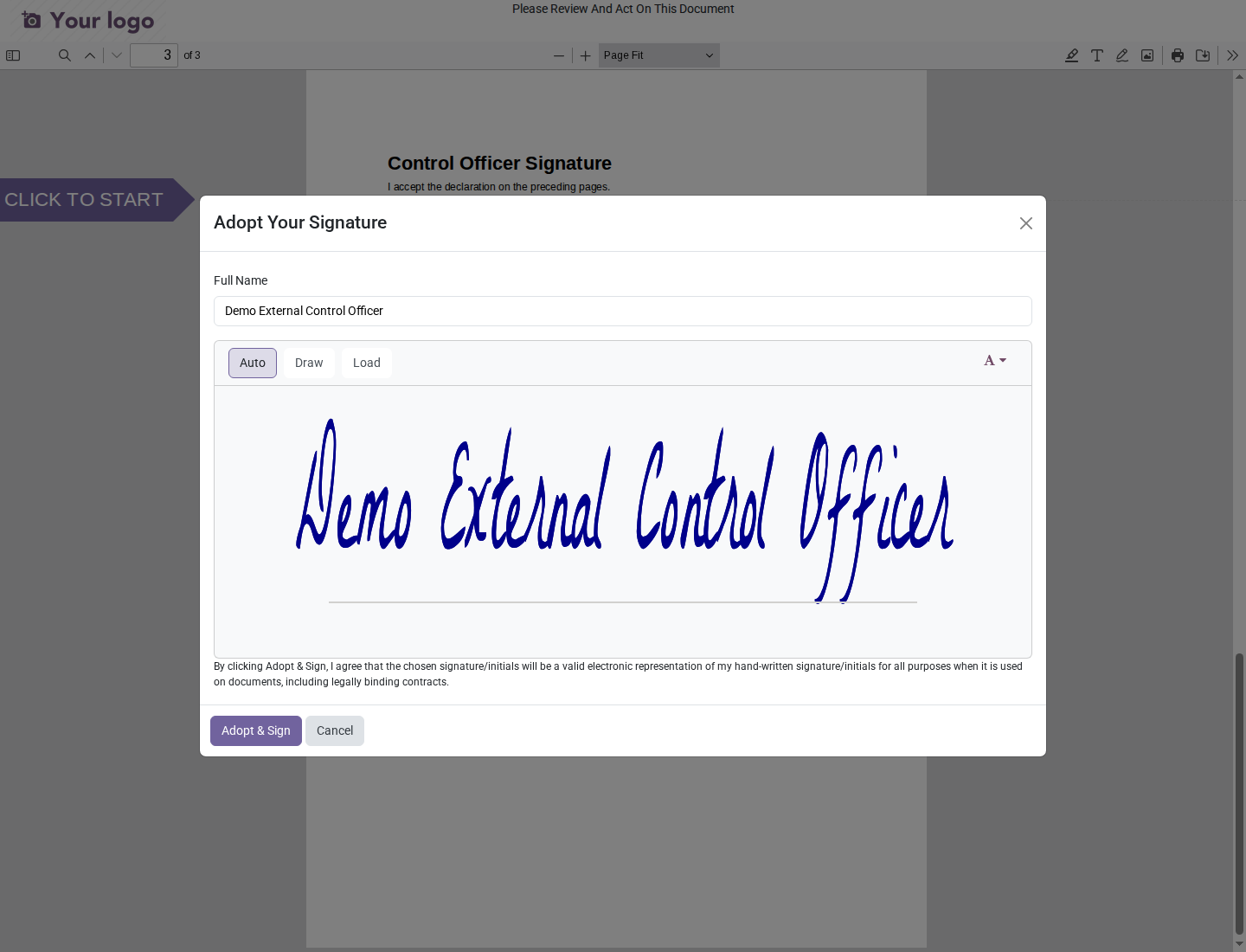
Use Adopt & Sign in the signature dialog, then Validate & Send document in the portal. Check that the declaration checkbox is selected before submitting. The dialog's standard legal wording does not establish qualified-signature compliance.
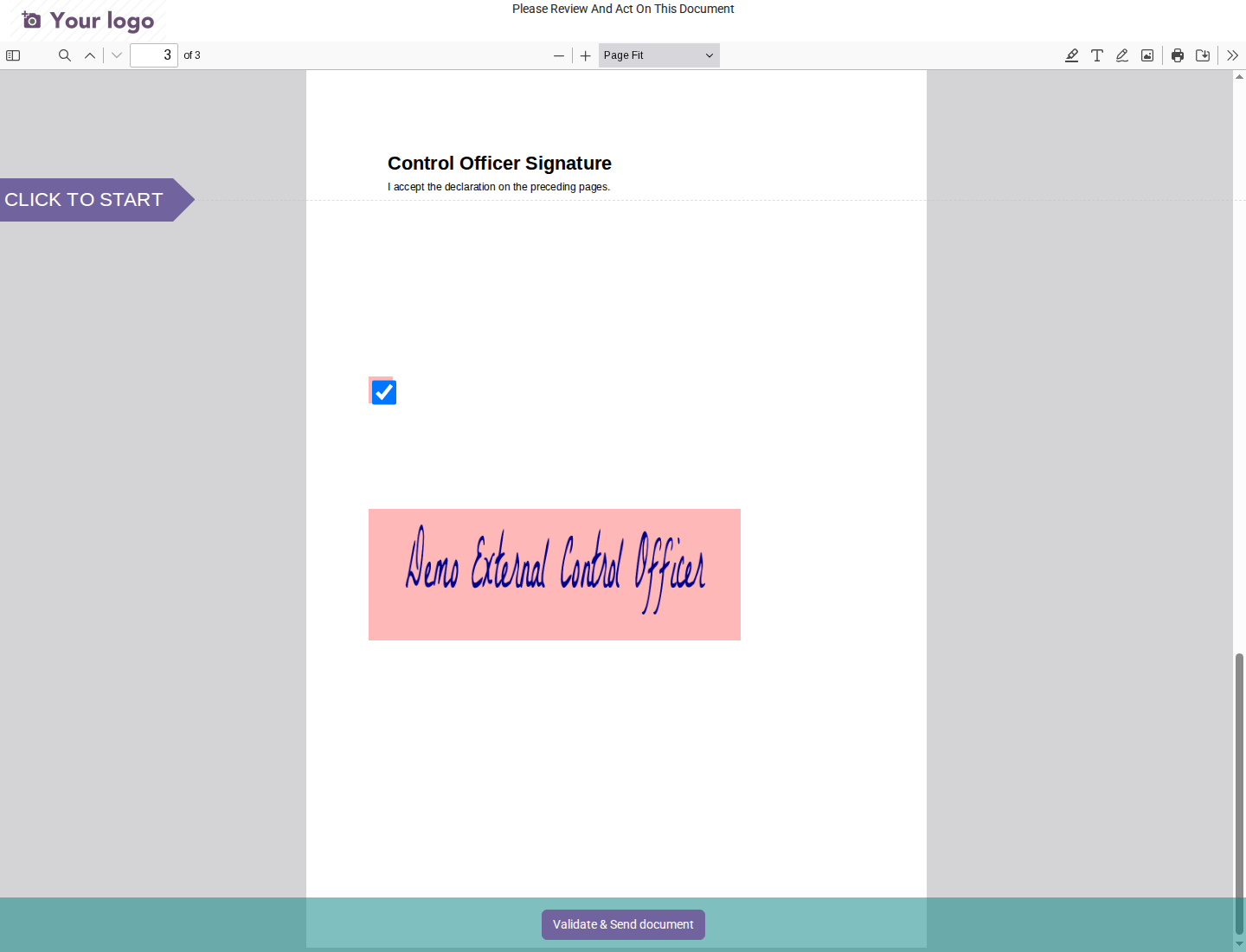
The external sign-off identifies the assigned contact, not an authenticated internal signer or presenter. The invitation grants access to this signing PDF, not the PMIS case or business document. Internal users keep the existing direct signature workflow; this portal route records acceptance, not reservations, returns, or rejection.
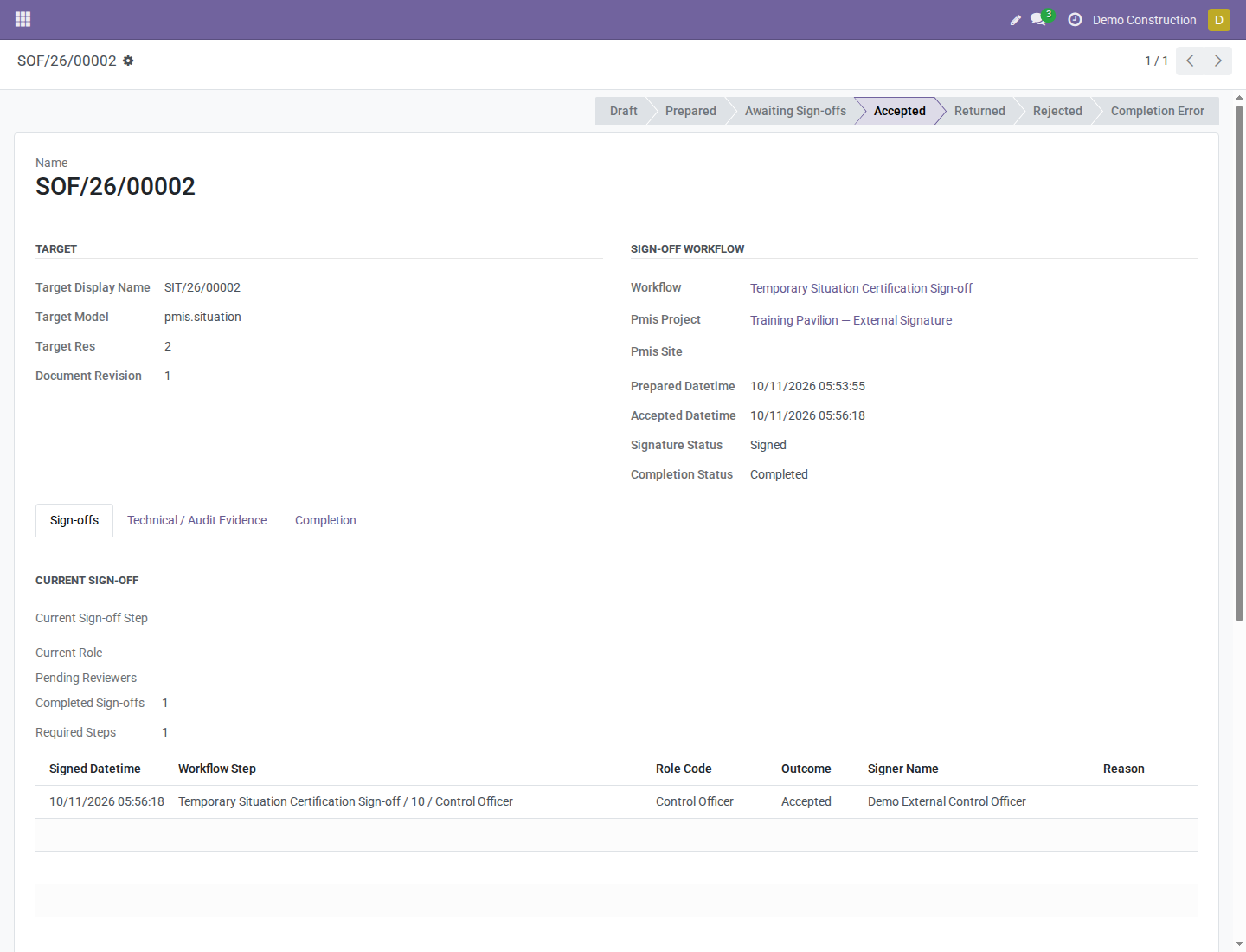
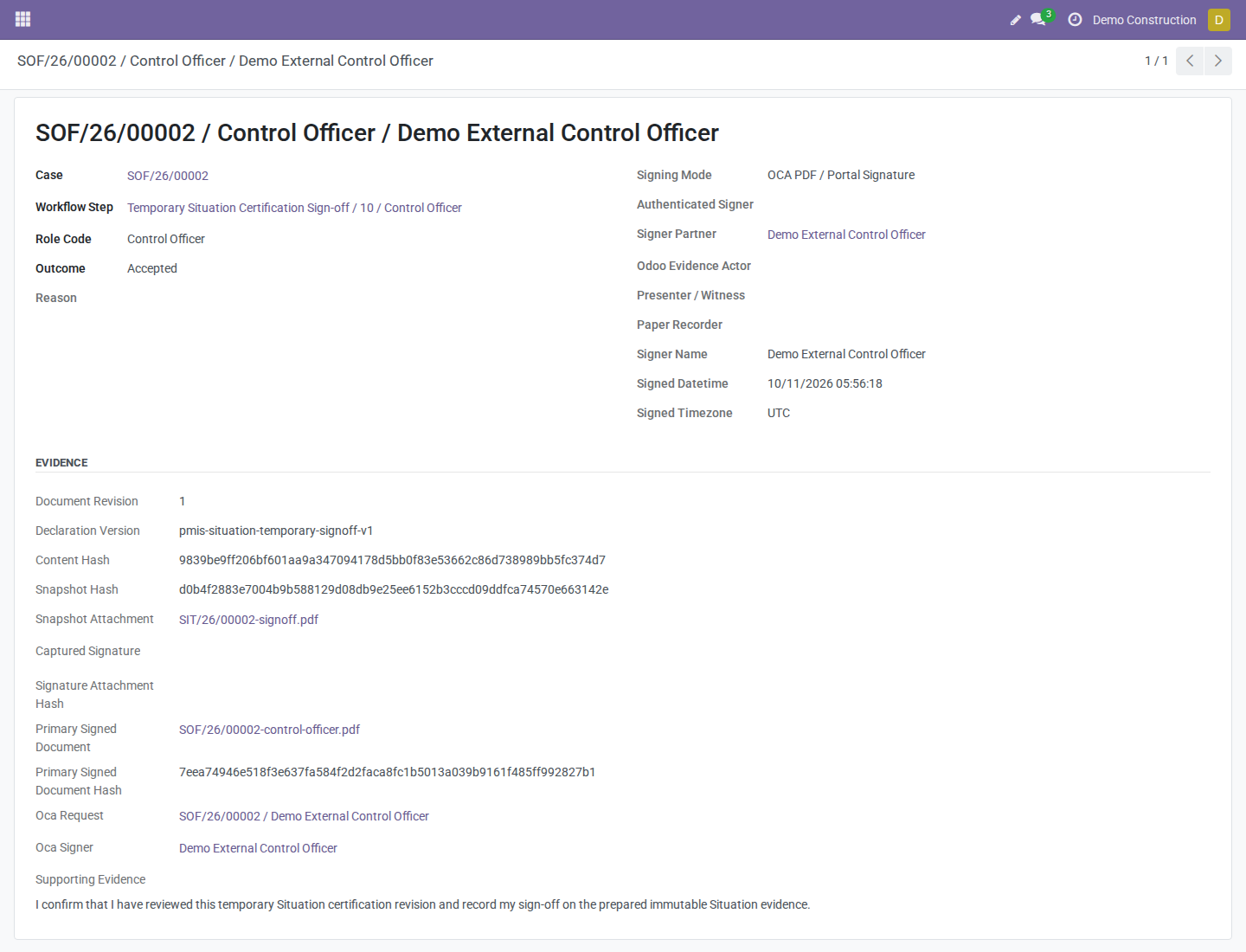
Completion permissions: completion runs with the requesting operator's current internal permissions. Measurement Book issuance needs PMIS Valuation Manager access. Situation delivery/invoicing needs the applicable internal permissions and configuration. A completion error does not discard the signature or signed PDF; the authorized internal responsible can retry without another signature.
Revocation and replacement: an unsigned invitation is rejected if its officer, document, declaration, current step, or internal requester's eligibility changes, or if the invitation/case is cancelled. An authorized operator can cancel an unsigned OCA invitation and send a replacement; this does not cancel the PMIS case. A recorded signature cannot be cancelled as an invitation.
Use the case button: an ordinary OCA request linked through its Object field alone does not count as PMIS approval. Only the case-created, bound request can record this Control Officer outcome. This is not a claim of qualified electronic-signature or statutory compliance.
Completion
After the final positive signature, one atomic attempt:
- Validates material classification and applicable stock configuration.
- Creates/reuses the outgoing picking, fully reserves, and validates normal stock operations without a partial-delivery backorder.
- Verifies valuation and normal posted stock accounting for automated-valuation products.
- Links signed evidence and accepts the Situation.
- Applies company invoice policy and completes the case.
Explicitly no-material Situations skip delivery. Measurement Book sign-off, purchase/final Situations, and non-positive outcomes do not trigger customer delivery.
Checkpoint: case Accepted, completion completed, and Situation Accepted or Invoiced. In the material example, picking is Done and valuation verified. Read these separately from signature status.
6. Review costs and invoices
Open Delivery and Actual Cost. Review picking, delivery state, operation attribution, gross cost, returned value, net cost, valuation, stock accounting, and invoice/payment states. The configured responsible is assigned to the picking; operation attribution fields retain the actor who triggered execution.
| Event | Inventory | Accounting |
|---|---|---|
| Submission/preparation | None | None |
| Completed material delivery | Done moves and normal valuation layers | Automated valuation posts normal stock entries; manual valuation creates no automatic stock journal entry. |
| Draft invoice | No repeated delivery | No posted receivable/revenue/tax entry. |
| Posted invoice | No repeated Situation delivery | Normal receivable/revenue/applicable tax entry. |
| Payment | None | Separate payment/reconciliation. |
| Stock return | Normal linked return/valuation | Normal stock reversal where applicable. |
| Credit note | No stock return by itself | Separate invoice reversal. |
Observed delivery cost USD 14 differs from Situation value USD 950 before taxes. The demo's automated stock entry has debit and credit totals of USD 14; accounts depend on Odoo configuration. The customer invoice remains a separate draft document.
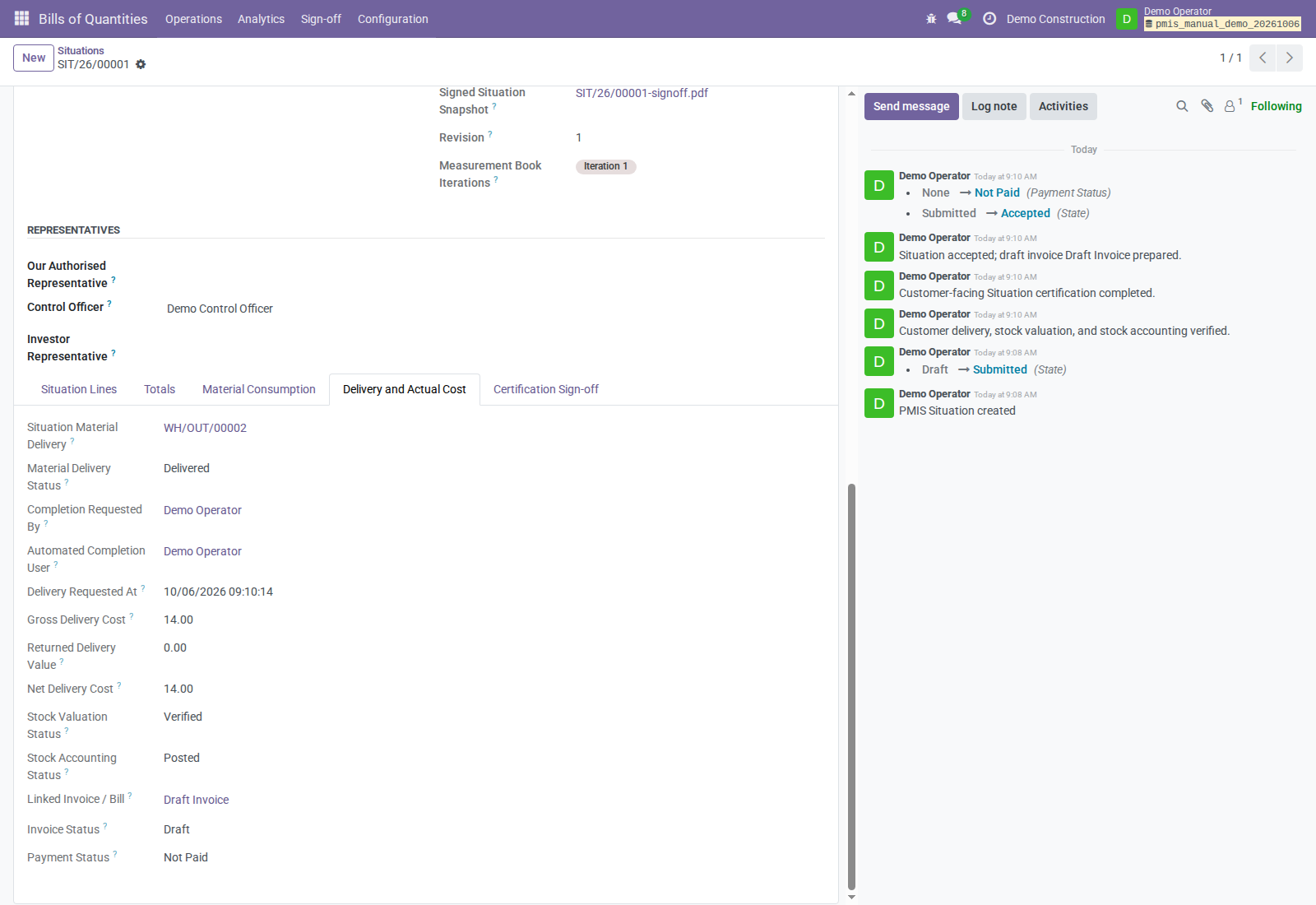
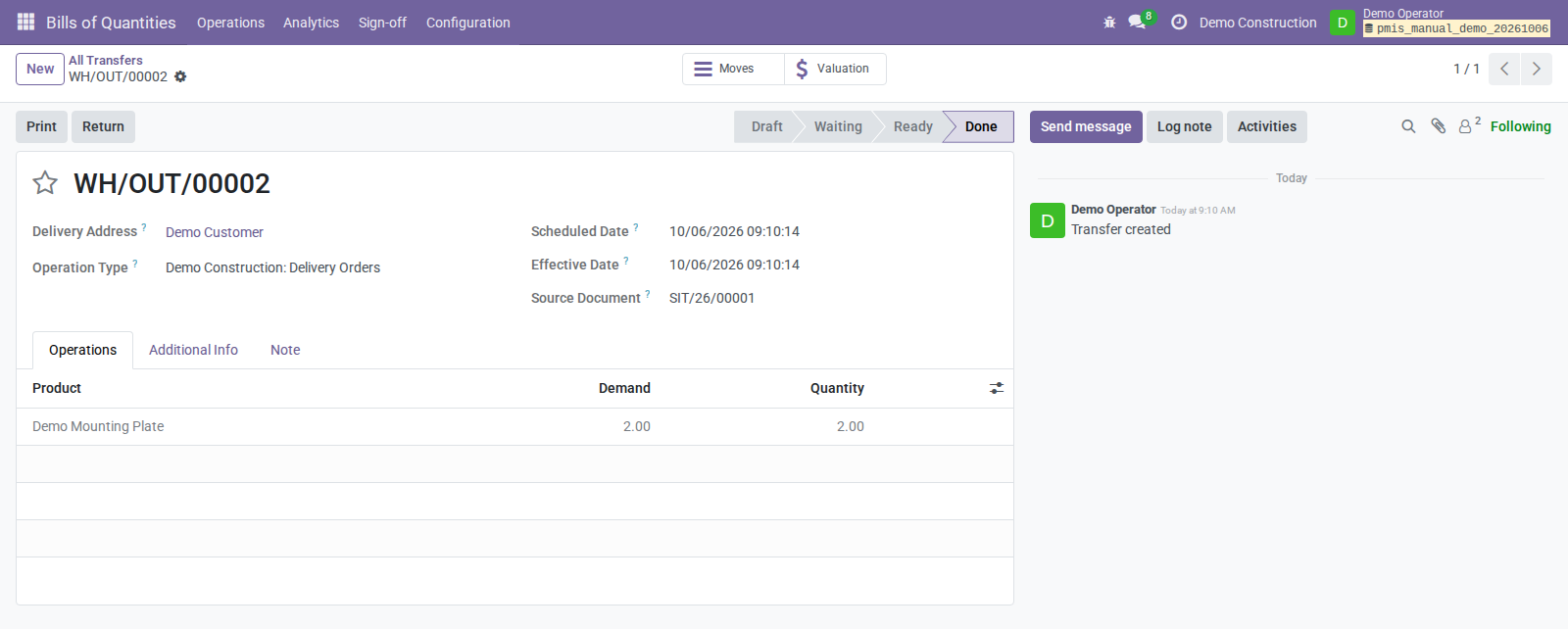
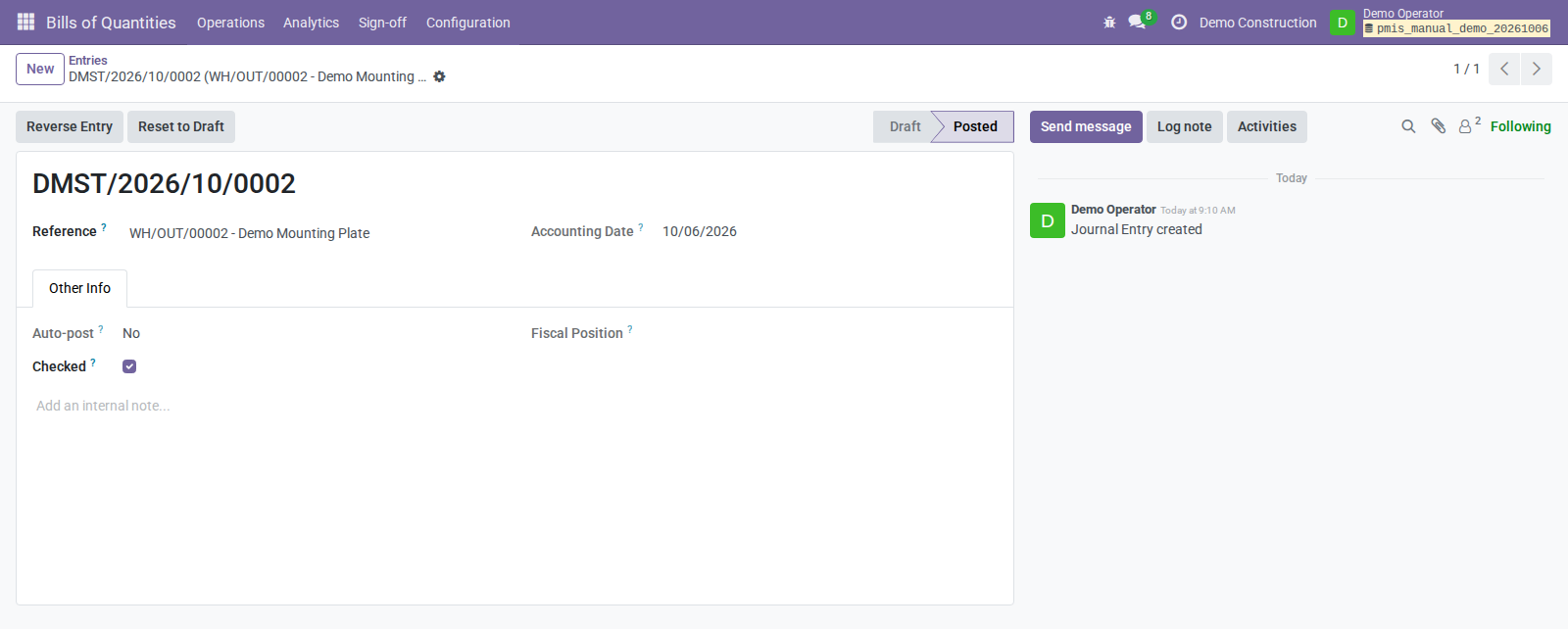
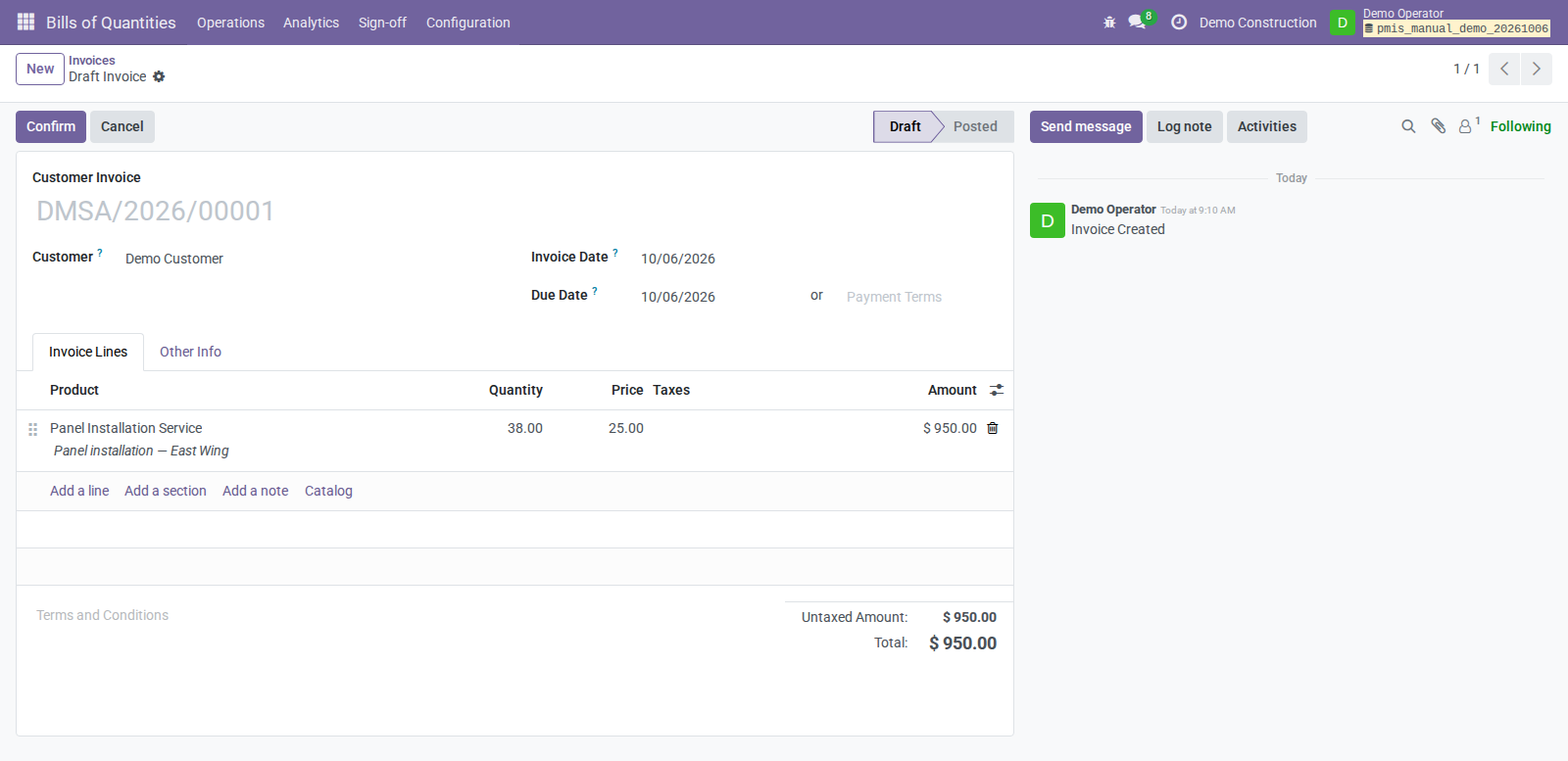
With Prepare draft invoice, the linked invoice remains unposted. An authorized accounting user can use Post Invoice after acceptance. Prepare Draft Invoice can also run before acceptance; preparation neither certifies nor posts, and later preparation can rebuild draft lines. Review the actual invoice and taxes before posting.
Alternative: internal purchase consumption
This separate route uses Purchase / Inside scope and Operations-confirmed material; it is not another automatic step after customer sale delivery.
- Prepare a purchase BoQ with vendor/storable material items. An optional purchase response creates an RFQ; confirmation/receipt use normal Purchase/Inventory.
- Create a purchase Situation with material lines/units and enter positive Internal Confirmed Quantity on applicable lines.
- Submit; as the responsible project/site Operations Manager with Stock User access, use Confirm Material Consumption.
- Review Material Consumption and its internal-to-production picking. Available untracked material validates automatically; unavailable/tracked material remains pending for normal warehouse processing.
- Use Retry Stock Completion for available untracked material, or normal lot/serial allocation and picking validation for tracked stock.
Checkpoint: actual consumption/cost comes from Done moves and valuation layers. Pending quantities are not actual consumption. Operations confirmation does not require customer certification. These addons provide no purchase Situation customer-certification or automatic vendor-bill creation route.
The separate demo purchase Situation consumes 3 plates at standard cost USD 7, giving USD 21. It remains Submitted after operational confirmation; a Done stock operation is not customer certification.
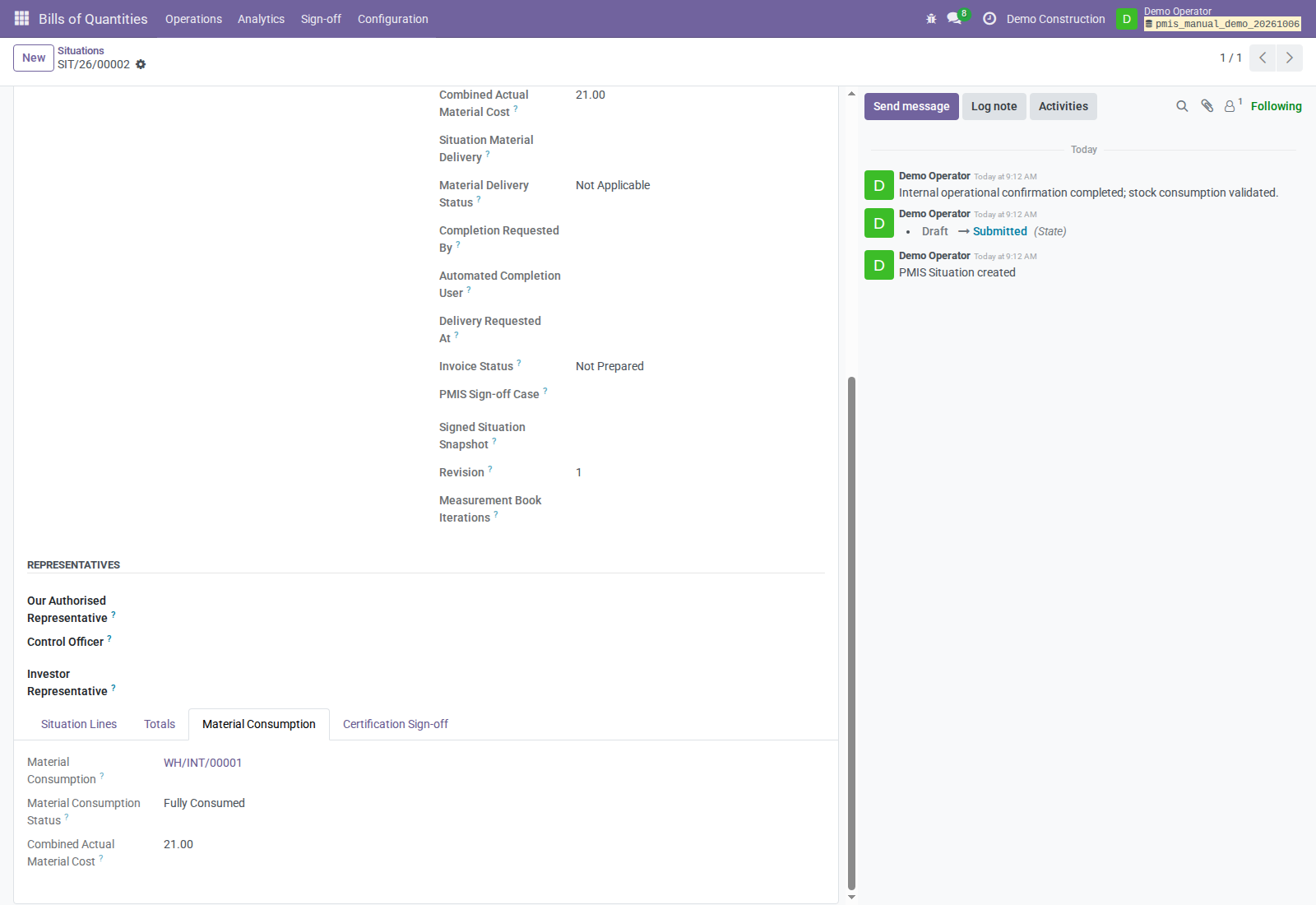
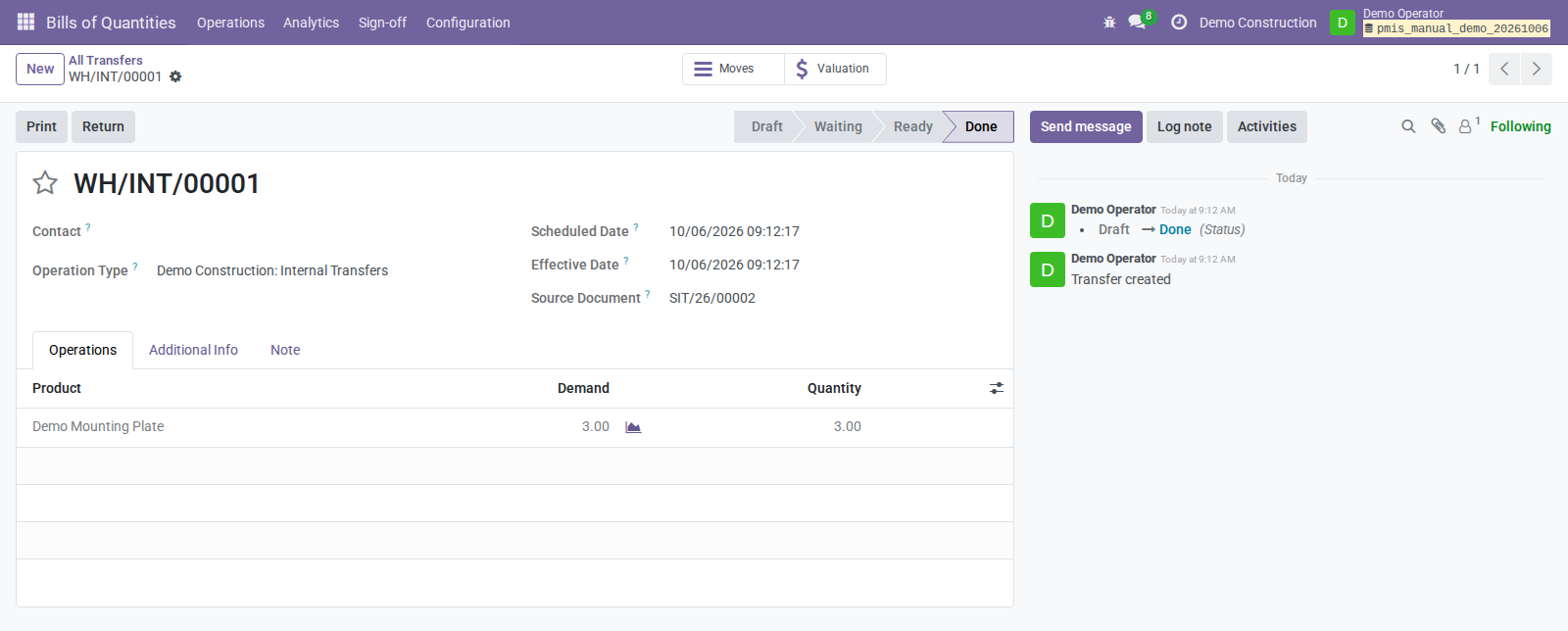
Corrections and recovery
| Situation | Action | Retained evidence |
|---|---|---|
| Log wrong before approval | Manager rejects with reason; user uses Return to Draft and resubmits. | Rejection reason and incremented revision. |
| Approved log wrong | Manager enters Correction Reason, uses Create Correction, then submits/reviews/approves the new log. | Original remains locked; supersession occurs on correction approval. Source attachments stay on original. |
| Book/Situation returned or rejected | Use the document's rejection/draft revision workflow, correct, submit, and create the new revision's case. | Earlier immutable case and sign-offs. |
| No signer/case access | Check active/internal user, live group, company, project/site authority, matching Control Officer contact, and responsibility. | Existing case/evidence. |
| Prepared content changed | Resolve revision and fresh evidence/case as applicable before signing. | Earlier immutable evidence. |
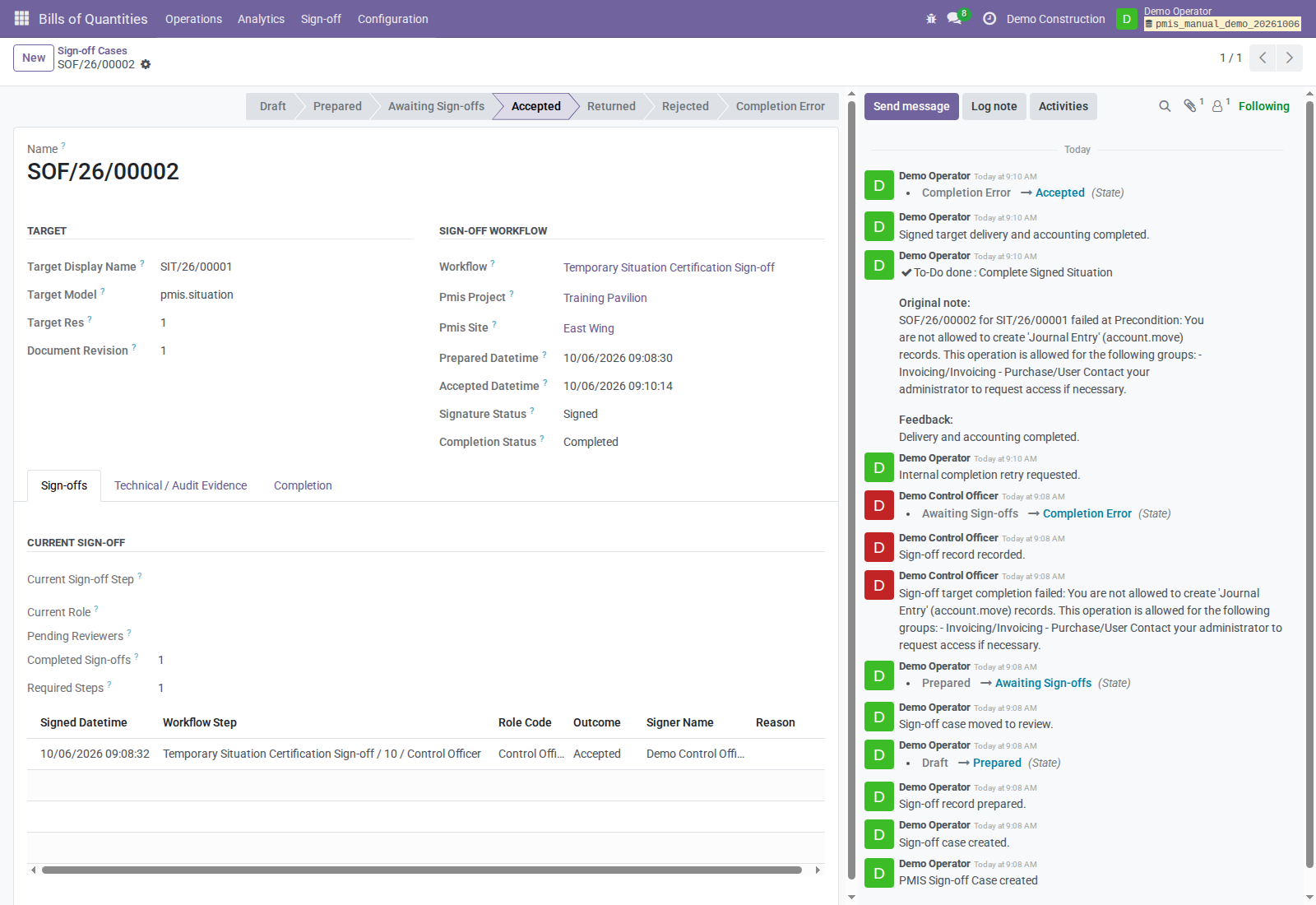
| Positive signature then Completion Error | Correct prerequisites; configured responsible uses Complete Signed Situation or Retry Delivery Completion. | Same signature/revision/hashes; retry creates no new signature. |
| Consumption pending | Resolve stock/tracking and retry or validate through warehouse. | Existing consumption picking and confirmation attribution. |
| Returned delivered material | Validate a normal return; handle credit note separately. For a partial return, Retry Delivery Completion delivers only missing net quantity. | Original evidence, moves, and return lineage. |
Sale completion failure rolls back partial stock, reservations, valuation, and invoice effects made inside that attempt. The signature remains and the Situation is uncompleted. A pending purchase consumption picking instead stays available.
Demonstrated sale completion retry
The demo Control Officer has signing authority but no Accounting permissions. Their positive signature therefore remains Signed, while the draft-invoice precondition produces Completion Error. The Situation stays Submitted; there is no retained delivery picking or invoice from that failed attempt.
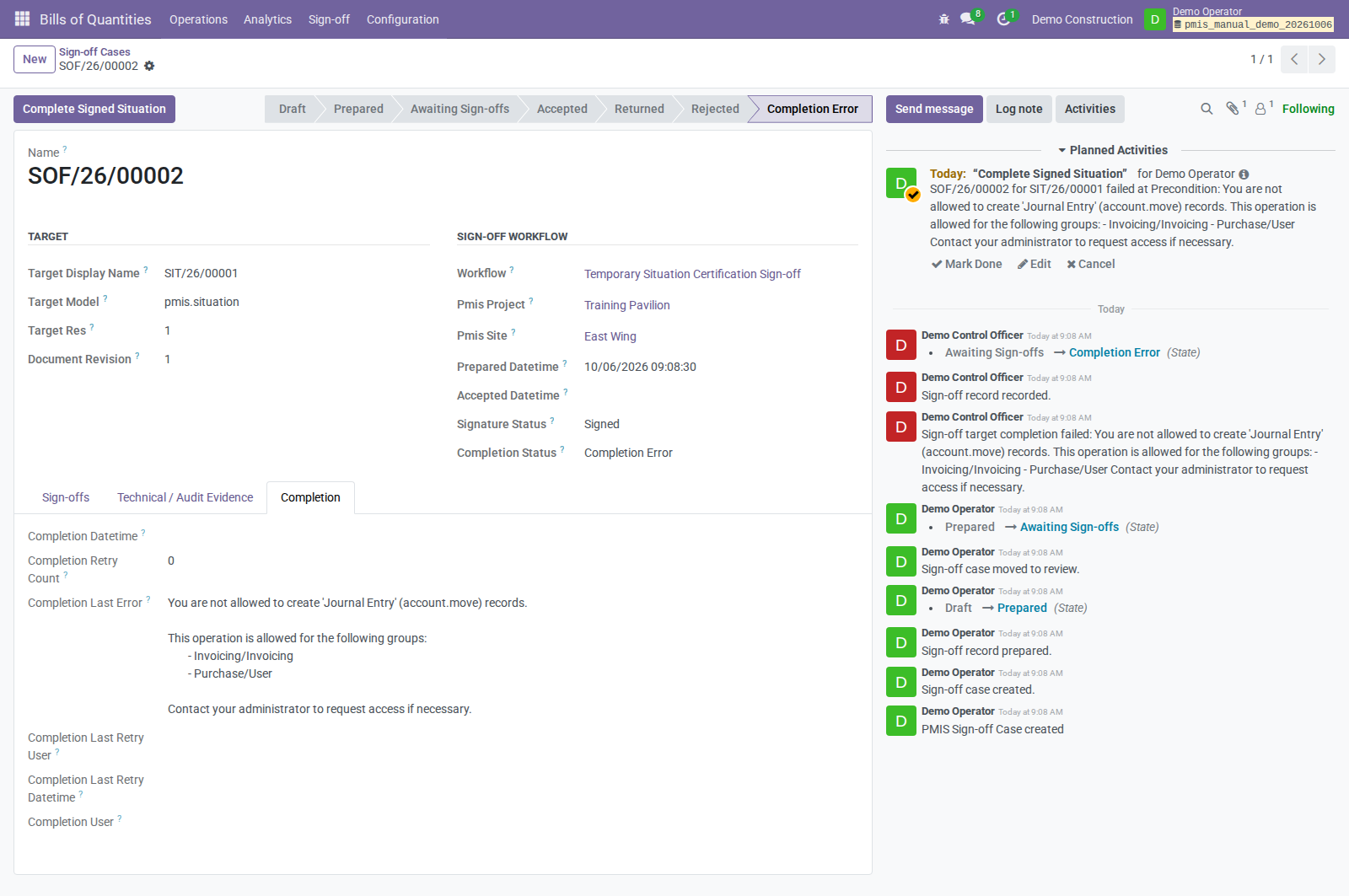
Demo Operator, the configured completion responsible with Stock/Accounting permissions, uses Complete Signed Situation. Completion succeeds without asking the Control Officer to sign again. The demo verifies one unchanged signature and unchanged content/PDF hashes before and after the retry.
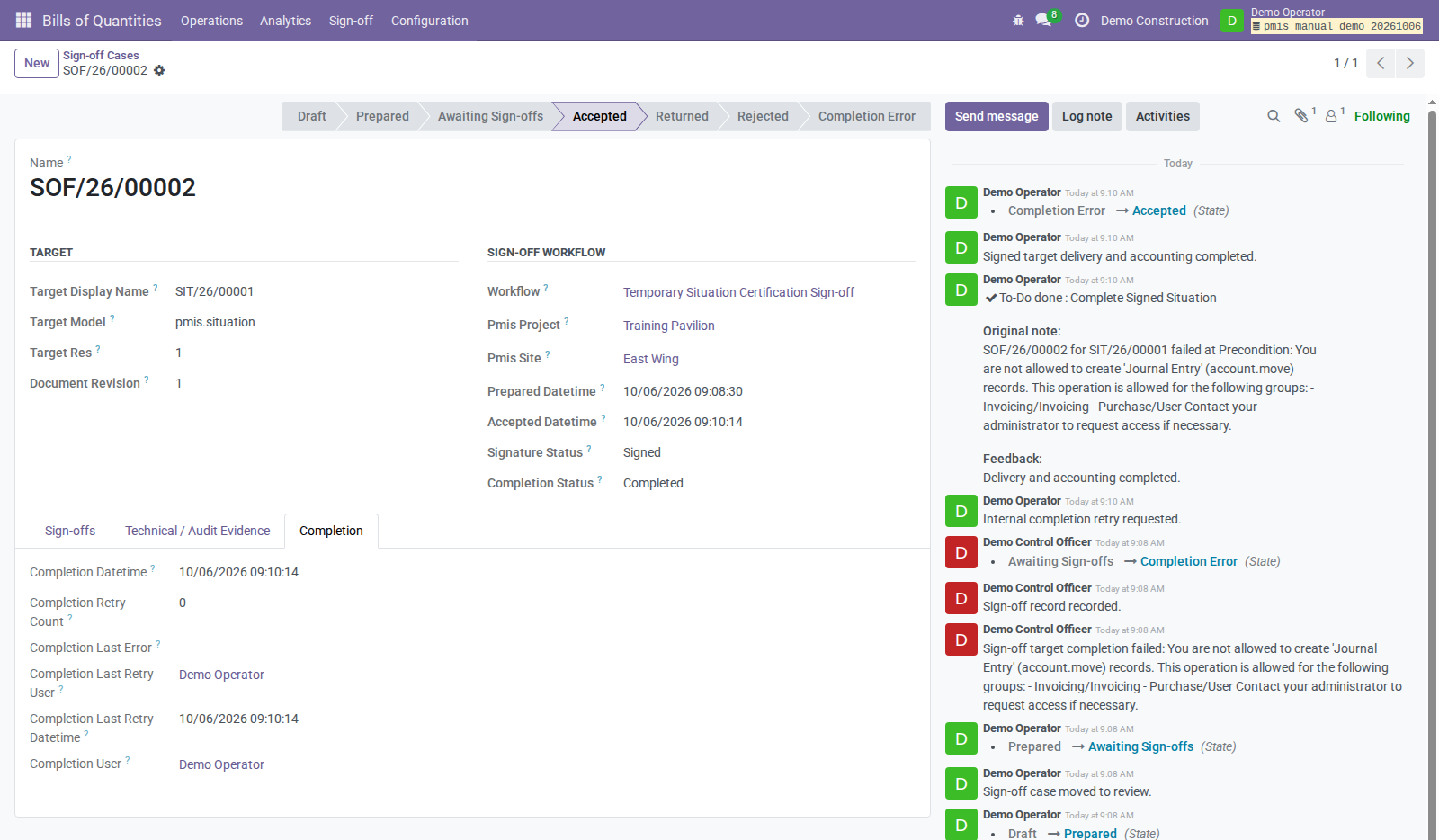
This is an observed permission-precondition failure, not a demonstrated stock-shortage failure. Availability/tracking errors follow their own diagnostic messages; those variants remain outside this capture session.
Demonstrated approved-log correction
The demo correction changes crew evidence from 16 to 18 hours, without changing worked or accepted quantities. Revision 2 is submitted, reviewed, and approved. The original stays approved and locked, and its Superseded By link points to the correction only after that approval.
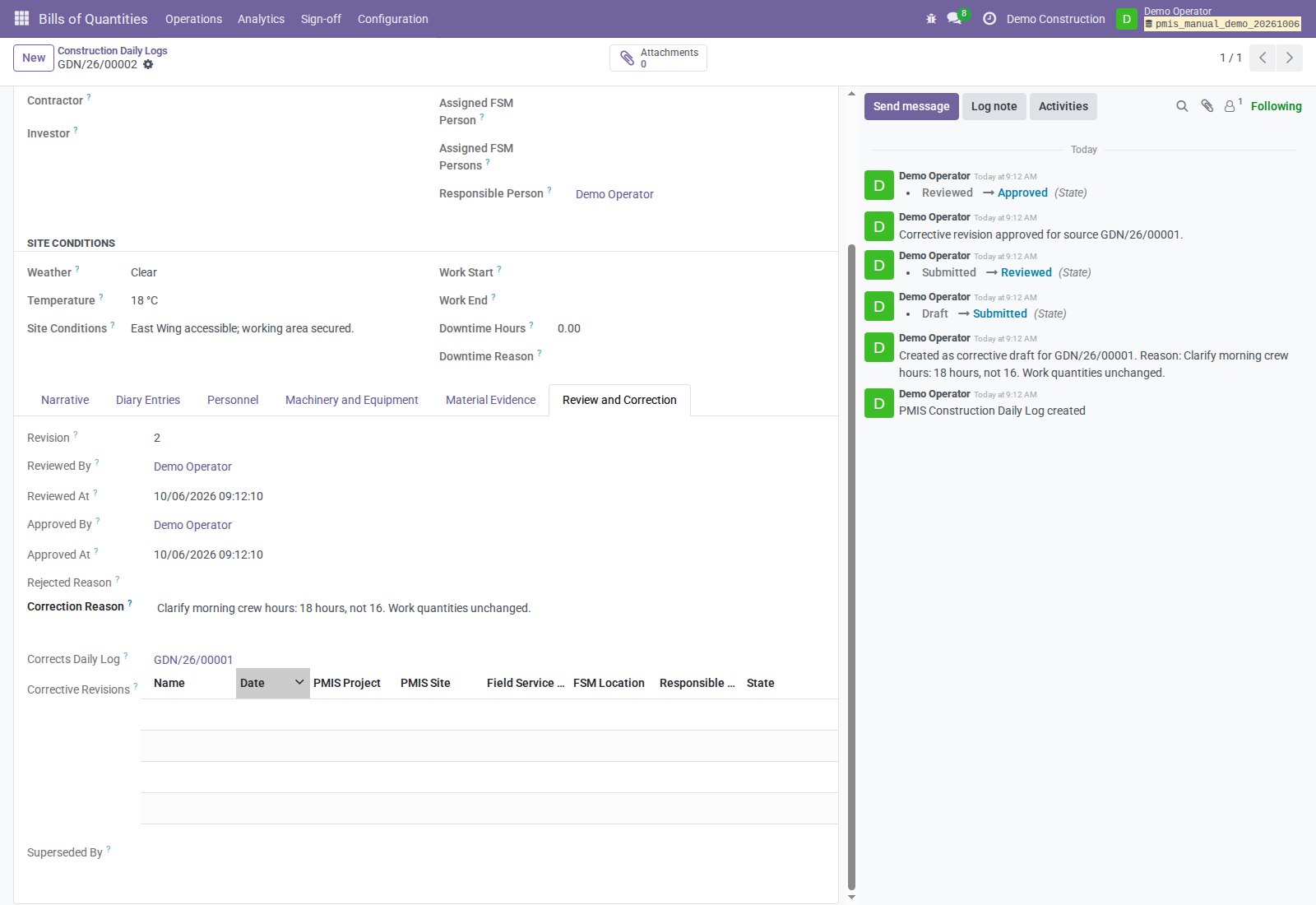
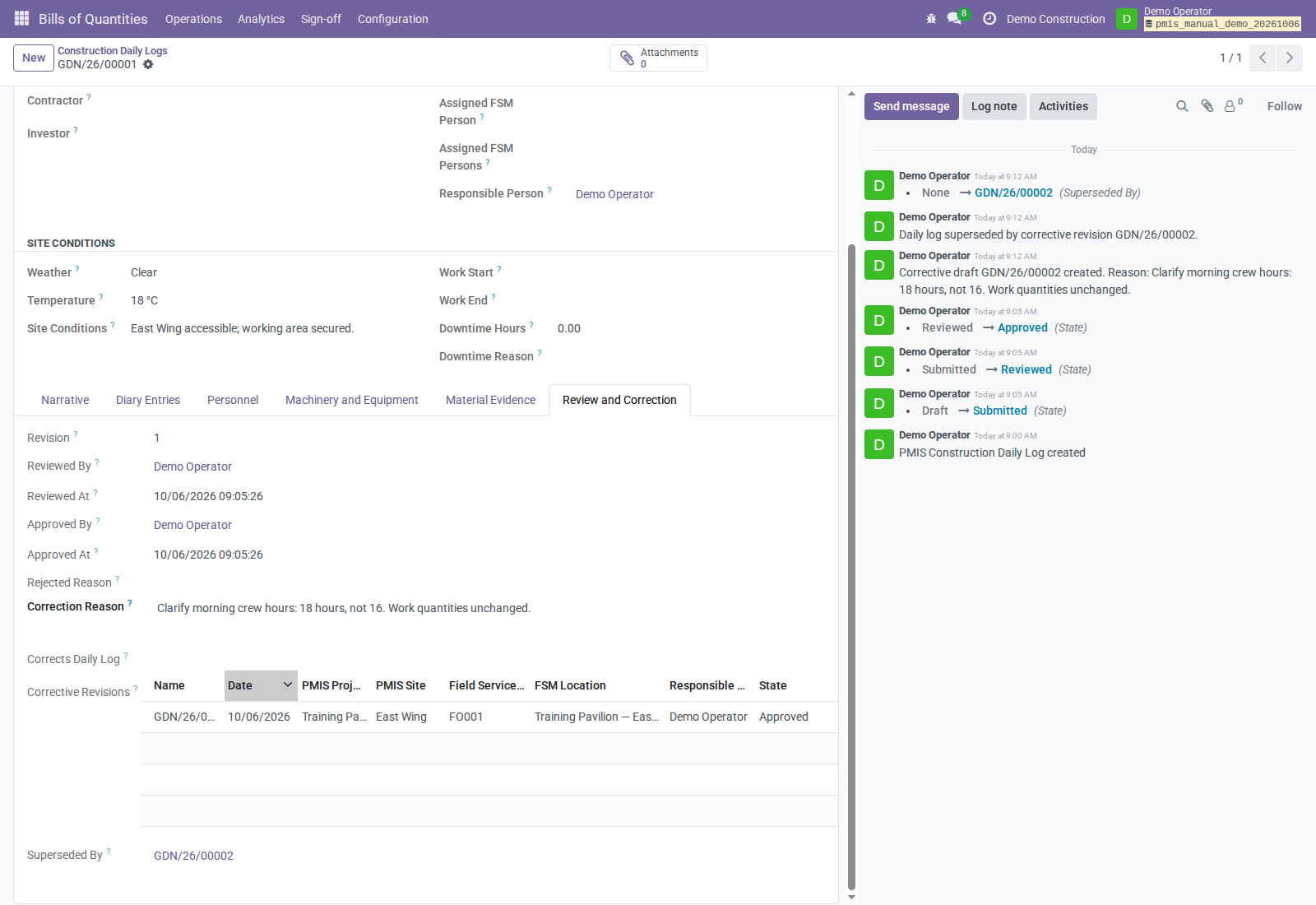
Do not change signed scope/revision to repair stock availability: retry checks prepared evidence. Changed scope needs a controlled new revision/case. The addons do not expose a complete guided UI for every supersession scenario; involve the responsible administrator when the needed revision path is unavailable.
A signed completion-error Situation cannot simply be cancelled. Validated stock
blocks cancellation/deletion; use stock returns and accounting reversals to
correct Done moves and posted entries. A full return sets delivery cancelled:
the server supports corrected redelivery, but the current form hides the retry
button in that state. A supported operational entry point needs separate review.
Reports and retained evidence
Download the current signed measurement PDF and the signed landscape Situation. Situation reports now use A4 landscape so their quantity and value columns have more space. This one-page financial sample (38 × 25 = 950) has a completed approval block and a visible handwriting-style synthetic Control Officer signature directly on the report, not an appended portal form. It was signed through an ordinary OCA PDF request; it does not record a new PMIS workflow approval. See signed document evidence. The OCA-signed PDF download contains the identical one-page signed document, without portal form pages. Measurement Books also require Control Officer approval before issuance. An external officer can use the bound OCA invitation; the internal requester needs PMIS Valuation Manager access for issuance. The current measurement sample shows 40 m² measured, 38 m² accepted, 62 m² remaining, and a visible signature. Its workflow was accepted and issued through external OCA signing, then the current issued report was separately signed as a clean reading copy. See measurement signing evidence.
The media index contains only current PDF deliverables; obsolete portrait, unsigned, and portal-form samples have been removed. Removing repository samples does not alter immutable attachments in business databases.
Report boundaries: retained iteration snapshots captured in the older UI screenshots may display Draft / Provisional Print because preparation precedes issuance. The current measurement sample is rendered from the Issued record and has explicit iteration dates. The Situation PDF does not print material mapping; that mapping is retained in the canonical manifest. Do not replace immutable business snapshots merely to change presentation labels.
| Output | Purpose | Retention |
|---|---|---|
| BoQ / BoQ Item / project BoQ reports | Planned scope | Current records; restricted financial values need Program Estimation access. |
| Construction Daily Log PDF | Daily evidence | Rendered on demand; approval stores no PDF snapshot. Attachment index lists filenames without embedding content. |
| Measurement Book sign-off PDF | Financial review | Immutable case evidence. |
| Issued iteration PDF/lines | Accepted measurement pages | Retained issued evidence, separate from subsequent drafts. |
| Situation PDF/manifest | PDF: certification values; manifest: certification and material mapping | Immutable; invoice does not replace signed document. |
| Stock picking/moves/valuation/entries | Actual material and cost | Normal records with Situation/line/route traceability. |
| Invoice/payment | Billing/settlement | Separate Accounting records. |
Implementation boundaries
- Supplied customer Situation signing is temporary sale only, not final/purchase.
- Logs do not synchronize quantities or create measurements, Situations, stock, invoices, or bills.
- Each Situation line has one explicit material mapping; there is no automatic bill-of-materials explosion.
- Ordinary order fulfillment/invoicing and Situation operations are separate paths; this guide establishes no cross-path automatic deduplication.
- Situation dates do not filter Generate Lines; review its measurement links.
- Payments, credit notes, and stock-return creation are separate operations.
- Represented signatures are internal evidence, not portal signing or established qualified electronic-signature/statutory construction-log compliance.
- OCA PDF/portal signing is a separate option for external Control Officers; it also does not establish qualified-signature or statutory compliance. Its October 11 browser demo verifies Situation certification only, not email delivery, Measurement Book issuance, stock valuation, or invoicing.
- Real report rendering and the scoped four-addon demo workflow are verified. Represented signing, shortage/tracking errors, returns, and other edge cases were not exercised. Inspected assertions are not a fresh test pass.
- Issued-iteration PDF labeling and printed Situation material mapping have the presentation limitations described under reports; no application code was changed.
Source map
Repository sources used for this edition; module READMEs provide deeper detail.
| Topic | Primary evidence |
|---|---|
| Scope/responses/navigation | BoQ interface, sale wizard, menus, Assessment README |
| Measurements | book, lines, iteration, sign-off adapter |
| Daily evidence/corrections | log, FSM order, material evidence, Field Service README |
| Signature/completion | case, Situation adapter, Situation link, Sign-off README |
| External Control Officer portal signing | case invitation, protected OCA request, signature callback, portal access, October 11 screenshots and observations |
| Stock/cost/returns | Situation stock, stock form, return lineage, Situation Stock README |
| Invoicing | Situation/lines, company policy, settings |
| Inspected test assertions (not executed) | daily-log tests: approval/corrections and unchanged commercial counts; Situation case tests: hash checks, failure/retry, presenter authority; delivery tests: cost/posting, unavailable-stock rollback, retry authority/idempotency, partial-return redelivery. |
See the companion tutorial storyboard.
TODO
- Video work is paused; record/review the companion tutorial only when resumed.
- Resolve the issued-iteration PDF's provisional label and the absence of printed Situation material mapping in a separately authorized implementation task.
- Exercise stock-shortage/tracking failures, represented signing, and returns before adding screenshots or claiming runtime verification for those variants.
- Confirm exact UI paths for repeat-period books, signed-document supersession, and full-return redelivery before documenting those clicks.