PMIS Audit user manual
Use PMIS Audit to investigate inventory valuation and reconcile the complete inventory account with the stock valuation report. Product-level FIFO diagnosis supports that investigation; the final accounting control is Full Posted Account Balance = Total Stock Valuation, for the same company and fiscal cut-off.
This guide follows pmis_audit 18.0.1.4.1 on Odoo 18 Community. All screenshots
were captured from the current Odoo interface on October 27, 2026, using a
fictional Audit Training Company in a disposable database. The illustrated
corrections were actually posted through the forms by a training operator with
normal audit, accounting, and inventory permissions. No restored customer
database was used. Account codes and counterpart choices are training examples,
not instructions for another company's books. Text uses decimal points; the
screenshots show the same amounts with regional decimal commas.
Contents
- Access and preparation
- Choose the workflow
- Understand the balances
- Training records
- Scan the complete inventory account
- Inspect sources and record decisions
- Prepare an account correction
- Accounting and valuation together
- Accounting only
- Valuation only
- Correct an untagged posting
- Confirm, post, and refresh
- Product diagnosis and inspection
- Product corrections and rounding
- Verify the complete account
- Other audit features
- Troubleshooting and limits
Access and preparation
Ask the administrator to install or upgrade the module. Updating source and restarting Odoo alone does not install new menus, models, and access rights. Follow the compatibility upgrade instructions when the legacy compatibility addon is installed.
| Task | Required roles |
|---|---|
| Scan accounts and run product diagnosis | Accounting Manager and Data Auditing / Audit User |
| Prepare and post corrections | Accounting Manager and Data Auditing / Audit Manager |
| Read or change stock, products, and accounting records | Their normal Odoo permissions also apply |
Audit Manager includes Audit User. It does not supply inventory-management permissions. The training operator also has Inventory Administrator and Show Accounting Features - Readonly for the accounting-detail screens. Depending on installed accounting apps, the top-level app may be Invoicing rather than Accounting. Check native accounting-detail visibility if account columns or the journal entry's Journal Items tab are missing.
Before correcting anything:
- Switch to the company under review.
- Choose the inventory account and fiscal cut-off. Agree on an open correction date and counterpart accounts with the accounting team.
- Obtain purchasing, stock, and journal evidence supporting the intended value. A detected difference is not proof of the correct acquisition cost.
- For valuation changes, verify automated FIFO configuration and matching physical, net valuation, and remaining quantities. Lot-valued products need a separate review.
- Check prior-period treatment. The tools create new adjustments; they do not decide whether an earlier financial year should be changed.
Choose the workflow
Open Inventory → Reporting → Valuation Balance Audit.
| Entry point | Use it for |
|---|---|
| Account Reconciliation | Compare the whole inventory account, including untagged postings, with stock valuation; retain review decisions and prepare corrections. |
| Account Corrections | Reopen saved account-correction drafts and inspect posted account corrections. |
| Find Discrepancies | Diagnose product valuation/FIFO, quantity, residual, and product-tagged ledger differences; explore supporting evidence. |
| Corrections | Reopen the separate product-level paired correction workflow. |
For a complete account reconciliation, start with Account Reconciliation and return there after all adjustments. A clean product scan alone does not establish that the full general-ledger account agrees with stock valuation.
Understand the balances
| Field or term | Meaning |
|---|---|
| Full Posted Account Balance | Every posted journal-item balance on the selected account through the fiscal cut-off, including items without a product. |
| Total Stock Valuation | Sum of SVL values through the same fiscal cut-off for products currently mapped to the account, including archived products. |
| Account Minus Valuation | Full posted account balance minus stock valuation. Zero is the account-level consistency objective. |
| Current Remaining FIFO Value | Current residual value on the layers included by the cut-off; it is not a reconstruction of historical FIFO balances. |
| Untagged Account Balance | Included account balance on items without a product; it is not automatically an error or an amount to reverse. |
| Aggregation Rounding | Difference between rounding the full-account comparison and adding the individually rounded product/pool differences. |
| Ledger Value / Stock Value / Fifo Value | Product-level or untagged-pool amounts on account findings. An untagged pool has no SVLs of its own. |
| Ledger Minus SVL | Product/pool ledger minus valuation; its sign differs from FIFO Minus SVL. |
| FIFO Minus SVL | Remaining FIFO value minus total valuation. |
| Physical Qty / Quantity / Remaining Qty | Company-owned internal/transit stock excluding consignment; net SVL quantity; remaining FIFO quantity. |
The account comparison uses current product-category account mappings. It does not reconstruct past account assignments. Investigate mapping changes separately. Draft and canceled entries are outside the posted balance. Fiscal dates, rather than merely the date a record was entered, define the cut-off.
Training records
The seven products each have net and remaining quantities of two units.
AUD-QTY has physical quantity three; the others have physical quantity two.
| Product | Initial valuation | Initial product-tagged ledger | Remaining FIFO | Treatment illustrated |
|---|---|---|---|---|
AUD-COST |
€99.92 | €105.00 | €20.00 | Accounting and valuation correction |
AUD-LEDGER |
€20.00 | €24.00 | €20.00 | Accounting-only correction of €4.00 |
AUD-SVL |
€99.92 | €20.00 | €20.00 | Valuation-only correction |
AUD-PAIR |
€99.92 | €99.92 | €20.00 | Separate product-level paired correction |
AUD-ROUND |
€99.928, displayed €99.93 | €99.92 | €20.00 | Product correction with a disclosed cent difference |
AUD-QTY |
€20.00 | €20.00 | €20.00 | Quantity blocker; no value correction |
AUD-VALID |
€23.00 | €20.00 | €23.00 | Retain a supported €3.00 untagged cost adjustment |
There are also two untagged inventory debits:
TRAIN/UNTAGGED/ERROR: €7.00, a duplicate entry to reverse.TRAIN/UNTAGGED/VALID: €3.00, supported acquisition cost forAUD-VALID. Its tagged ledger €20.00 plus this documented €3.00 equals valuation €23.00.
Initially the complete account is €398.84, stock valuation €462.69, and Account Minus Valuation −€63.85. The untagged pool totals €10.00.
Scan the complete inventory account
- Open Account Reconciliation → New.
- Select Account, for example the training
660000 Training Inventory. - Set Fiscal Cut-off and save. The cut-off must include the intended correction date if you want this review to show the correction's effect.
- Click Scan / Refresh.
- Read the full totals before working through the findings.
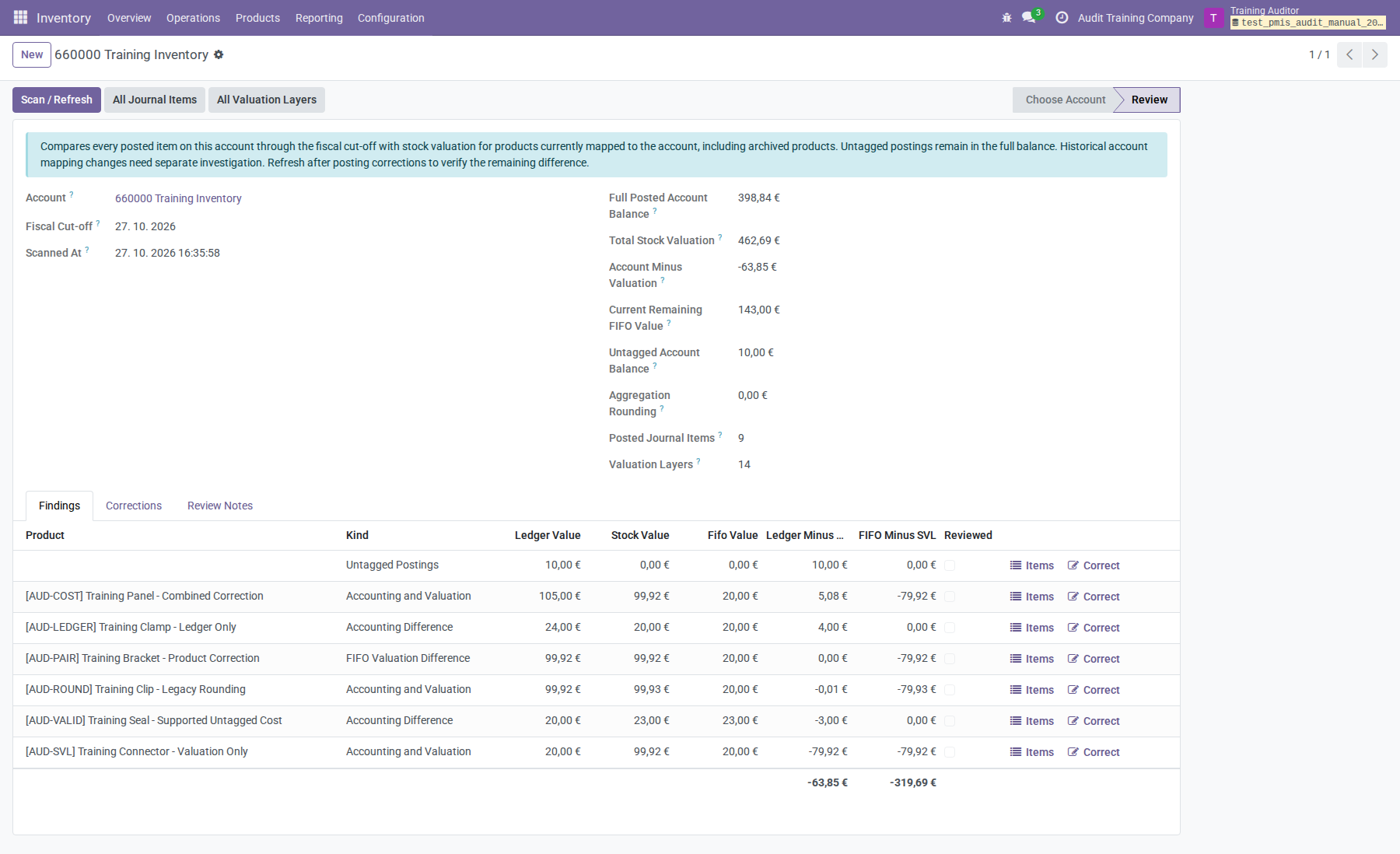
Findings include ledger-only differences even where valuation already equals remaining FIFO. The untagged pool is shown separately. Previously captured rows remain available when they become balanced; a refresh preserves notes but clears Reviewed so that the refreshed evidence can be reviewed again.
After scanning, account, company, and cut-off are fixed. Create a new review for a different scope. Scanned reviews and findings are retained rather than deleted.
Inspect sources and record decisions
Use All Journal Items to open the complete posted-account scope and All Valuation Layers for the stock valuation scope. Items on a finding narrows the account items to that product, or to the untagged pool. Open a finding to inspect its Journal Items, Valuation Layers, and decision notes.
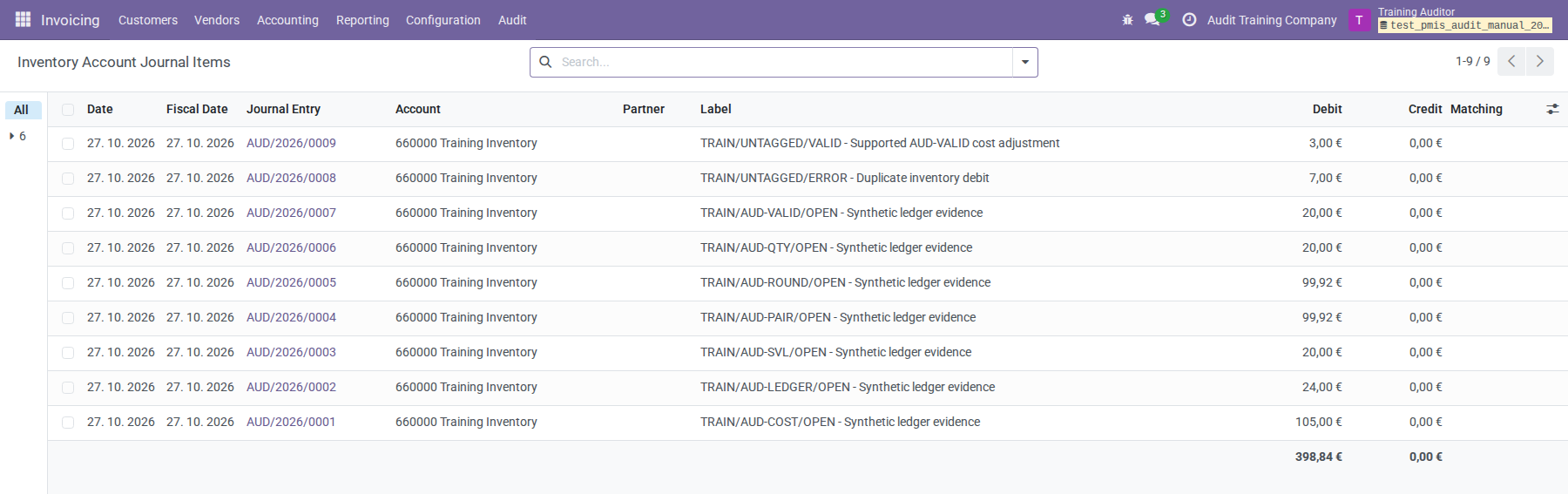
Compare document references, product tags, fiscal dates, amounts, and related entries. An item without an SVL link may be an automated entry, an earlier entry whose link has changed, or a valid manual posting. Missing links alone do not establish an error. Do not reverse every unlinked or untagged item.
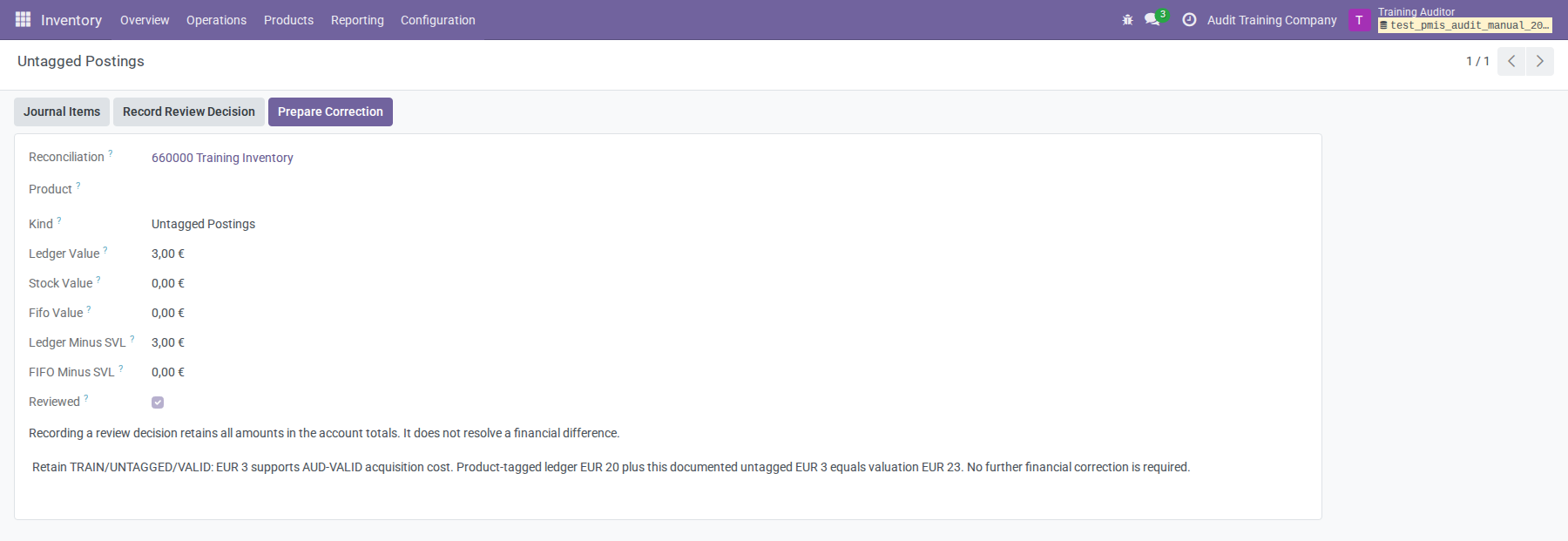
If an entry is valid, record the supporting documents and reasoning in Review Decision / Evidence, then click Record Review Decision. This marks a review decision; it does not remove any amount from the totals or clear a financial difference. Several findings may describe the same exposure, so do not add all reported differences together as a correction amount.
Prepare an account correction
Use Correct on an account row, or open it and click Prepare Correction. The proposed mode follows the displayed balances; verify that it matches the actual cause. Alternatively, in Journal Items, select the supporting items and use Action → Review Inventory Account Correction. That action creates a new review and draft correction; it posts nothing.
A selection must contain posted items for one account and company, with one product, or consist entirely of untagged items. The active company must match. Never add a dummy product to an untagged correction.
On Evidence and Decision:
- Verify the review, finding, product if applicable, and Mode.
- Select Reviewed Source Journal Items. For valuation-only work, a fully consumed Source Layer of the same product/company can support the correction instead.
- Enter Correction Fiscal Date, and a company general Journal in company currency for modes that create accounting entries.
- Explain the discrepancy, selected sources, intended treatment, and evidence in Finding and Correction Rationale.
- Click Refresh Evidence after changing sources or scope. Recheck the proposed amounts and counterpart allocations.
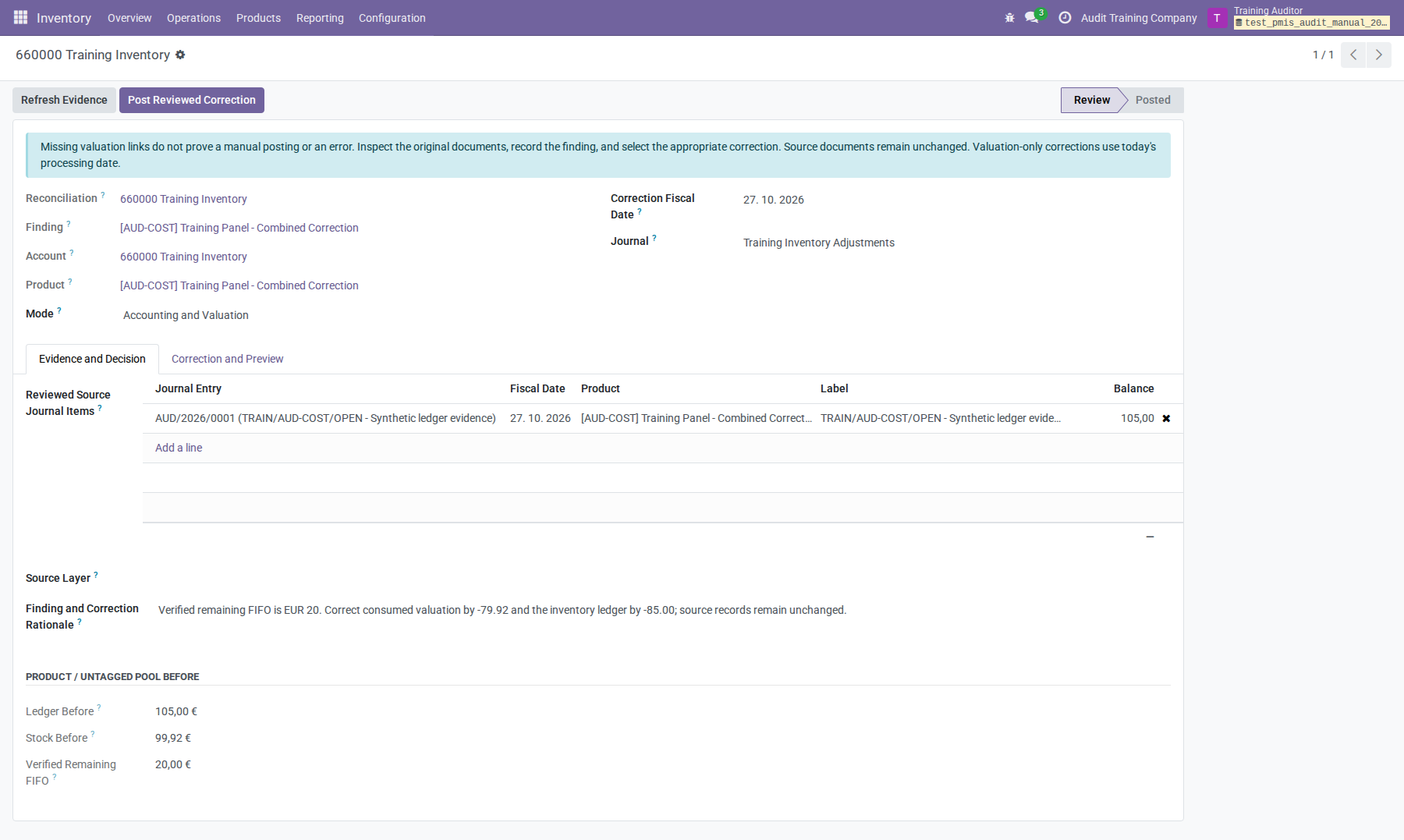
An account correction creates at most one SVL, regardless of counterpart count. Where supported by the evidence, Source Layer can link it to a fully consumed original layer. Do not attach an arbitrary layer to fill the optional field.
Refresh Evidence resets confirmation and recalculates proposed changes. For Accounting Only, it proposes the negative net source balance. That is a starting proposal, not a conclusion that the whole source must be reversed. Reenter a reviewed partial amount after refreshing if necessary.
The screenshots of the three mode previews below were captured before any correction was posted. Their full-account projections therefore share the initial baseline. Refresh each draft before posting it after another correction; its account-wide projection will then reflect the updated baseline.
Accounting and valuation together
Choose Accounting and Valuation when both product totals need correction to verified remaining FIFO. This path can address a reviewed ledger disagreement that blocks the separate product-level paired tool; other valuation and quantity safeguards still apply.
For AUD-COST, the reviewed target is €20.00:
| Proposed effect | Amount |
|---|---|
| Inventory Account Change (+ Debit / - Credit) | −€85.00 |
| Stock Valuation Change | −€79.92 |
| Signed counterpart total | +€85.00 |
On Correction and Preview, enter signed counterpart allocations and inspect Proposed Entries. A positive balance is a debit; a negative balance is a credit. The counterpart total must equal the negative inventory-account change. The training journal credits inventory €85.00 and debits the approved training expense account €85.00. Its SVL changes value by −€79.92 with zero quantity and zero remaining balances. Counterpart choices require an independent accounting review; a balanced entry alone does not establish correct treatment.
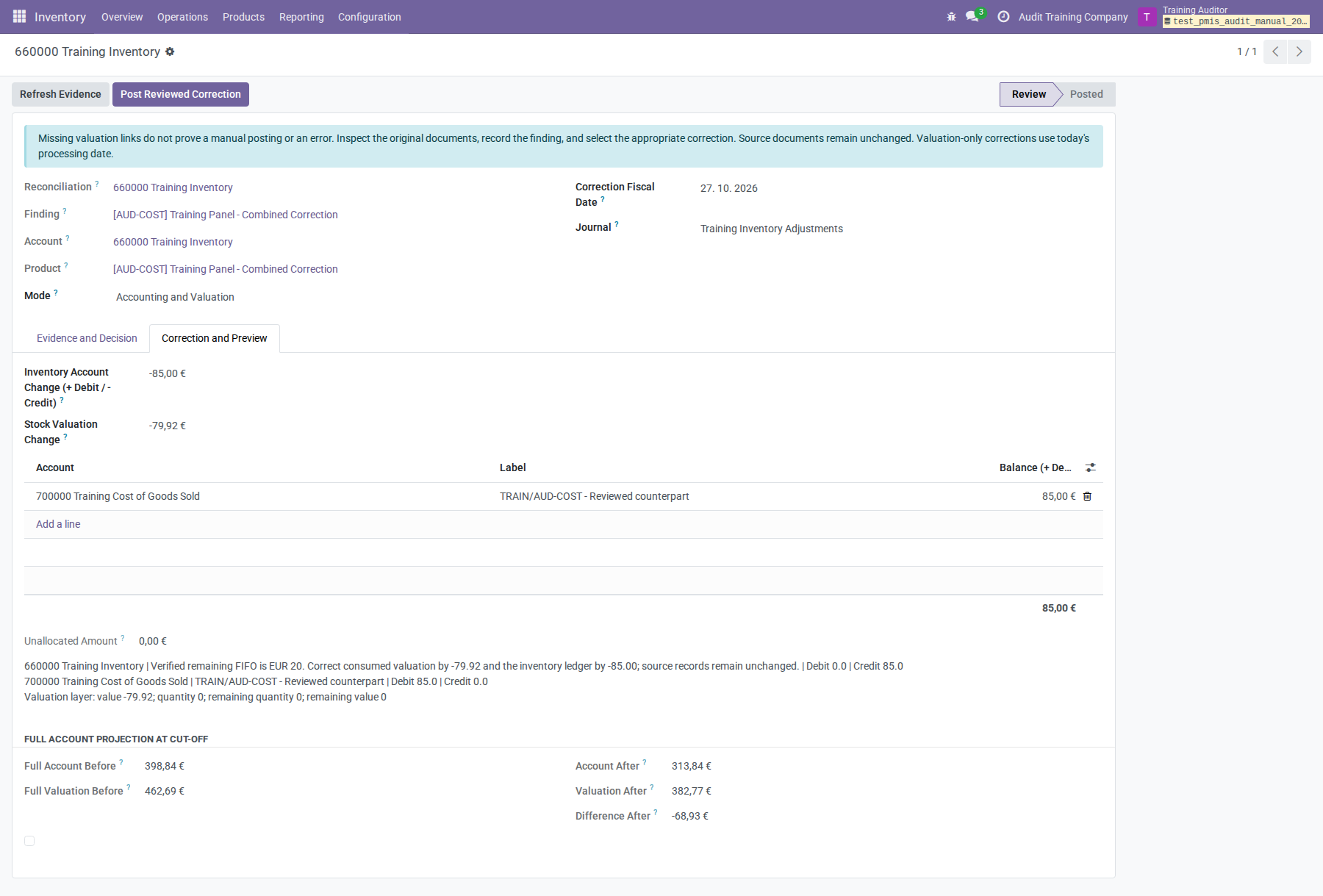
The projected complete account is €313.84 and valuation €382.77, leaving −€68.93. That nonzero projection is expected: other findings are unresolved. One valid correction does not certify the whole account.
Accounting only
Choose Accounting Only when the valuation is correct and only the ledger needs an adjustment. This creates a balanced journal entry and no SVL.
For AUD-LEDGER, valuation and FIFO already equal €20.00, while the ledger is
€24.00. Selecting the €24.00 source proposes −€24.00 after refresh. The reviewed
error is only €4.00: set Inventory Account Change to −€4.00, retain zero Stock Valuation
Change, and allocate +€4.00 to the approved counterpart.
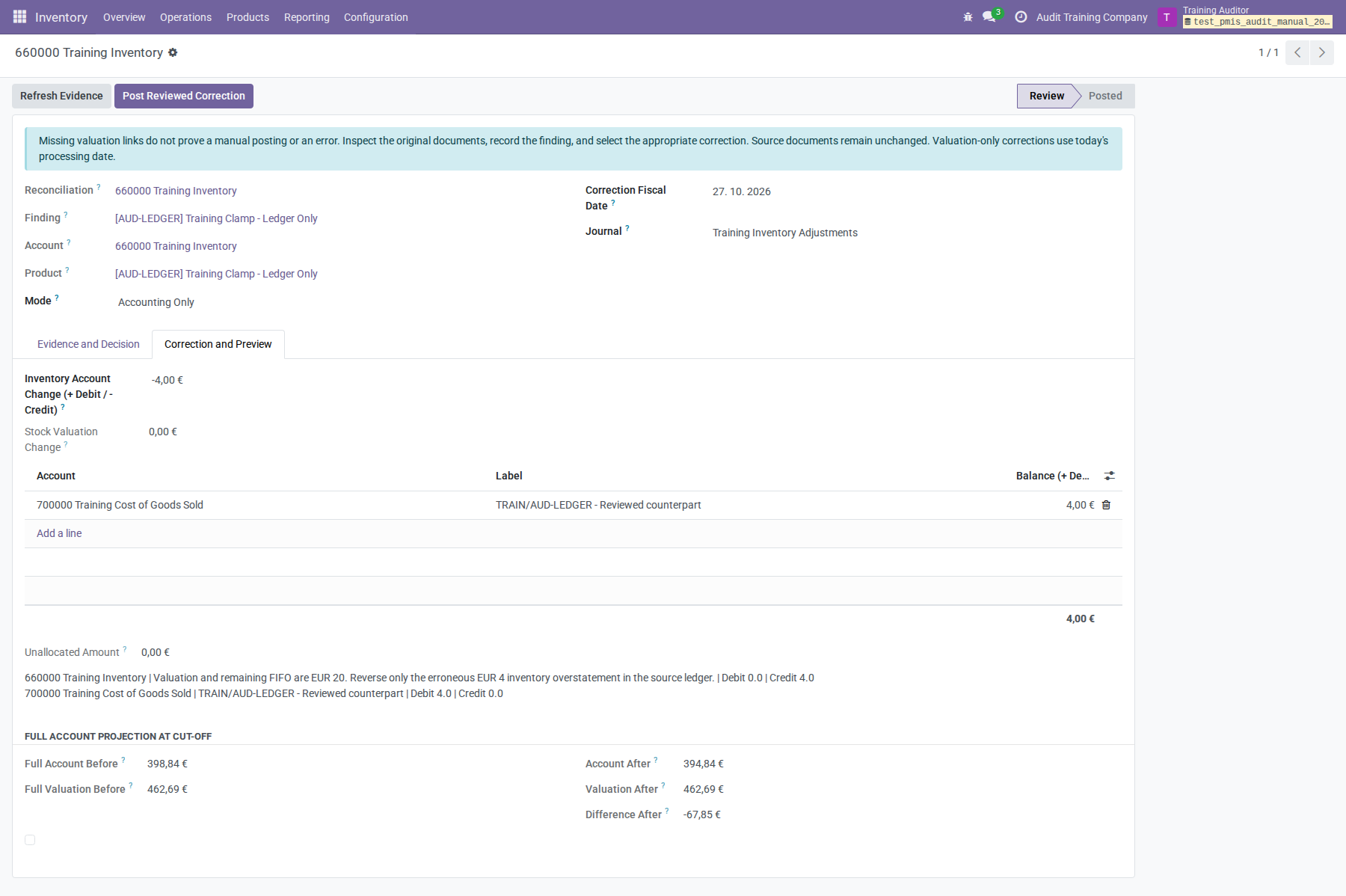
This mode also supports justified corrections to postings without a product. It does not repair physical stock or remaining FIFO balances.
Valuation only
Choose Valuation Only when the product ledger already equals verified remaining FIFO, but total SVL value does not. This creates one zero-quantity valuation layer and no journal entry.
For AUD-SVL, set Stock Valuation Change −€79.92; Inventory Account Change
is zero. No journal or counterpart lines are permitted. The new valuation must
bring the product to €20.00, matching both its ledger and remaining FIFO.
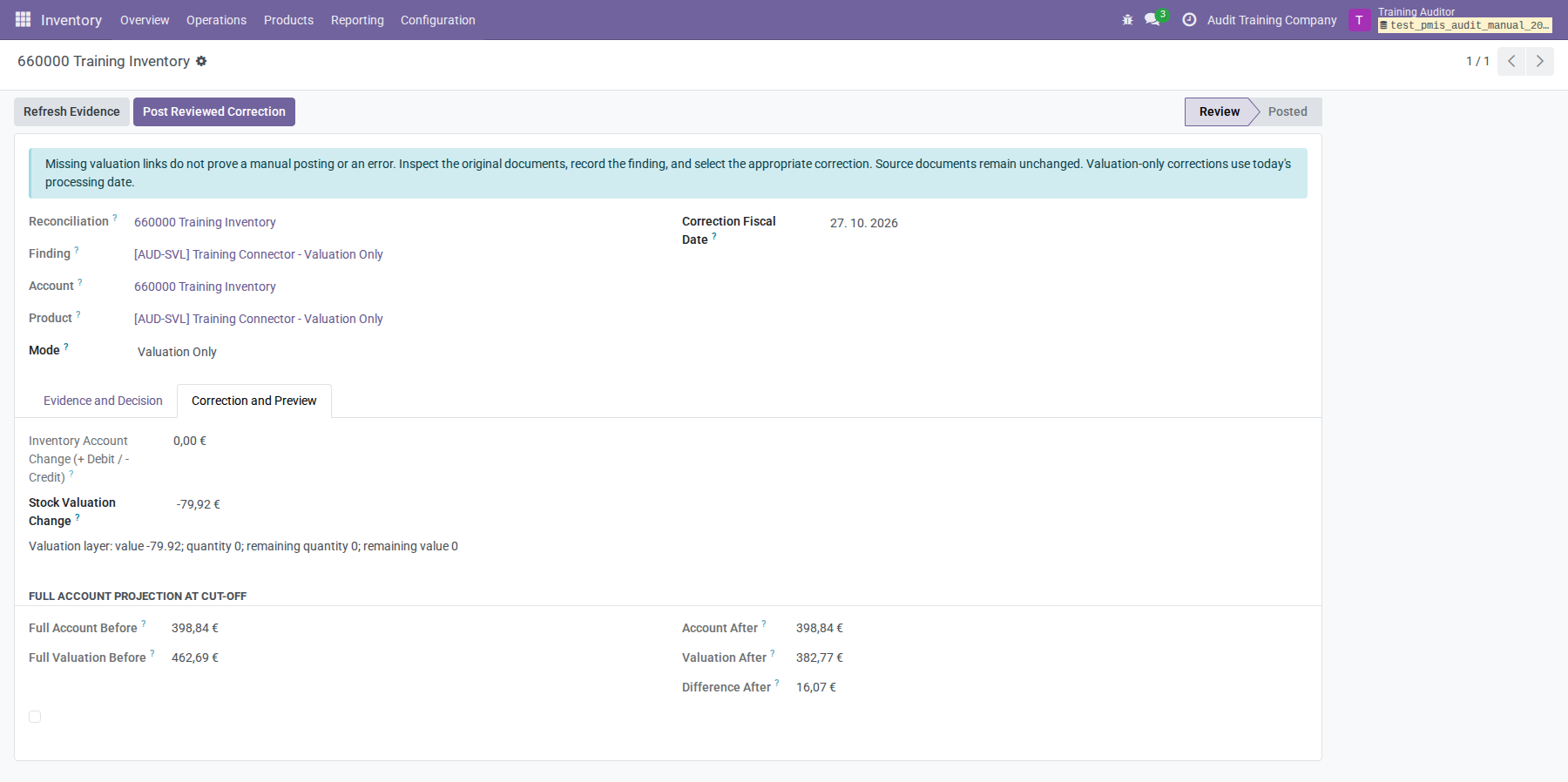
An unlinked layer uses its processing date, so valuation-only corrections must use today's processing date. The review cut-off must include it. All valuation corrections require a cut-off covering current product evidence; the tool does not reconstruct historical remaining FIFO for a past date. Normal fiscal locks still apply, including to valuation-only work.
Correct an untagged posting
Open the untagged finding's Items and distinguish the error from valid
postings. In the example, correct only TRAIN/UNTAGGED/ERROR for €7.00; retain
TRAIN/UNTAGGED/VALID for €3.00.
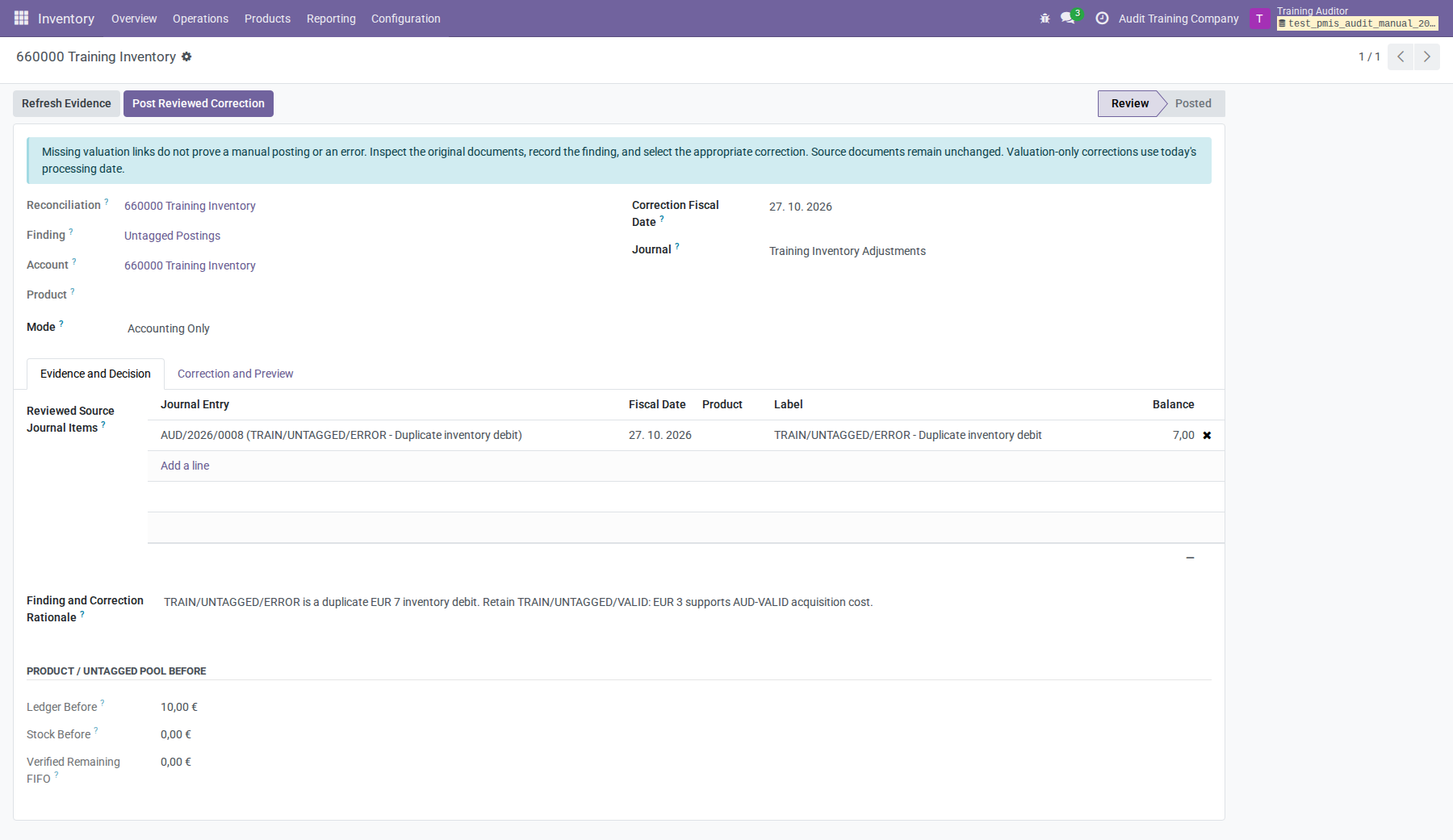
Prepare Accounting Only, leave Product empty, and select the €7.00 source.
Use −€7.00 on inventory and +€7.00 on the original training input account
660100 to reverse the duplicate balanced entry. Do not reverse the full €10.00
pool merely because both items are untagged.
Confirm, post, and refresh
- Verify the source references, rationale, correction date, journal if applicable, product balances, signed amounts, and full-account projection.
- For accounting entries, ensure Unallocated Amount is zero and every counterpart is approved. The inventory account itself, deprecated accounts, other-company accounts, receivable/payable/off-balance accounts, and foreign account currencies are not accepted as counterparts.
- Save the draft. Check the confirmation checkbox at the bottom of Correction and Preview; scroll down if necessary.
- Click Post Reviewed Correction and accept the confirmation dialog.
- Inspect Move (the journal entry) and/or Layer (the valuation layer).
- Return to the reconciliation and click Scan / Refresh.
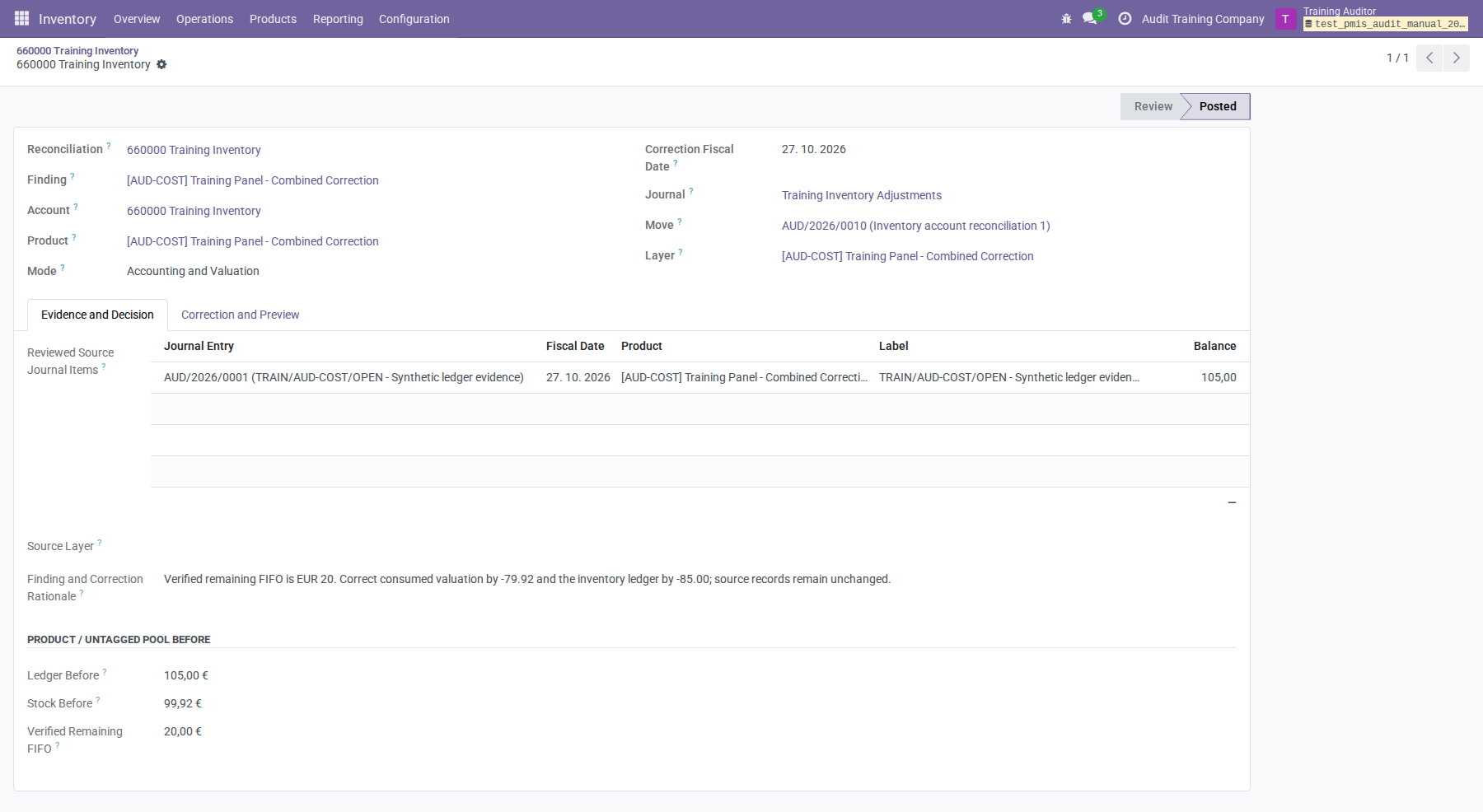
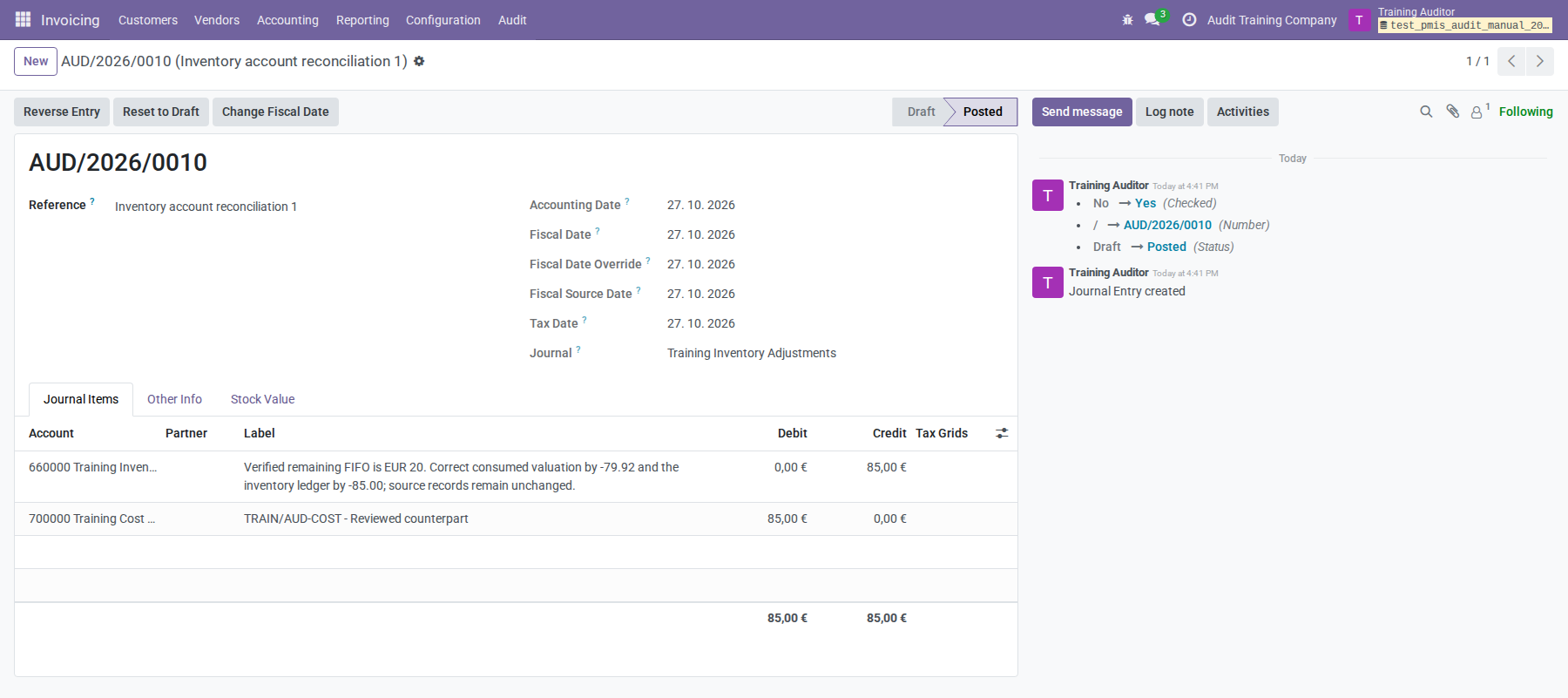
Editing the proposal or allocations clears confirmation. Changed evidence blocks posting until refreshed and reviewed. Refreshing another correction is also necessary after the complete account's balances change.
The selected source journal items are reserved when posting succeeds. The same source cannot be corrected a second time by this workflow, even in a fresh draft. For a justified later adjustment, review the new entry and document the new cause. Posted corrections remain immutable and cannot be duplicated or applied again. If posting or final balance checks fail, the correction's new financial records and source reservations are rolled back together. Original documents, stock quantities, and remaining FIFO balances are preserved.
Product diagnosis and inspection
Use Find Discrepancies for detailed stock review:
- Select products in the active company, or leave the selection empty for a company scan. Click Scan.
- Selected products always receive detailed inspection. For a company scan, Include Balanced Products extends inspection beyond valuation/FIFO aggregate candidates.
- Compare quantities, total valuation, remaining FIFO, product-tagged Stock Ledger, and Correction Blockers.
- Use Explore Findings for ranking, filters, and grouping. The initial order is largest Absolute Valuation Change first. Use Absolute Change ≥ 1 or enter Minimum Absolute Change; clear thresholds to restore smaller cases.
- Use Inspect or Inspection Findings for the observations and source records, and Evidence for the product's layers.
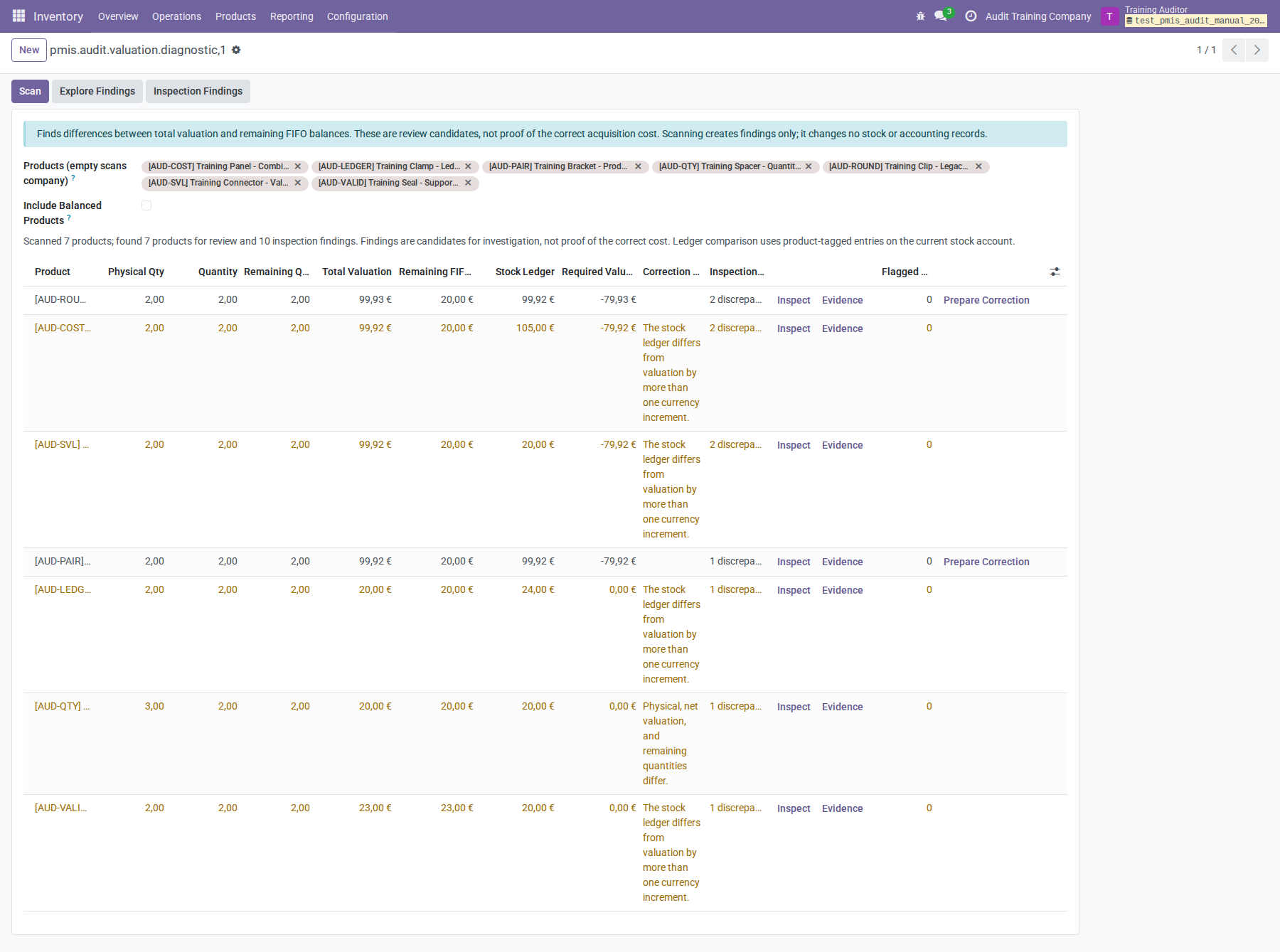
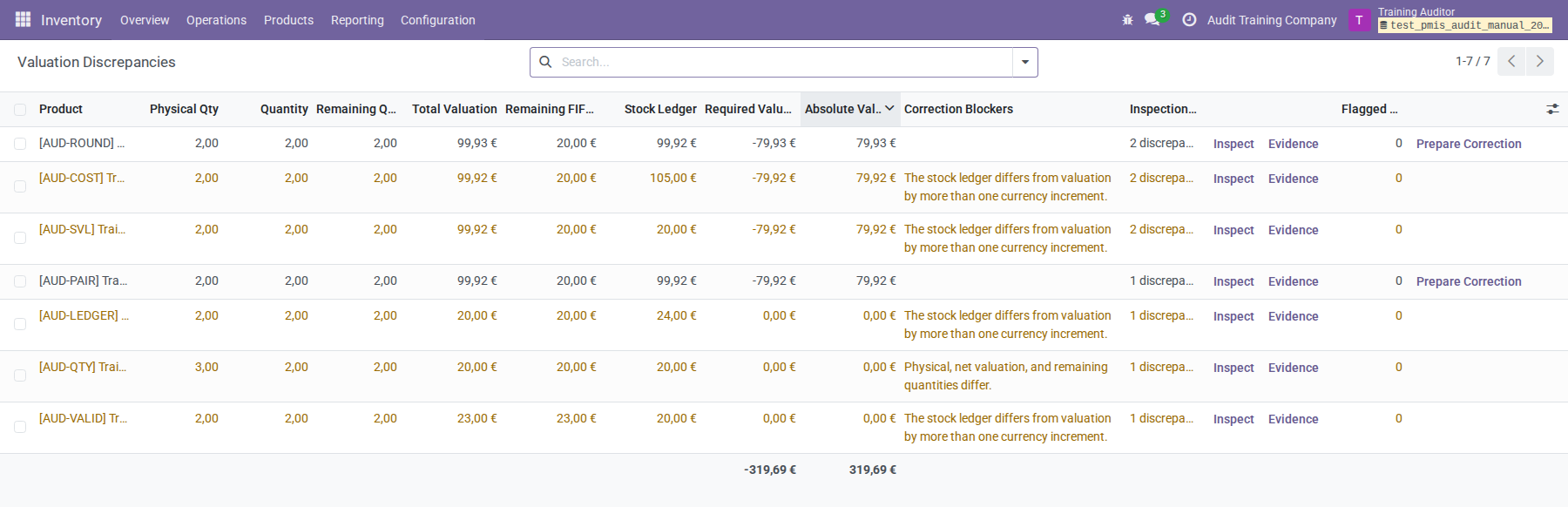
The product ledger comparison includes only tagged items on the currently
configured valuation account. It cannot include the untagged €3.00 supporting
AUD-VALID; use the account review and documentary evidence for that explanation.
An inspection's Confirmed Discrepancy establishes a current difference, not its original cause or the correct replacement cost. Review Why Flagged, What to Review Next, Recorded → Comparison → Difference, and related layers, bills, and journals. Quantity-only observations do not estimate a monetary correction. Zero is a comparison boundary for invalid residuals, not permission to set balances to zero.
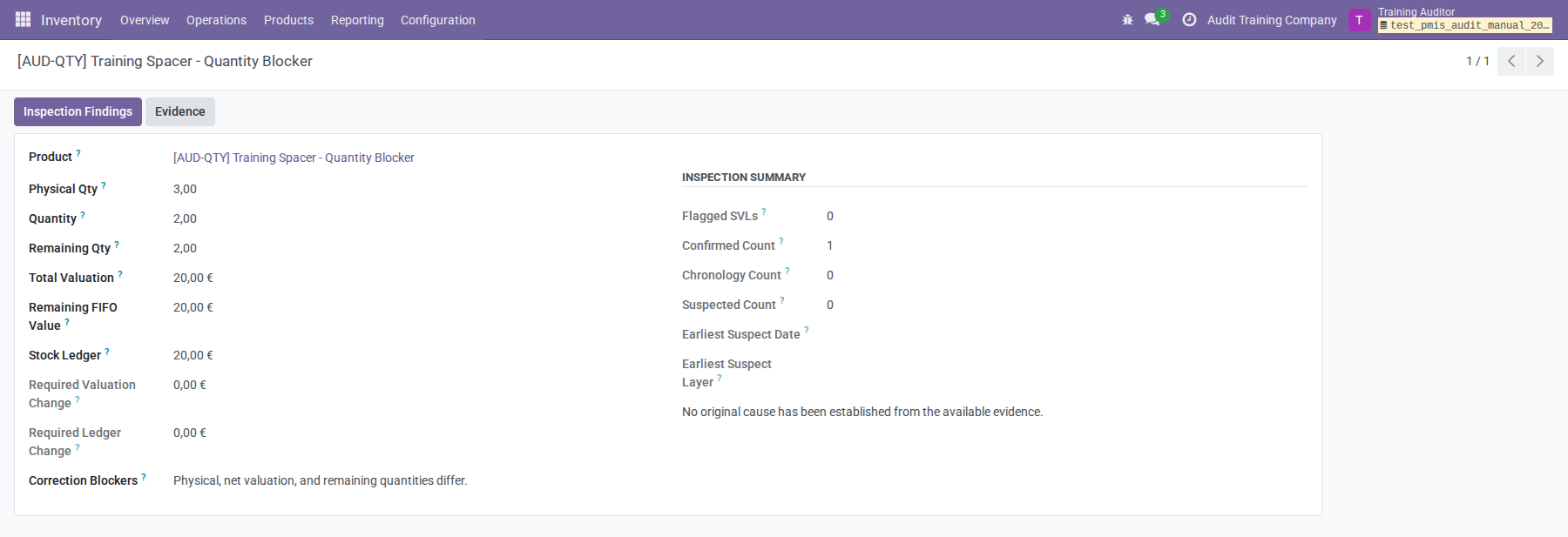
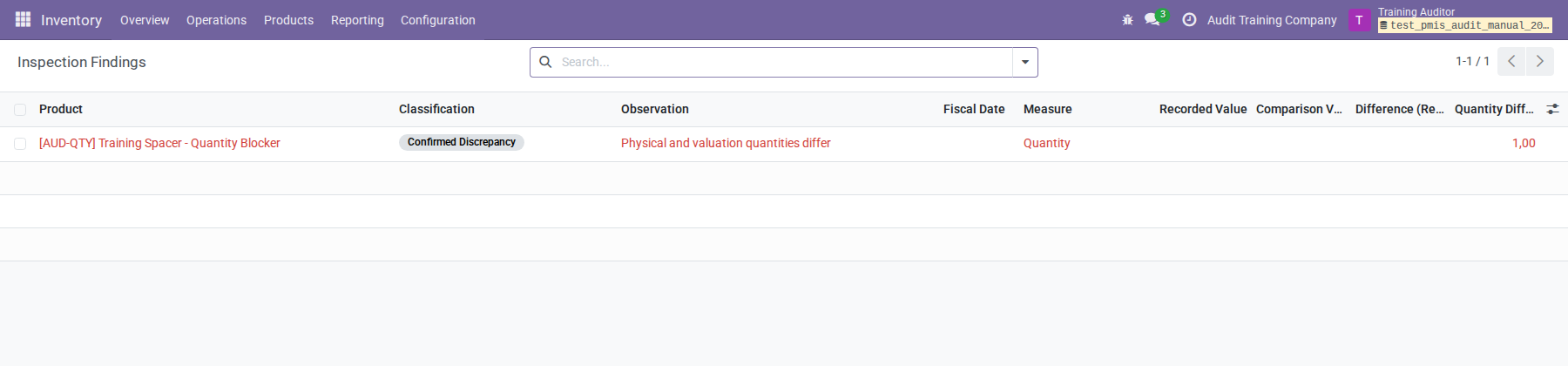
AUD-QTY has valuation and ledger €20.00, yet physical quantity three instead of
two. It requires a separate stock investigation. It has no financial difference
in the account review and cannot be repaired with an invented value adjustment.
Flagged SVLs appears only when a scan identifies specific layers. Its count is distinct layers, not all product-wide differences. The Flagged by This Scan filter shows those layers with Layer ID, Created on, and Fiscal Date; remove it to inspect the full product history. Zero flags do not certify layers.
Fiscal dates provide accounting context. FIFO consumes in processing order, independent of fiscal-date order. A late-entered picking or a fiscal date before its receipt does not itself prove a costing error. Later supplier-bill price adjustments also do not require rewriting an already-consumed outgoing layer. Do not compare that layer blindly with today's averaged receipt price.
Inspection evidence is temporary and belongs to its creating auditor. Rescan to refresh it; linked records show their current state. Related-layer links are not a complete recursive impact assessment. Use the retained account reconciliation for durable notes and correction history.
Product corrections and rounding
The separate Prepare Correction action on product diagnosis creates a paired product correction. It requires automated FIFO, coherent quantities and residuals, a valid stock account, and valuation/ledger agreement within the supported rounding increment. Both required changes must be nonzero. Use account corrections for justified ledger-only or valuation-only work.
For AUD-PAIR, the reviewed target is €20.00. The product tool proposes Valuation Change
−€79.92 and Ledger Change −€79.92. Select the journal and
date, enter the reason and signed +€79.92 counterpart, review the live journal
and layer previews, save, confirm, and click Post Correction. Corrections are
retained under Valuation Balance Audit → Corrections.
Each product-tool allocation creates a zero-quantity layer. Optional Source Layer links must point to fully consumed layers of the same product/company; they let future native return costing include the child adjustment. Without a source link, the adjustment corrects the product balance only. Do not choose an arbitrary source merely to fill the optional field.
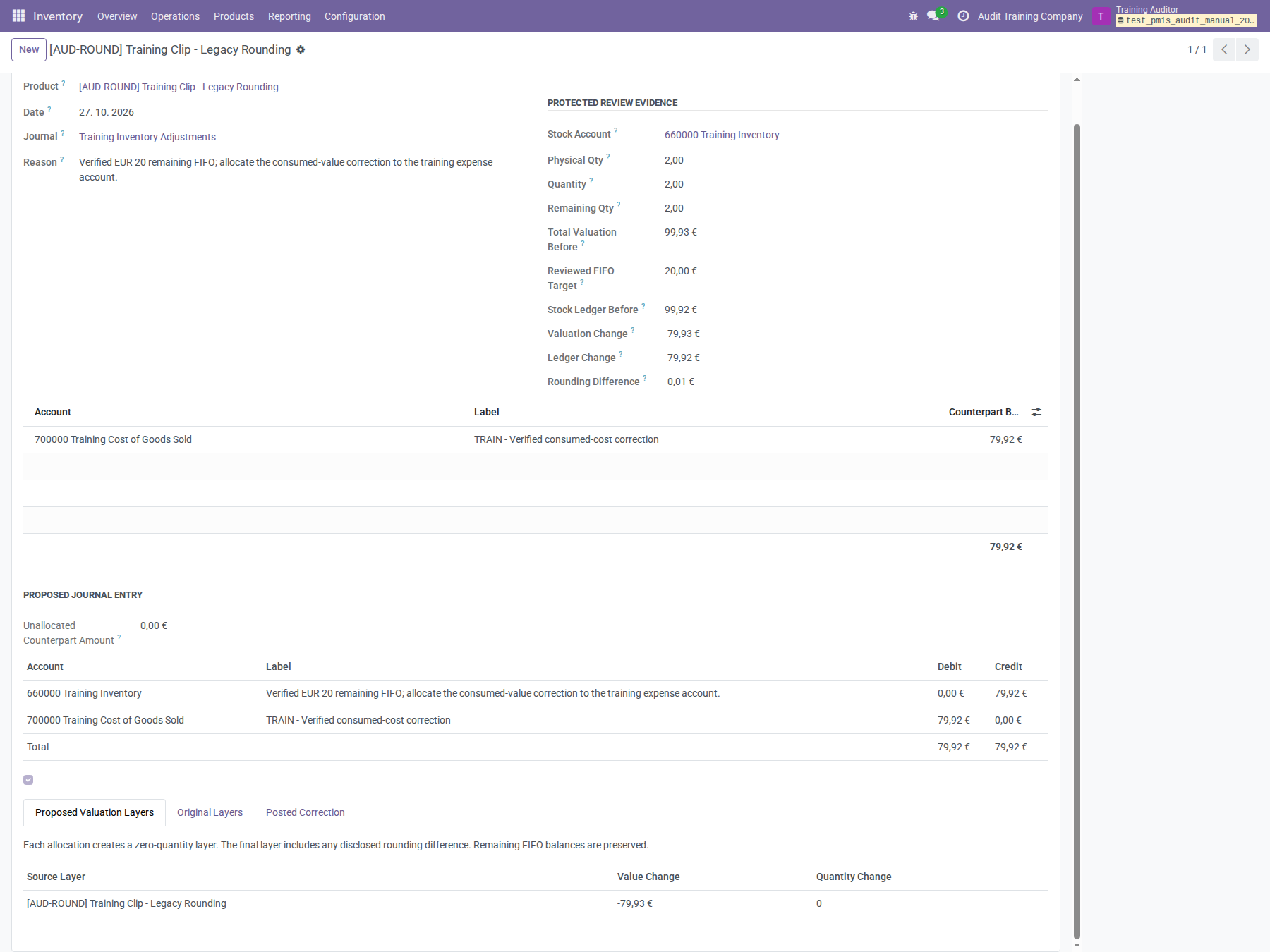
For AUD-ROUND, the underlying value is €99.928, displayed €99.93. The ledger is
€99.92 and FIFO is €20.00:
| Product correction field | Amount |
|---|---|
| Valuation Change | −€79.93 |
| Ledger Change | −€79.92 |
| Rounding Difference | −€0.01 |
| Counterpart debit | +€79.92 |
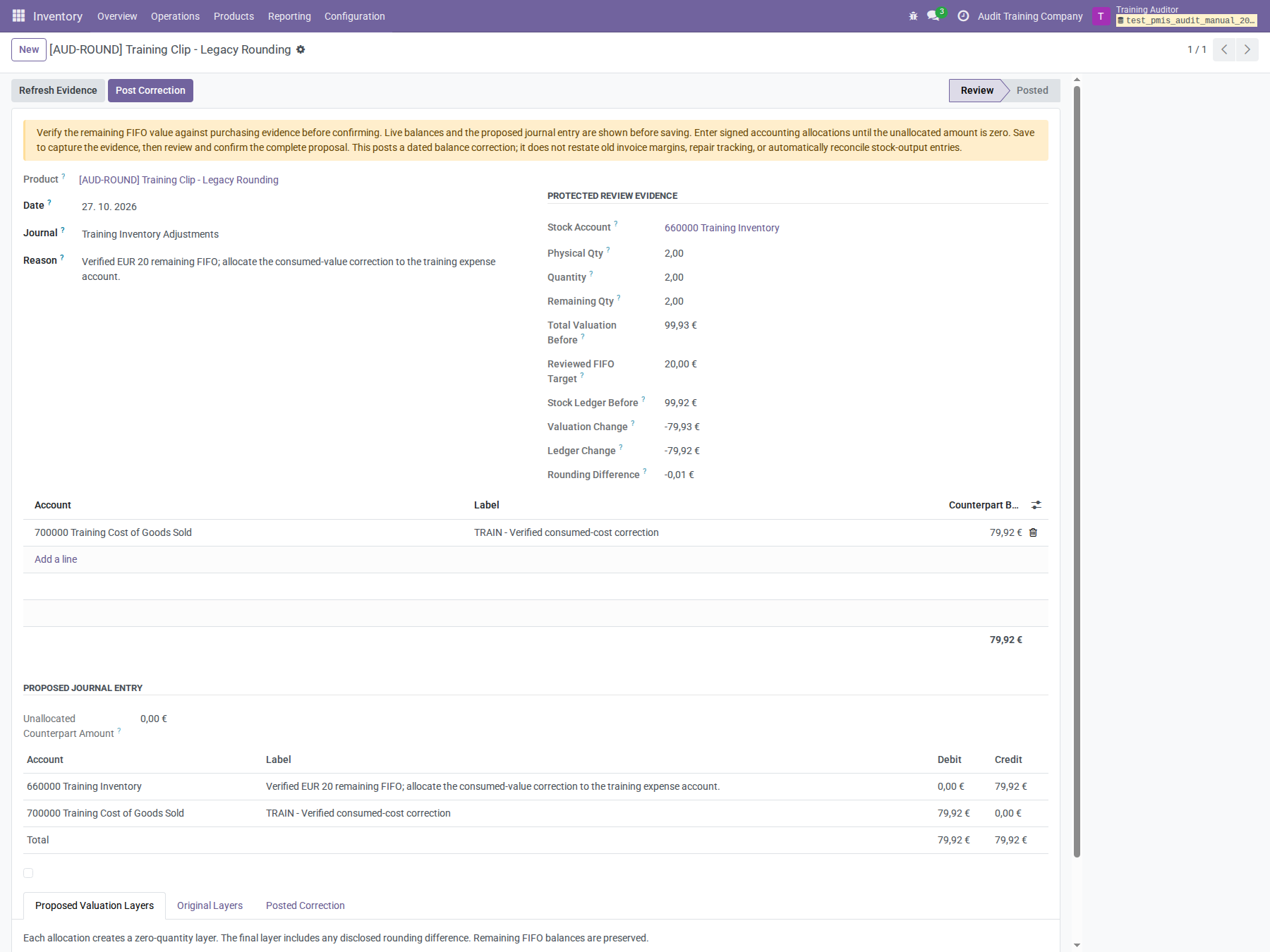
Enter counterparts from Ledger Change, not Valuation Change. Inspect Proposed Valuation Layers; scroll down to see its source and amount. The last layer absorbs the disclosed rounding difference. Here the single child layer is −€79.93, while the journal balances at €79.92.
After posting, raw product valuation is €19.998, rounded to €20.00. FIFO and the ledger remain €20.00. The product cost is synchronized with remaining FIFO per net stock quantity where applicable. Physical and remaining quantities do not change. The ordinary Adjust Valuation workflow is not a substitute when the remaining FIFO value is already correct: ordinary revaluation changes that remaining value too.
Verify the complete account
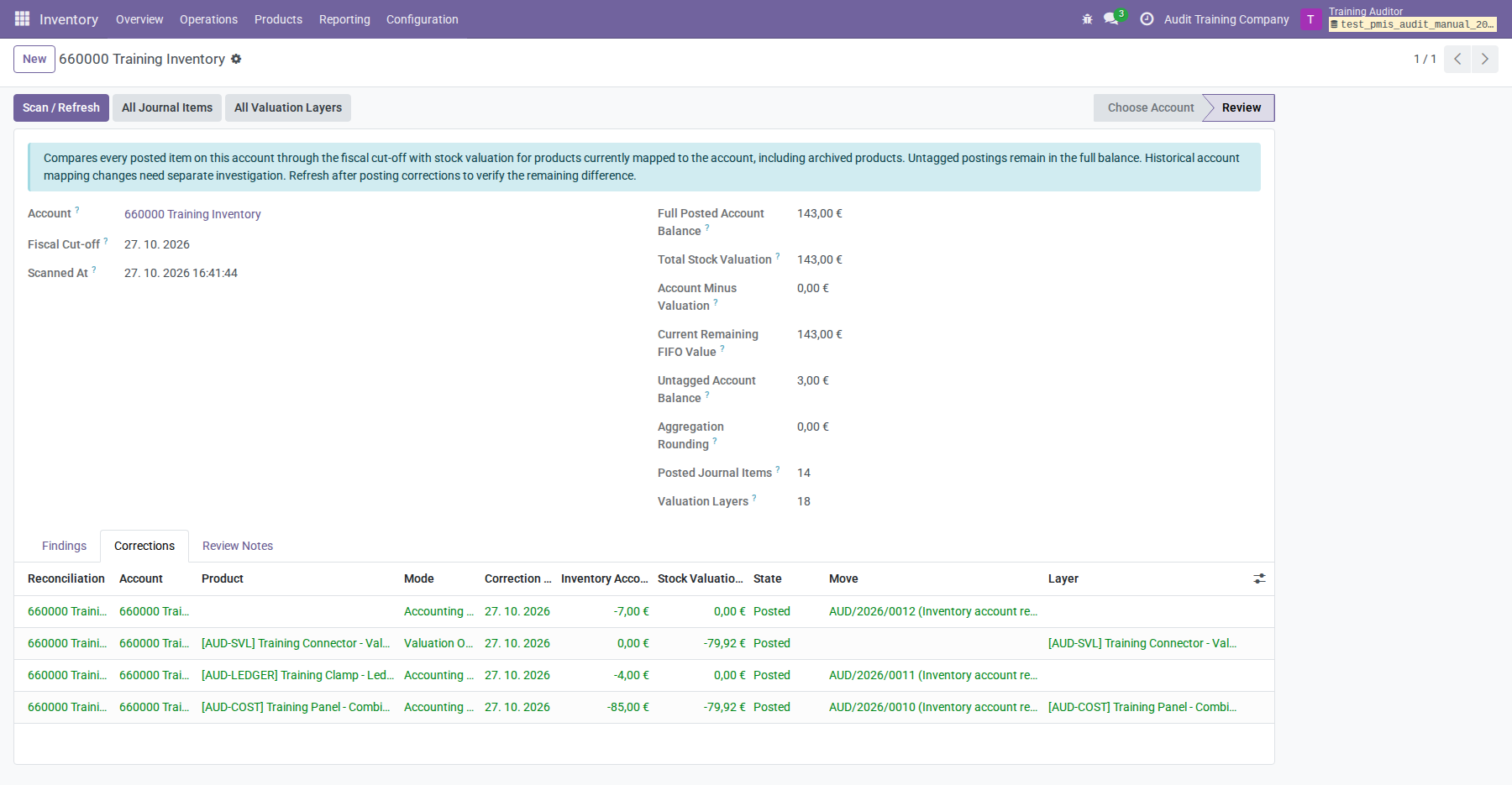
After posting the four account corrections and the two product corrections, refresh the account review. The training totals are:
| Control | Final amount |
|---|---|
| Full Posted Account Balance | €143.00 |
| Total Stock Valuation | €143.00 |
| Account Minus Valuation | €0.00 |
| Current Remaining FIFO Value | €143.00 |
| Untagged Account Balance | €3.00, retained with evidence |
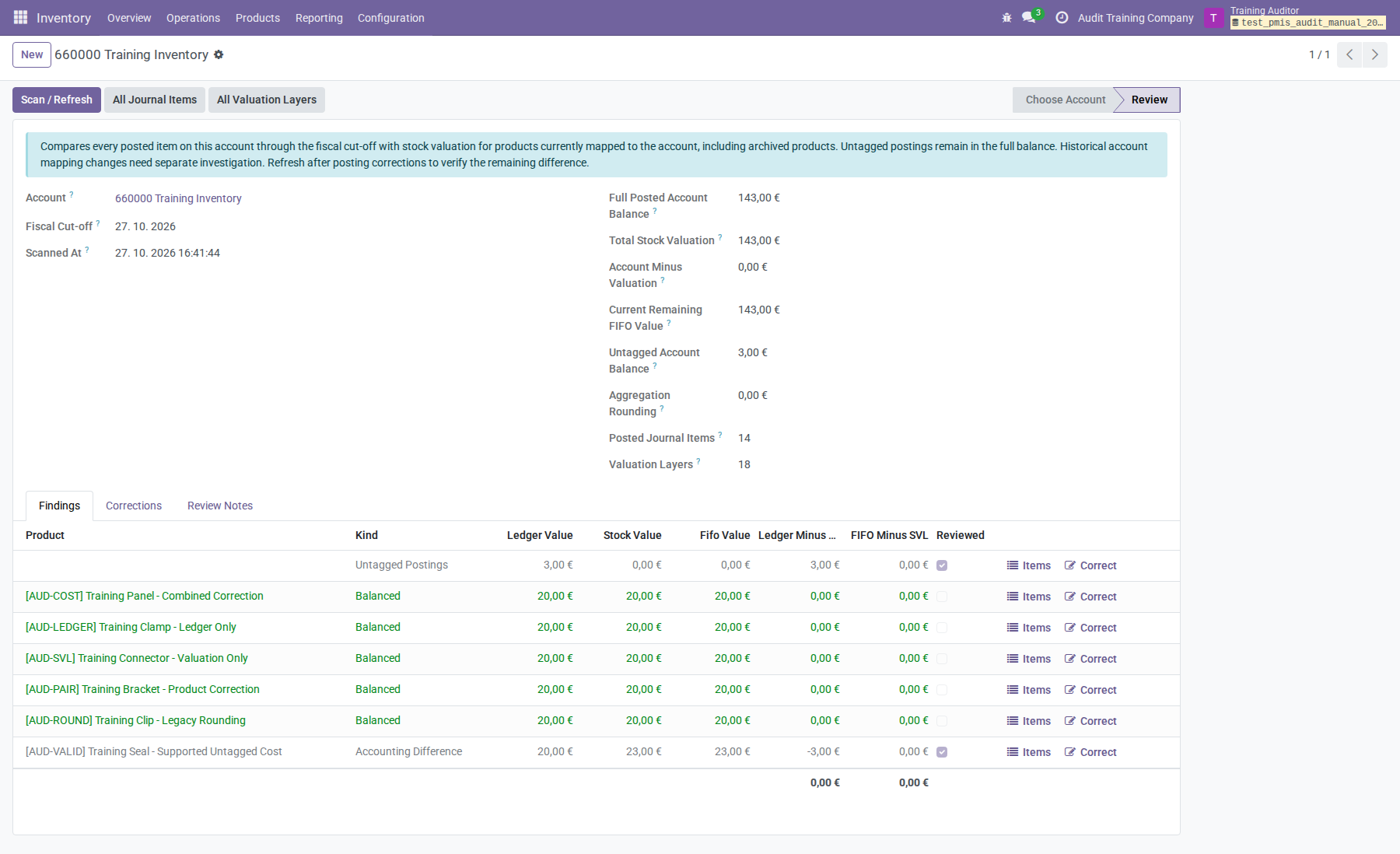
The refreshed review retains balanced rows. AUD-VALID still has a tagged
ledger/valuation difference of −€3.00, offset by the supported untagged +€3.00. Record
decisions on both findings after the final refresh; this
explains the tagging difference without another financial adjustment.
The Corrections tab lists the four account corrections belonging to this review. The two separate product corrections remain under the product Corrections menu; their posted amounts are nevertheless included in the full-account totals.
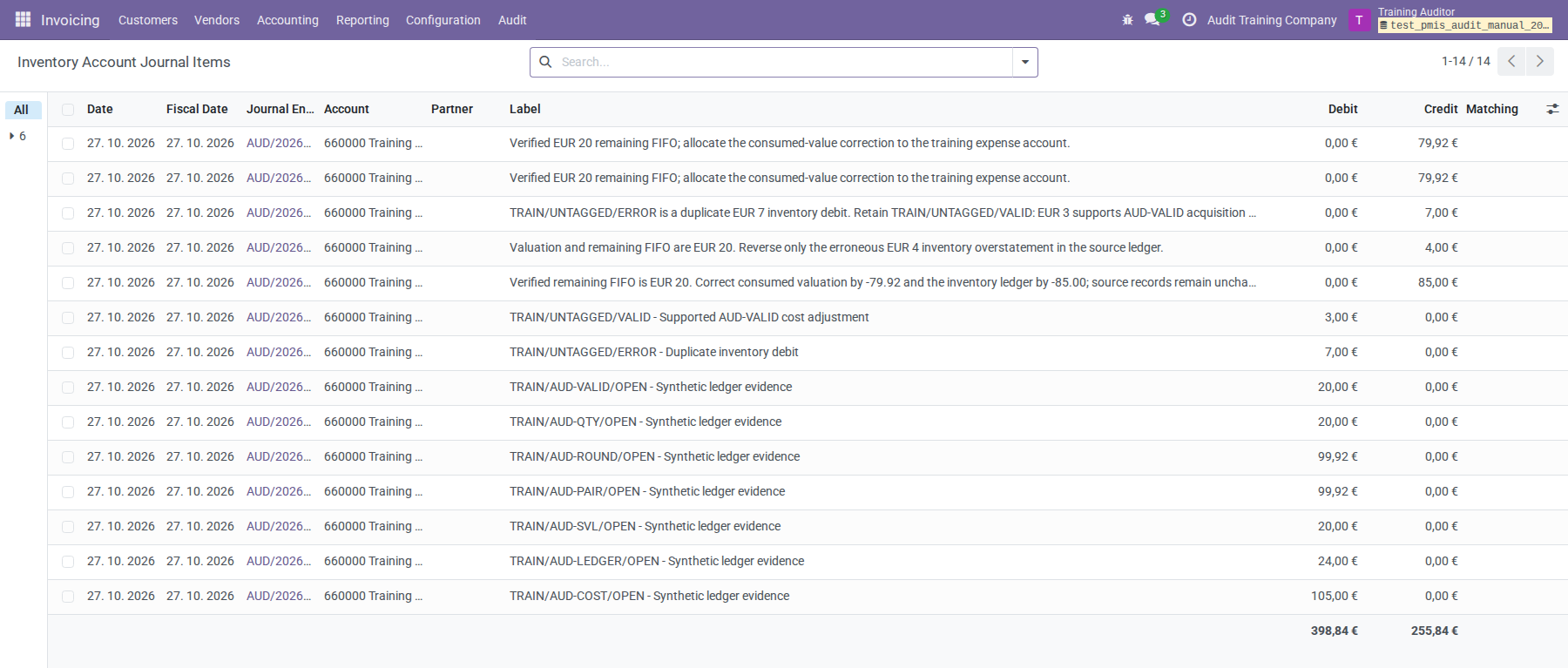
Open All Journal Items again. In the illustrated final list, inventory debits total €398.84 and credits €255.84, giving the €143.00 debit balance. The valuation-only correction has no account item. Open generated journals to verify all counterpart lines, or filter by the exact correction reference and use Group By → Account to isolate the balanced correction.
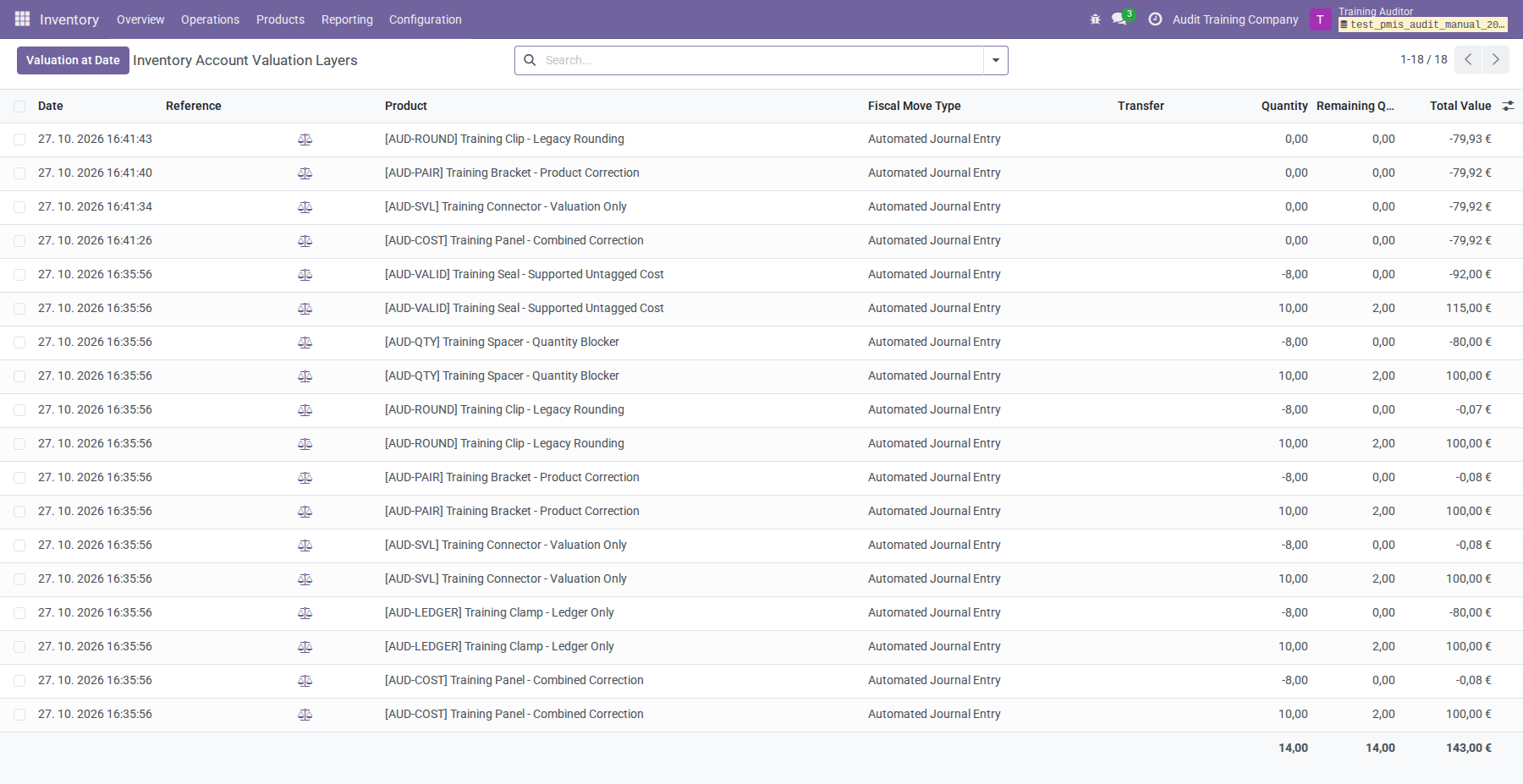
Use All Valuation Layers to review the other side of the comparison. The training list includes the original evidence and four new zero-quantity layers; accounting-only corrections have no valuation layer.
For closure, confirm the same company, account, fiscal cut-off, mapping scope,
and currency precision on both sides. Explain retained differences and
aggregation rounding; do not insert a balancing plug. Account consistency does
not certify stock quantities, historical margins, tracking, taxes, or unrelated
accounts. AUD-QTY still needs its stock investigation even though this account
is financially reconciled. Later postings require a refreshed review or a new
review for the new period.
Other audit features
Compare valuation with posted billed costs
On valuation layers, enable Billed Cost Status, Billed Qty, Billed Unit Price, Billed Value, Incoming Delta, and Outgoing Delta as needed. Open Audit Entry to compare Record Values, Control Values, and related Journal Items. Linked entries expose Stock Value.
Billed-cost evidence uses posted supplier bills/refunds linked to purchase lines, signed company-currency balances, and quantities converted to the product unit. A valid zero cost differs from unavailable data. Partial Billed Cost means priced source quantities do not cover the layer quantity. Availability does not prove that all received units were billed.
Direct purchase links take precedence, including returns; otherwise immediate tracked purchase sources are used. Intermediate transformations are not priced recursively, and landed costs are not automatically included. Current Product Cost belongs to the layer company and is not a historical FIFO price. An outgoing delta is normal while a receipt remains partly unconsumed; zero without tracking is not proof of reconciliation.
Find supplier bills with landed-cost products
In Vendors → Bills, use Vendor Bills with LC, then Undistributed LC for bills without linked landed-cost records. Add Posted if required. Both filters also work on Journal Items, where they select all items of qualifying bills. A linked landed-cost record in any state excludes the bill from Undistributed LC. This does not prove complete allocation and excludes supplier refunds. The product's landed-cost setting determines inclusion; no audit refresh is needed.
Understand zero-price safeguards
Sections and notes are excluded. Changing unit price, display type, or state triggers these product-line rules:
| Lines | States where zero price is rejected | Exception |
|---|---|---|
| Sales | All except draft and cancel |
Discount exactly 100% |
| Purchases | All except draft, done, and cancel |
An installed discount, discount2, or discount3 field exactly 100% |
Changing only a discount does not trigger these constraints. They reject zero prices; they do not establish that a small nonzero price is correct.
Troubleshooting and limits
Account corrections preserve fractional cents in valuation-layer adjustments. For example, a raw valuation of −€0.005 needs a +€0.005 layer to reach zero; adding a rounded cent would leave +€0.005 instead. Journal entries remain in currency increments. Proposed Entries shows the layer amount used for posting; the account totals are displayed at currency precision.
| Symptom | Action |
|---|---|
| Missing menu or denied access | Check the module upgrade, combined audit/accounting roles, underlying permissions, and active company. |
| Evidence changed | Refresh and review again. Reenter any partial accounting-only amount after refresh; check counterparts and confirm again. |
| Counterpart total rejected | Signed allocations must offset the inventory-account change; review the actual accounts too. |
| Cannot find confirmation | In an account correction, scroll to the bottom of Correction and Preview. In the product tool it is above the notebook tabs. |
| Source already corrected | Inspect the earlier correction; do not reuse its original reserved source. |
| Reviewed finding remains in totals | Expected: a decision does not exclude financial amounts. |
| Proposed full-account difference is nonzero | Review the other findings and projection scope; one correction may not close the account. |
| Valuation-only date rejected | Use today's processing date and an inclusive review cut-off; honor fiscal locks. |
| Posting date or lock rejected | Use an approved open date or the normal lock/exception process. The reviewed accounting and fiscal dates must be preserved. |
| Stock/accounting busy | Retry after the other operation finishes; the tool does not disconnect users. |
| Quantity/residual/configuration blocker | Investigate stock ownership, quantities, FIFO residuals, lot valuation, and account configuration before valuation work. |
Account reviews aggregate valuation records directly, including archived products; the number of products mapped to an account does not impose a catalogue limit. All account findings are retained, including when there are more than 1,000. The Findings list displays 80 rows per page; use its pager to review the remaining rows. Changing pages never changes the complete account totals. A correction accepts 1,000 selected source items, 40,000 scoped journal items, and 20,000 scoped layers. Product evidence is additionally bounded to 20,000 quants. Product scans stop above 1,000 findings or 5,000 inspection observations. One product inspection permits 40,000 tracking links, 40,000 bill lines, and 1,000 observations; an individual observation is limited to 1,000 related layers and 1,000 related bills. Narrow the scope when a limit is reached rather than relying on a partial result.
These tools post dated balance corrections. They do not reprice old invoices, restate historical margins, rebuild tracking, reconcile stock-output items, resolve supplier bills, or decide prior-period accounting treatment. Include any such additional work in a separately reviewed process.