PMISuite Stock Accounting & Business Operations
Odoo 18 Community addons for inventory valuation, finance, logistics, and project delivery.
This repository contains 43 addons that extend Odoo and the Odoo Community Association (OCA) ecosystem. Its stock-accounting core connects inventory movements with valuation and financial control. Companion modules cover banking, purchasing, product pricing, reporting, construction workflows, equipment, digital assets, and time analytics.
Choose the modules that fit your workflow and install their declared dependencies. Each catalog entry links to its module documentation.
What you can do
- Follow inventory value: connect stock movements, FIFO value flow, fiscal periods, and accounting corrections.
- Manage financial operations: prepare payment references and SEPA exports, reconcile bank statements, and clear small residual balances.
- Improve warehouse workflows: work with location quantities, logistics units, receipt scheduling, and delivery documents.
- Connect project delivery: progress from assessments and measured work to certification, material operations, and invoicing.
- Produce operational reports: print delivery-aware invoices, CMR notes, and stock cost reports.
Module catalog
Stock valuation and financial control
Trace inventory value through stock movements, accounting periods, and correction workflows.
| Module | What it adds |
| Stock accounting (pmis_stock_account) | Fiscal valuation views, dropship accounting and reconciliation, valuation reversals, and purchase price difference corrections. |
| Stock value flow tracking (stock_valuation_layer_tracking) | Tracks FIFO consumption between stock valuation layers to trace incoming and outgoing value. |
| Fiscal periods (pmis_stock_move_fiscal_month) | Adds fiscal dates and months to stock and accounting records, including manual stock-period overrides. |
| Stock reconciliation (pmis_stock_reconcile) | Corrects wrong-product receipts through paired stock moves while carrying the outgoing valuation into the replacement product. |
| Landed costs (pmis_stock_landed_costs) | Preserves legacy landed-cost records, prevents their cancellation, and exposes valuation adjustment lines. |
| Audit visibility (pmis_audit) | Shows valuation discrepancies and landed-cost allocation flags, with purchase and sales price checks. |
| Accounting maintenance (pmis_audit_server_actions) | Provides restricted corrective actions for valuation, accounting entries, unit costs, and fiscal metadata. |
Accounting and banking
Support invoice administration, payment exports, bank reconciliation, and residual balances.
| Module | What it adds |
| Accounting essentials (pmis_account) | Structured payment references, invoice and journal-item notes, picking completion dates, and fiscal-position refund notes. |
| SEPA payments (pmis_account_banking_sepa) | Configurable SEPA XML remittance formatting for Slovenian banking requirements and a default goods/services payment purpose. |
| Cash journal dashboard (pmis_account_cash_journal) | Opens the current cash ledger from the dashboard while keeping historical cash registers accessible. |
| Bank reconciliation (pmis_account_reconcile_oca) | Extends OCA reconciliation with posted/unreconciled filters, CAMT payment hints, partner alignment, and remembered card-merchant mappings. |
| Rounding write-offs (pmis_rounding_writeoff) | Manually clears small customer or vendor net balances in company currency, subject to a configured limit. |
| Vendor bills from CRM (pmis_crm_vendor_bills) | Converts a lead into a draft vendor bill, transfers its messages and attachments, and archives the lead. |
Warehouse and purchasing
Make quantities, receipts, lots, and delivery documents easier to manage.
| Module | What it adds |
| Purchase receipts (pmis_purchase_stock) | Synchronizes receipt scheduling with purchase dates and lets Billing Administrators adjust purchase-line links. |
| Inventory adjustment filters (pmis_stock_inventory) | Filters adjustment quantities by selected locations, sublocation preferences, and the inventory product domain. |
| Location quantities (pmis_stock_control_columns) | Displays quantities for configured control locations as columns on product variants. |
| Lot quantities (pmis_stock_lot_display_name) | Includes available product quantity and unit of measure in lot display names. |
| Delivery line ordering (pmis_stock_picking_line_sequence) | Uses line sequences to order picking lines and printed delivery slips. |
| Alternate logistics units (pmis_deliverable_logistic_unit) | Converts sales and purchase quantities between logistics units and product units, such as sheets and square meters. |
Products and pricing
Organize product data and make pricing and surcharges visible.
| Module | What it adds |
| Product brands (pmis_product_brand) | Adjusts the product brand column in product lists, hiding it by default. |
| Internal product categories (pmis_product_internal_category) | Adds a separate internal category register and category assignment on products. |
| Pricelist visibility (pmis_product_pricelist_supplierinfo) | Shows selected pricelists and calculated prices, discounts, and cost on product templates and variants. |
| Energy surcharges (pmis_energy_surcharge) | Adds or updates weight-based surcharge lines on draft customer invoices and credit notes, and informational surcharge notes on quotations. |
Reports and documents
Connect printed documents to delivery, valuation, and accounting information.
| Module | What it adds |
| Financial reporting (pmis_account_financial_report) | Extends OCA financial reports with fiscal-date calculations and drill-downs, plus XLSX currency and date adjustments. |
| Invoice layout (pmis_account_invoice_report) | Adds a PMIS document layout, service date, payment terms, and payment reference to invoice reports. |
| Invoice weight (pmis_account_move_product_weight) | Displays total product weight in the invoice form's logistics information. |
| Invoices by delivery (pmis_invoice_report_grouped_by_picking) | Groups invoice lines by picking, with delivery references, delivered quantities, and optional lot and customs information. |
| CMR consignment notes (pmis_report_cmr) | Creates and prints international consignment notes from invoices or completed delivery orders. |
| Stock cost reports (pmis_stock_move_value_report) | Prints operation cost values for pickings, inventory adjustments, scraps, moves, and move lines, including landed costs. |
| Batch invoice PDFs (pmis_report_generation_fixes) | Adds company-aware rendering fallbacks and diagnostics for invoice PDF generation in batch send flows. |
Projects, field service, and business support
Connect commercial assessments and measured work with site operations, approvals, and supporting registers.
| Module | What it adds |
| Projects and assessments (pmis_assessment) | Manages projects, sites, demands, assessments, measurement books, and Situations for work certification and invoicing. |
| Document sign-off (pmis_signoff) | Provides company workflows, project/site signing authority, document snapshots, and sign-off evidence for measurement books and Situations. |
| Situation material operations (pmis_situation_stock) | Links internal material consumption and signed customer Situation deliveries to standard stock moves, valuation, and actual material cost. |
| Construction daily logs (pmis_field_service) | Extends OCA Field Service with project/site context, daily diaries, personnel, equipment, material evidence, and review workflows. |
| Helpdesk equipment (helpdesk_mgmt_equipment) | Registers equipment, models, categories, and media, and links equipment to support tickets. |
| Digital asset register (pmis_digital_assets) | Organizes hosts, application services, databases, and domains with ownership, responsibility, and lifecycle stages. |
| Time analytics (pmis_hr) | Combines attendance and time-off information in employee/day analytics with list and pivot views. |
| Manufacturing overview (pmis_mrp) | Adds a menu entry for the work center kanban dashboard. |
| Multi-company defaults (pmis_base_multi_company) | Configures active-company defaults for partners, products, projects, and analytic accounts using the OCA multi-company framework. |
| VAT address lookup (pmis_base_vat_autocomplete) | Uses VIES to complete partner details from eligible VAT numbers. |
| Shared usability (pmis_ux) | Adds PMISuite settings, product navigation, list/form refinements, repository-version visibility, and sales, purchase, and invoice report options. |
Legacy compatibility
Retain historical relationships for databases that used earlier PMISuite workflows.
| Module | What it adds |
| Legacy down payments (pmis_legacy_invoice_report_advance) | Preserves the earlier down-payment invoice chain and reporting. Intended only for databases that used this method in Odoo 14. |
| Legacy sales links (pmis_legacy_sale_links) | Retains quotation and order relationships from the former isolated-quotation workflow. |
Getting started
- Use Odoo 18 Community and Python 3.12.
- Review the selected addon's __manifest__.py for required Odoo, OCA, and PMISuite modules and any external dependencies.
- Add this repository and its dependency repositories to Odoo's addons_path.
- Refresh the Apps list, install the required modules, and follow their linked configuration and usage documentation.
Some integration modules install automatically when their dependencies are present. Legacy modules have migration-specific purposes; check their documentation before selecting them. Audit maintenance and valuation correction tools require the roles and operational precautions described in their module documentation.
Development and testing
The repository includes addon tests, pytest configuration, and Ruff configuration. In the PMIVerse workspace, use the shared runners below. They manage the pytest-odoo environment and disposable test databases.
Developer commands and test artifacts
Run an addon test suite
/srv/pmiverse/_pmiconfig/scripts/test/run_pytest_addon.sh \
  -a /srv/pmiverse/_pmisuite18/repos/pmiverse/stock-accounting/pmis_account_financial_report/tests \
  -d test_pmis_account_financial_report \
  -- -q --maxfail=1
Pass a test path, node ID, or -k expression after -- to narrow a run.
Run the repository suite
/srv/pmiverse/_pmiconfig/scripts/test/run_pytest_repo.sh \
  --repo /srv/pmiverse/_pmisuite18/repos/pmiverse/stock-accounting \
  -- --maxfail=1 -q
The repository runner discovers addons with a tests/ directory. Options include --pattern, --exclude, --only-changed, --parallel, --stop-on-first-fail, --no-junit, and --no-coverage.
Check static quality
/srv/pmiverse/_pmiconfig/scripts/test/run_lint_addon.sh \
  --repo /srv/pmiverse/_pmisuite18/repos/pmiverse/stock-accounting
Results and badges
Test logs and artifacts are written under /srv/pmiverse/logs/tests/<timestamp>/, with per-addon results, summary files, and optional JUnit and coverage reports. The runners set PYTEST_DISABLE_PLUGIN_AUTOLOAD=1 and explicitly load pytest_odoo. Database names follow the disposable test_<addon> convention.
Published badges are stored in .badges/tests/. To refresh them in the PMIVerse workspace, the existing /srv/pmiverse/_pmiconfig/scripts/test/manual_refresh_badges.sh wrapper accepts --repo and --branch 18.0; it also creates a commit.
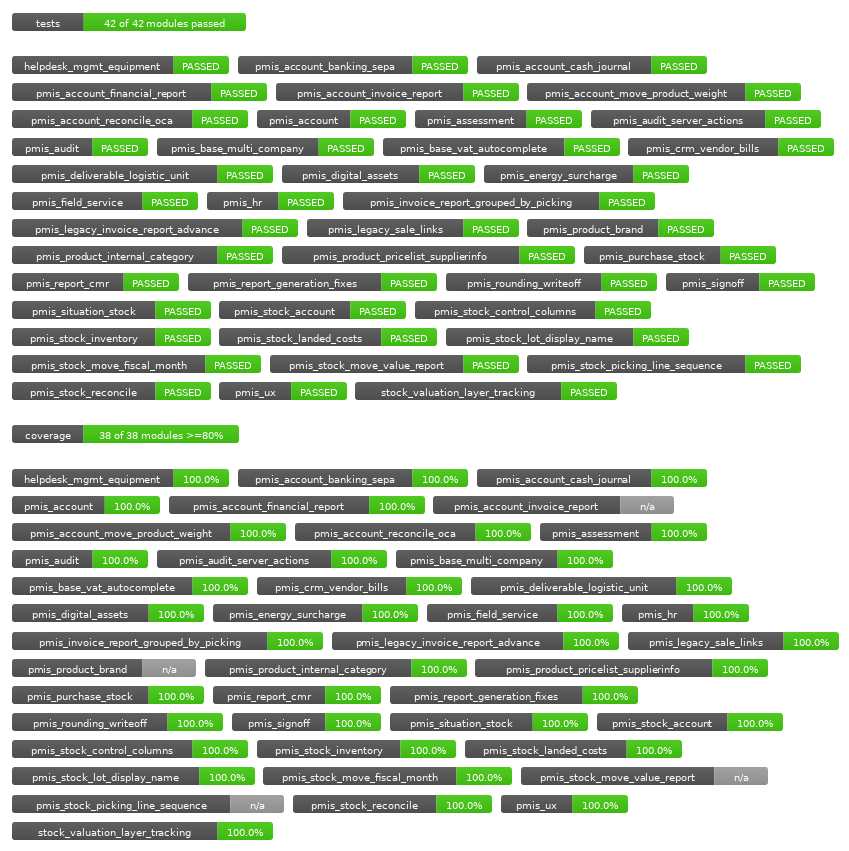
Published test and coverage badges
These badges reflect previously published runs, not a fresh validation of the current checkout. The recorded run is available in latest_run.txt.
Maintainer and licensing
This suite is maintained by LUXIM d.o.o., an independent R&D and deployment company focused on the Odoo ecosystem. Visit PMISuite for product information.
See the changelog for recorded repository changes and testing baseline history.