Reports for Bank Slovenia — User Manual
For accountants preparing SKV/KRD and SFR reports in Odoo 18 Community. The addon prepares downloadable reports from posted journal items; submission to the Bank of Slovenia remains a separate process.
Prepare company and classifications
Ask the accounting administrator to install the module and dependencies, enable Use Slovenian Accounting, and configure fiscal years. Complete company VAT, registry number, address, sector, and reporting contacts.
Before preparing a period:
- Select the intended company. For SFR, restrict the enabled companies to only that company; aggregation relies on record access and active company context rather than an explicit single-company filter.
- Open the relevant accounts under Accounting > Configuration > Chart of Accounts.
- For SKV, configure KRD Instrument type and KRD Maturity.
- For SFR, configure financial instrument, Debt/Obligation, and SKIS code source. If the source is Account, select the account's SKIS code.
- Complete partners' country, capital link, non-resident sector, and SKIS code as required by the report.

The synthetic receivable account's configuration. Classification fields may be on another tab depending on the installed accounting views.
Company Localization Settings can store default SKV debt and obligation accounts. Saving the associated settings writes shared system parameters; editing only the company form does not synchronize wizard defaults. Defaults are not isolated by company: always review the accounts in the report wizard.
Prepare SKV
- Open Accounting > Reporting > SI Bank Reports > SKV Report.
- Enter the period start/end dates and reporting details.
- Select the responsible person and check report-maker and contact details.
- Review Debt Accounts and Obligation Accounts, including company ownership. Correct inherited defaults when necessary.
- Click Get Data.
- Review the grouped Debt Lines, opening balances, increases/decreases, and closing balances against the source journal items.
- Use Print for the report or XML Export for the download.
- Retain and submit the reviewed output through your normal reporting process.
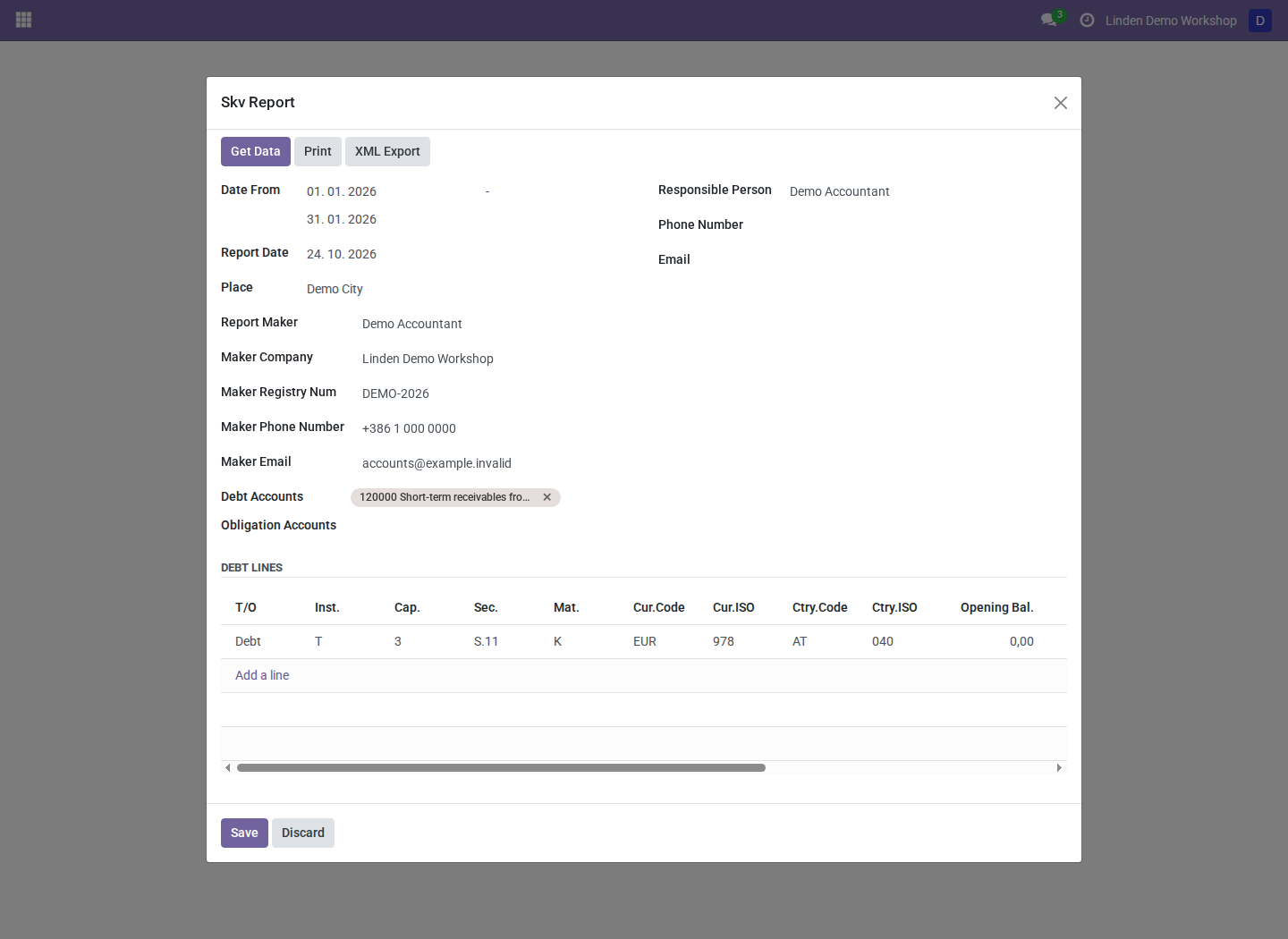
January 2026 report preparation using a posted synthetic Austrian-customer invoice. These are example classifications and amounts.
SKV excludes partners in the company's country and groups the remaining transactions by instrument, maturity, capital link, sector, currency, and country. Incomplete required classification or country/currency data can cause groups to be skipped. A generated file alone does not establish completeness.
Prepare SFR
- Confirm only the reporting company is enabled in the company selector.
- Open Accounting > Reporting > SI Bank Reports > SFR Report.
- Select Year, Quarter, and the resulting date range.
- Check company, sector, responsible person, and contact details.
- Click Prepare Data.
- Review all four report sections: financial assets, financial liabilities, asset transactions, and liability transactions.
- Open Lines and resolve partners listed under Partners without SKIS. Prepare the data again after correcting classifications.
- Click Generate xml and download the generated file.
SFR balance sections aggregate from fiscal-year start to the selected end date; transaction sections use the selected date range. The SFR export does not run the bundled XSD validator, so complete the receiving system's validation and your accounting review before submission.
Troubleshooting
| Symptom | What to check |
|---|---|
| SI Bank Reports menu is absent | Module installation, accounting access, selected company, and Slovenian settings |
| SKV lines are missing | Posted state, accounting dates, selected accounts, foreign partner country, and required classifications |
| Wrong accounts appear by default | Shared defaults; select the reporting company's accounts directly |
| SFR period dates are blank | Select a configured fiscal year and quarter |
| SFR totals include unexpected records | Restrict enabled companies and review account/partner SKIS sources |
Screenshot context
Screenshots are real Odoo 18 captures from a fresh disposable database with fictional company, partner, and posted invoice records. They are not submitted reports. See the module overview for dependencies and limitations.