Slovenian Asset Management — User Manual
For asset accountants using OCA asset management in Odoo 18 Community. This addon adds percentage depreciation and previous-system information. Normal asset acquisition, depreciation posting, and disposal use the installed asset management workflow.
Configure a percentage profile
With asset-configuration access:
- Open Accounting > Configuration > Assets > Asset Profiles.
- Create or open the profile for the relevant asset class.
- Configure the asset, accumulated-depreciation, expense accounts, and journal.
- Set Time Method to Percentage.
- Enter Annual depreciation percentage, greater than zero and no more than 100. Review the default of 100% before use.
- Choose Percentage method:
| Method | Behavior |
|---|---|
| Fixed (percentage of base) | Applies the period rate to the depreciation base |
| Declining (switch to linear) | Uses the larger of declining residual depreciation and the amount needed over remaining periods |
- Select the period length and schedule duration/end date, then save.
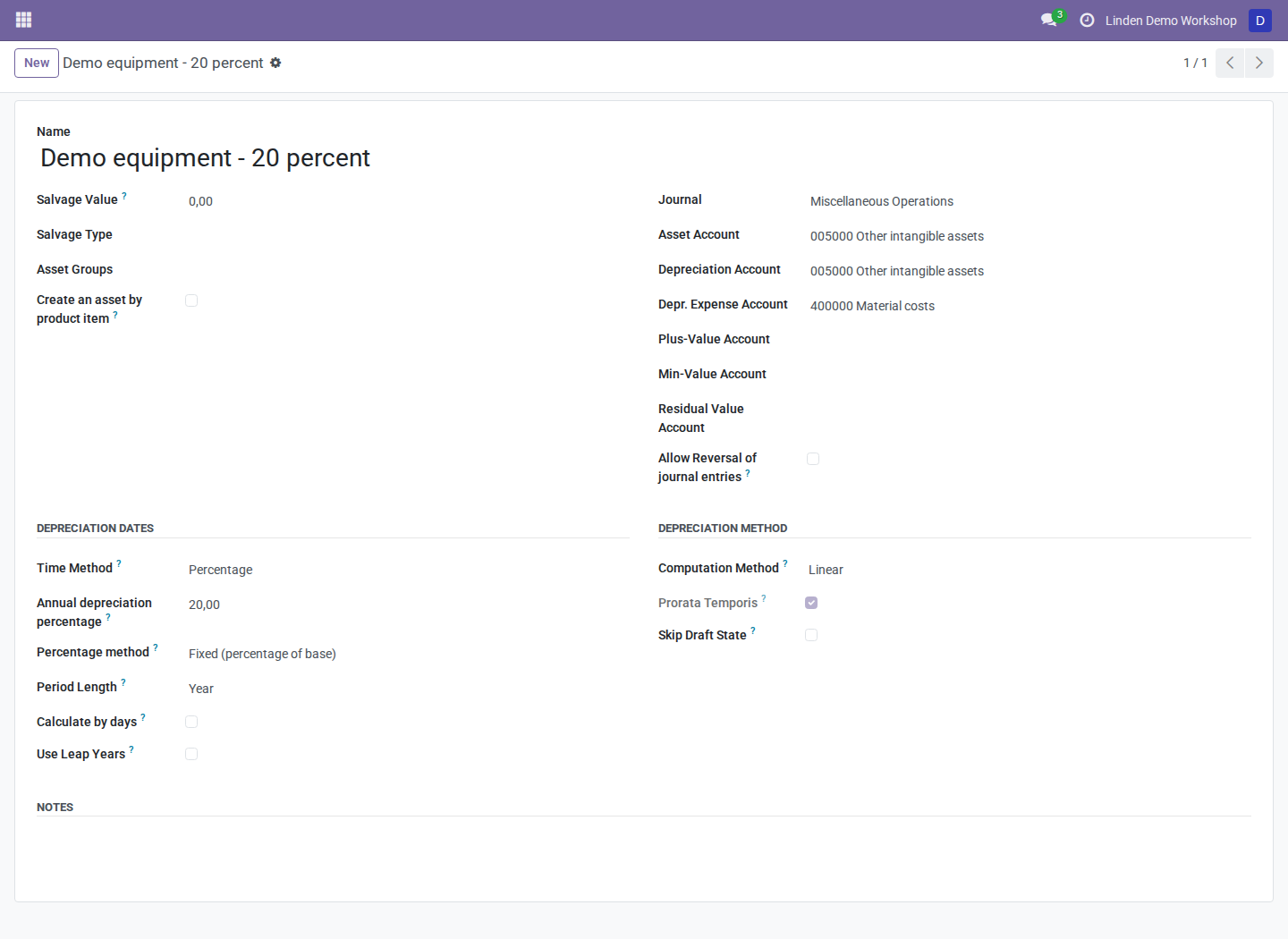
A fictional equipment profile using a 20% annual fixed rate. The appropriate rate and accounting treatment must be determined for the actual asset.
The annual rate is divided by 12 for monthly periods, by 4 for quarterly periods, or by 1 for yearly periods. Schedule duration matters: the remaining residual is assigned to the last non-initial period.
Create and review an asset
- Open Accounting > Accounting > Assets and create a draft asset.
- Select the profile and review the copied percentage settings.
- Enter purchase value, salvage value where applicable, Purchase Date, depreciation start date, and schedule duration.
- If relevant, fill Previous depreciations information: first previous depreciation date, previously depreciated amount, and previous periods.
- Compute the depreciation board using the standard asset controls.
- Review each period, rounding, initial lines, and final residual.
- Confirm the asset and post depreciation using the normal asset workflow.

A synthetic EUR 10,000 equipment asset with its computed schedule. Computing a board is distinct from posting depreciation journal entries.
Periods on or before the fiscal-year lock date become initial lines with zero depreciation. If every period is initial, no non-initial final line exists to clear the residual. Review start/end dates and locks instead of assuming a zero board means the asset is fully depreciated.
Previous-system fields do not automatically import historical journal entries. Reconcile historical accounting separately under the approved opening process.
Change settings or close an asset
Percentage fields are editable on a draft asset. Once a depreciation move is posted, writes to the percentage settings are blocked. Have the asset manager review the appropriate correction workflow rather than editing posted history.
An accounting manager can use Set to close after reviewing outstanding work. This button changes the asset state only: it does not create disposal, write-off, or balancing entries or establish that all accounting is complete.
Troubleshooting
| Symptom | What to check |
|---|---|
| Percentage fields are hidden | Time Method must be Percentage |
| “Wrong percentage!” | Annual rate must satisfy 0 < rate <= 100 |
| Large final depreciation | Schedule duration and remaining residual; the final line clears it |
| Initial zero-value lines | Fiscal-year lock date and schedule boundaries |
| Closed asset still has an accounting balance | Manual close changes state only; review depreciation and disposal accounting |
Screenshot context
Screenshots are actual Odoo 18 browser captures from a fresh disposable database with fictional assets and accounting records. See the module overview for dependencies and calculation details.