PMIS Quality Management System user manual
This walkthrough takes a company from its first approved quality manual through an internal audit, a nonconformity, corrective action, a follow-up effectiveness check, and a closed management review. The screenshots show synthetic records for Example Works, a company that receives, assembles, and releases workshop kits. Use your own scope, criteria, and evidence when applying the workflow.
The example uses ISO 9001:2026 as its reference. The clause numbers below locate the relevant topics in the standard. Use the standard itself when assessing applicability and conformity. ISO 9001:2026
1. Set up the workspace
- Make the Odoo 18 sources for this repository and OCA
management-system,knowledge,crm, andmanufactureavailable on the addons path. Update the Apps list and install PMIS Quality Management System. See the addon overview for the effect of installing document approval in a database with existing document revisions. - Select the company in the company switcher before creating QMS records. Confirm the company on forms where Odoo displays it. The supplied Quality system and templates are shared. Save policies, procedures, audits, findings, actions, and reviews under the relevant company.
- Assign document authors Knowledge / Editor and independent approvers Knowledge / Approver. Use Knowledge / Manager to administer document categories. Assign the quality coordinator Management System / Manager to create audits and management reviews. Management System / Auditor can update accessible audits and their verification lines. An individual can have both Knowledge and Management System access.
Top-level Management System opens the app. Its Management System menu contains operational records such as Audits, Nonconformities, Actions, and Reviews. Its Documentation menu contains Manuals, Procedures, and Work Instructions.
2. Create and approve a company quality manual
The manual documents how the company operates its QMS. Use it to capture scope and process interactions (clause 4), policy and responsibilities (5), planning (6), support and document control (7), operating controls (8), performance evaluation (9), and improvement (10).
- As a Knowledge manager, open Management System → Configuration → Categories. Open ISO 9001:2026 Quality Manual Template and copy its Template text.
- Create a category named Example Works Controlled Manuals. Set its parent Category to ISO 9001:2026 Quality Manual Template, set Company to Example Works, and paste the copied text into Template. Enable Require approval and choose an Approver group containing the designated reviewers. The designated reviewers also need Knowledge approver access. Save the category.
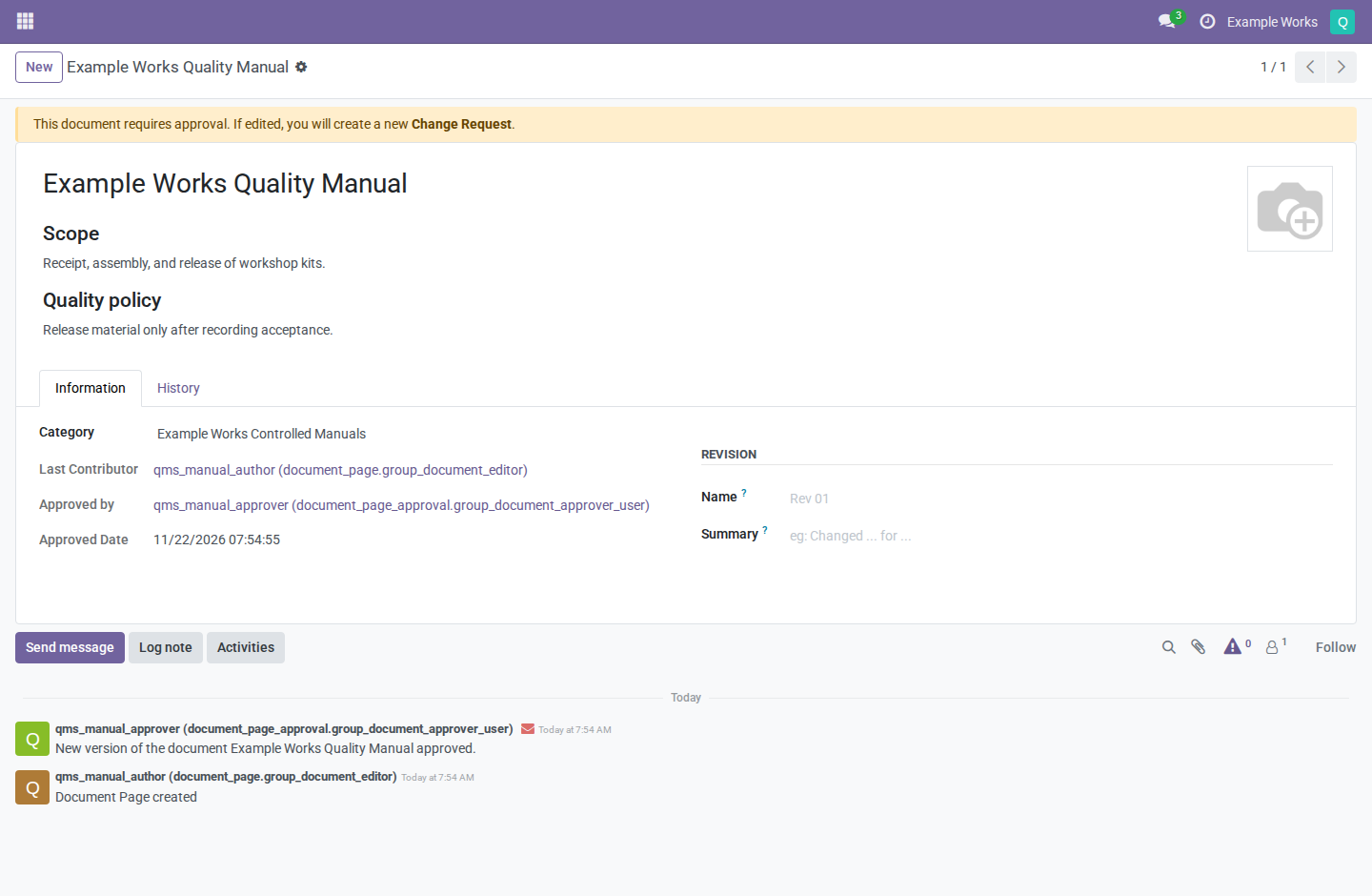
- As a document editor, choose Documentation → Manuals → New. Enter Example Works Quality Manual and select Example Works Controlled Manuals as the category. Set the company and complete the populated template. For example, set the scope to “Receipt, assembly, and release of workshop kits.” Set the quality policy to “Release material only after recording acceptance.” Name the receiving lead as the owner of incoming material inspection and reference the applicable procedure.
- Save the page. With approval required by its category, saving changed content submits a change request. As an approver, open Change Requests from the document or the Knowledge menu, select the pending revision, review the proposed content, and click Approve.
- Reopen the manual. Confirm the approved content, Approved by, and approved revision in the document history. For later changes, enter a revision summary describing what changed and why.
Create Incoming Inspection Procedure under Documentation → Procedures. For a process template, clear the generic text before selecting QMS Process and Controls Template. Describe who inspects incoming material, how acceptance is recorded, and who can release or quarantine it. For example, “The receiving lead signs the incoming inspection record before releasing the receipt.” Use Work Instructions for the step-by-step procedure at the receiving station. Use QMS Risks and Opportunities Template under Procedures for planning records, such as the risk that unsigned material is released and the opportunity to automate a release check.
3. Plan and perform an internal audit
Clause 9.2 concerns internal audit. Plan the timing, scope, criteria, methods, and participants. Choose an auditor who can assess the receiving process impartially. Retain the sample references and observations so another reviewer can understand the conclusions.
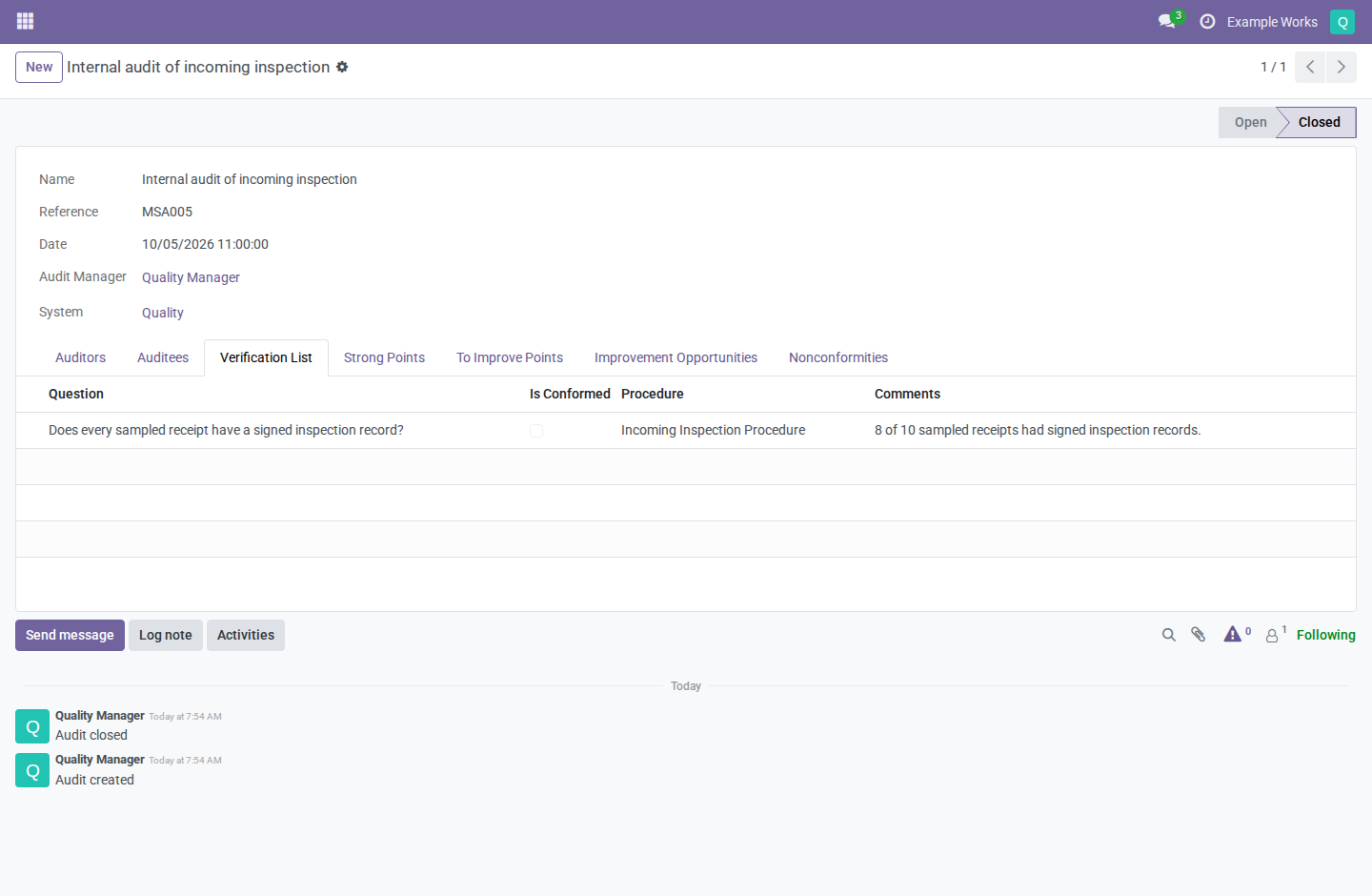
- Open Management System → Audits → New. Enter Internal audit of incoming inspection, choose System → Quality, select the audit manager, and set the date. In the example the audit takes place on October 5, 2026.
- Add the auditor on Auditors and the receiving lead on Auditees. Save. On Verification List, add a question and link Incoming Inspection Procedure.
- Ask “Does every sampled receipt have a signed inspection record?” Sample ten receipts against the procedure. Enter “8 of 10 sampled receipts had signed inspection records” in Comments. Leave Is Conformed cleared for this line. Record the affected receipt identifiers and retain the sample list with the audit records.
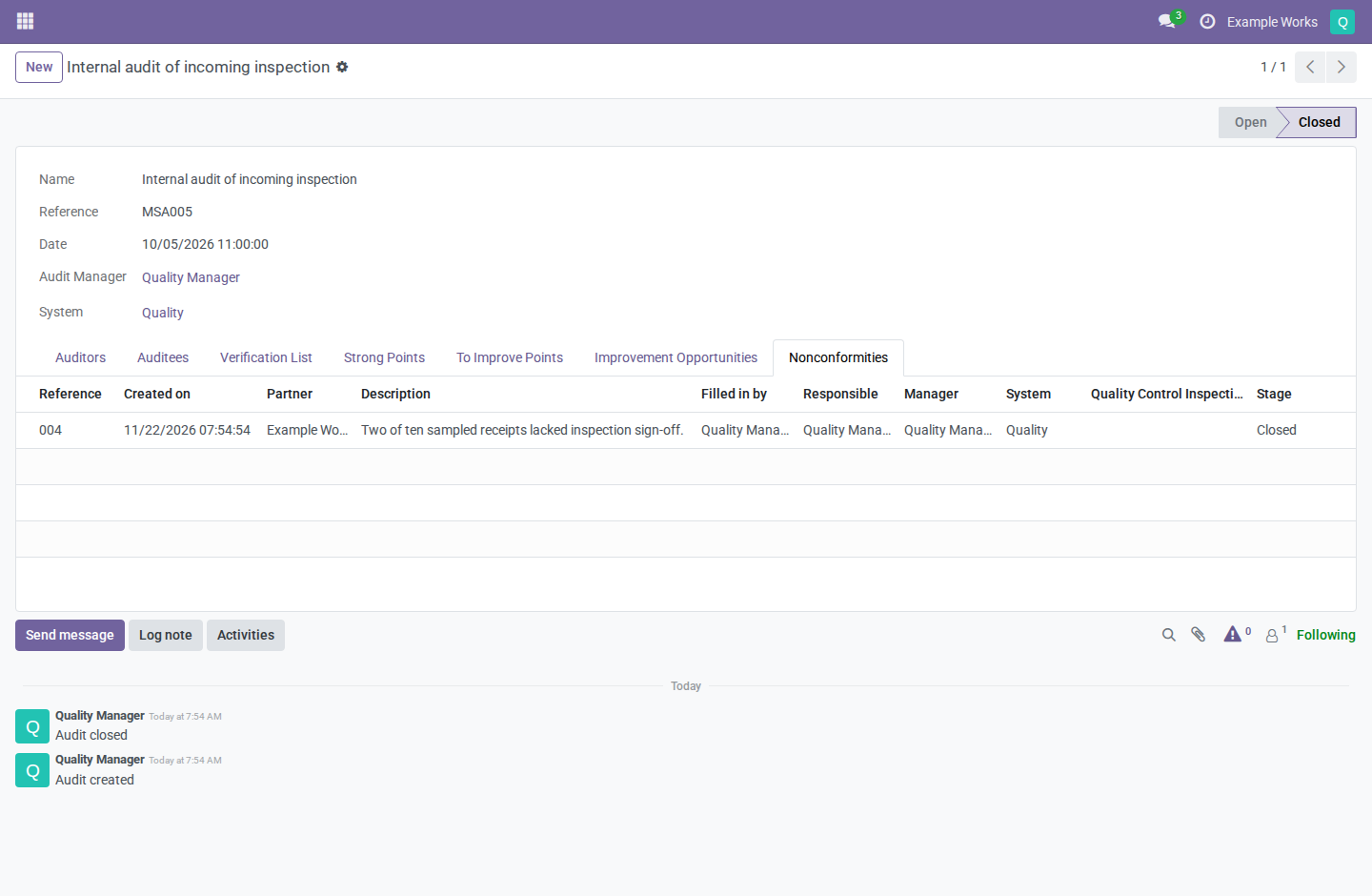
- Create the finding in the next section, return to the audit, and add it under Nonconformities. After recording and reviewing the audit results, use Close on the audit. The linked finding has its own lifecycle and can remain open during follow-up.
4. Record the nonconformity and implement corrective action
Clause 10.2 concerns nonconformity and corrective action. Record what failed, control the immediate problem, assess its cause and possible recurrence, and make a change that addresses the cause.
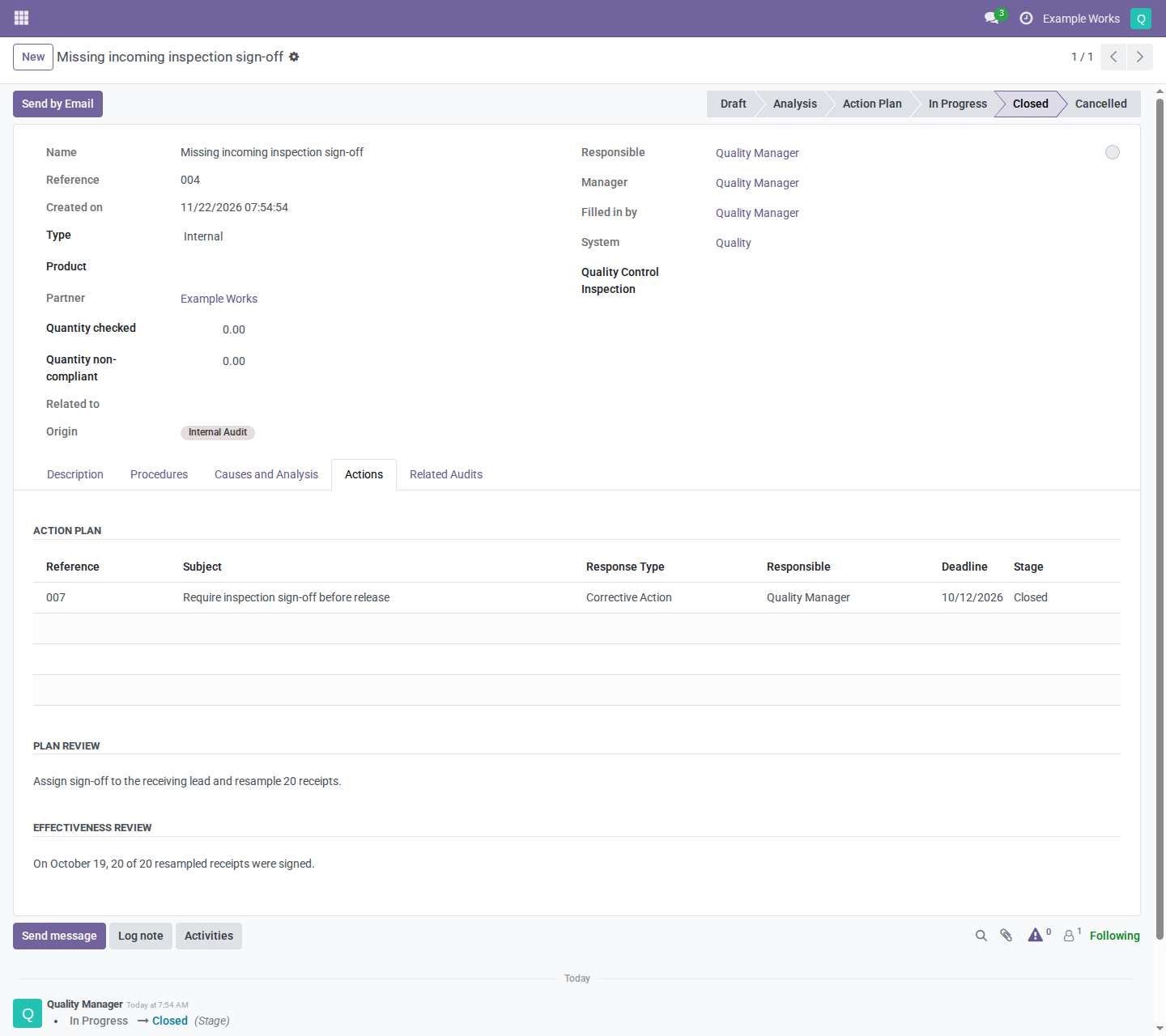
- In Management System → Nonconformities, create Missing incoming inspection sign-off. Select Quality, choose Internal Audit as the origin, select the applicable partner (the company's contact for this internal example), and set Responsible and Manager. Enter the audit reference in Related to, add Incoming Inspection Procedure on Procedures, and record the two affected samples under Description. Save in Draft.
- Record containment in Description. For this example, hold the affected material pending inspection, then disposition it according to the procedure. Record who handled the material, when they did so, and the references to the inventory records.
- Move the finding to Analysis. On Causes and Analysis, record “The intake checklist did not assign responsibility for sign-off.” Look for the same gap in related receiving processes.
- Move to Action Plan. In Actions, add a new action or link one created under Management System → Actions. Enter Require inspection sign-off before release and set Response Type → Corrective Action, Responsible, and Deadline. In Description, record the checklist change, assignment of sign-off to the receiving lead, and training before the deadline. Save the action and confirm it is linked to the finding.
- In the finding's Plan Review record the owner and a measurable effectiveness check: “Resample 20 receipts after the change. Acceptance criterion: all 20 are signed before release.” Save the comments before moving the finding to In Progress. Starting the approved plan moves linked draft actions to In Progress.
- Complete the checklist change and training. Retain the approved checklist revision, training record, and implementation date with the action. Keep the finding open for verification.
5. Verify effectiveness and close the finding
- After implementation, have the inspector sample 20 new receipts. Record the date, population, sample references, and results. In this example, on October 19 all 20 of 20 resampled receipts were signed before release.
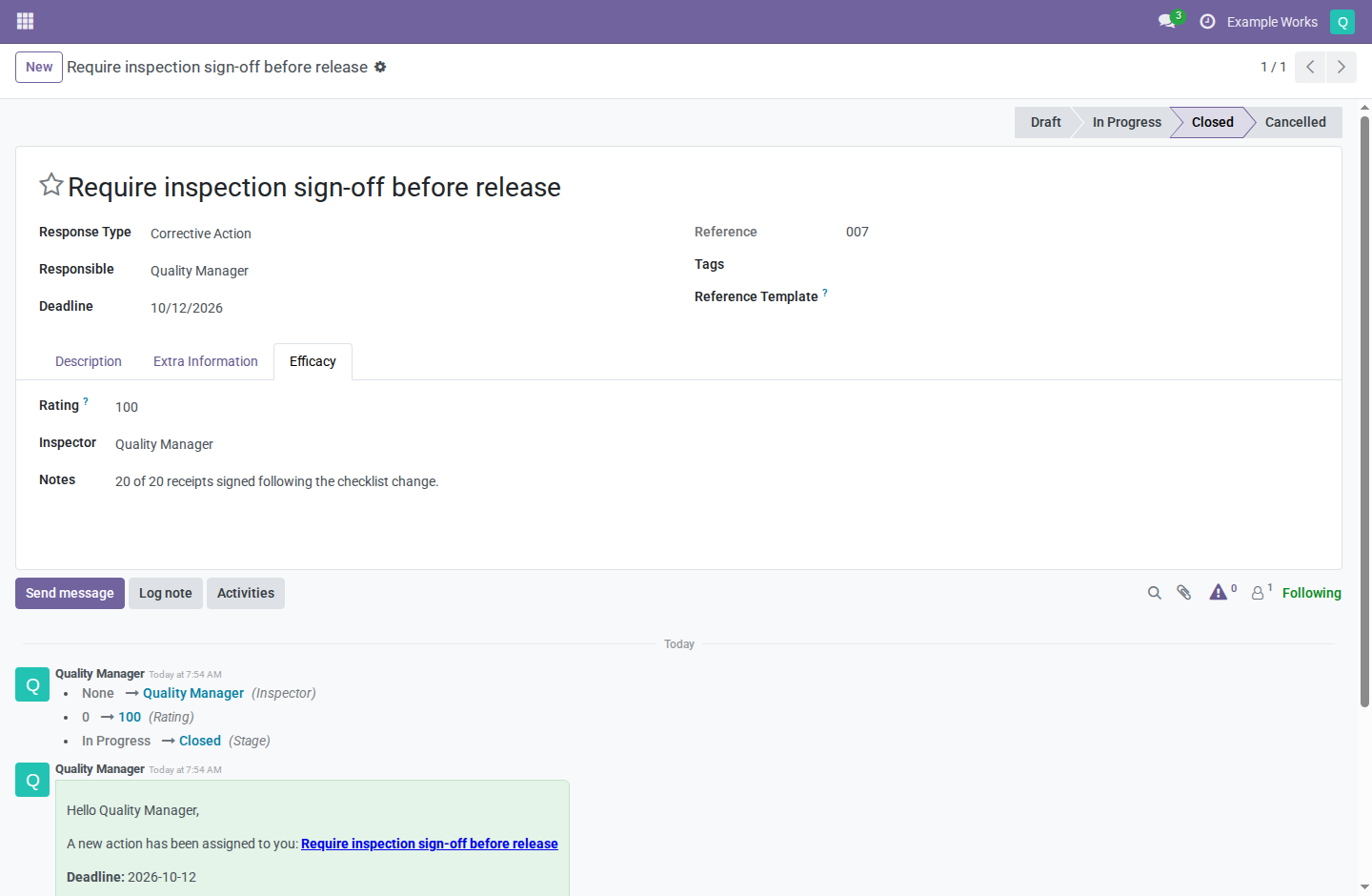
- Open the corrective action and select Efficacy. Set Inspector, enter Rating 100 for an effective action, and use Notes to record the sample result and evidence reference. The field accepts ratings from 0 to 100. If the check fails, investigate and revise the action plan, then repeat the check.
- Set the action to Closed when complete. Open the finding's Actions tab and enter Evaluation Comments under Effectiveness Review while the finding is still In Progress. State whether the criterion was met and reference the evidence.
- Set the finding stage to Closed. Odoo requires evaluation comments and all linked actions to be in ending stages. The inspector's assessment and the evidence support the decision to close.
6. Conduct and record the management review
Clause 9.3 concerns management review. Use the meeting to evaluate suitability, adequacy, and effectiveness of the QMS and make decisions. Gather previous decisions and follow-up, changes affecting the QMS, customer feedback, progress on quality objectives, process and supplier performance, audit and corrective-action results, resources, and the status of risk and opportunity actions.
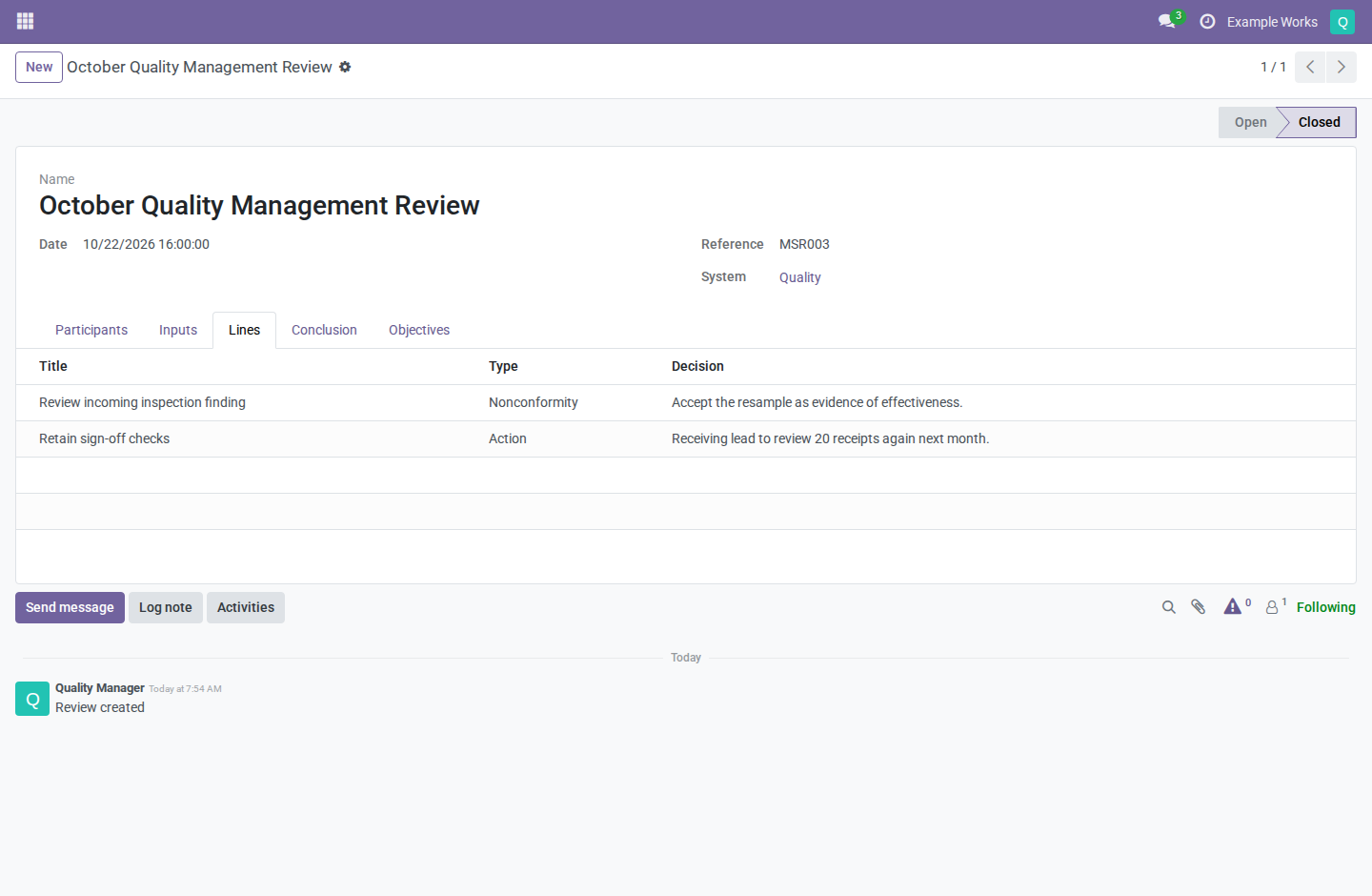
- As a Management System manager open Management System → Reviews → New. Enter October Quality Management Review, select Quality and the meeting date, and add participants. Include the quality manager and the decision makers for the operations reviewed.
- On Inputs, record the policy considered and the relevant changes. Summarize the audit and link the controlled manual and audit evidence through attachments, references, or the meeting record. Add applicable quality objectives and survey inputs using the Objectives and Surveys areas when available. For this example, compare the objective of full sign-off against the audit baseline (8 of 10) and the later effectiveness sample (20 of 20).
- On Lines, add a Nonconformity line, select Missing incoming inspection sign-off, and enter “Accept the resample as evidence of effectiveness.” Add an Action line linked to Require inspection sign-off before release and record “Receiving lead to review 20 receipts again next month.” If follow-up requires separate tracking, create a new action with its own owner and deadline and link it to an additional review line.
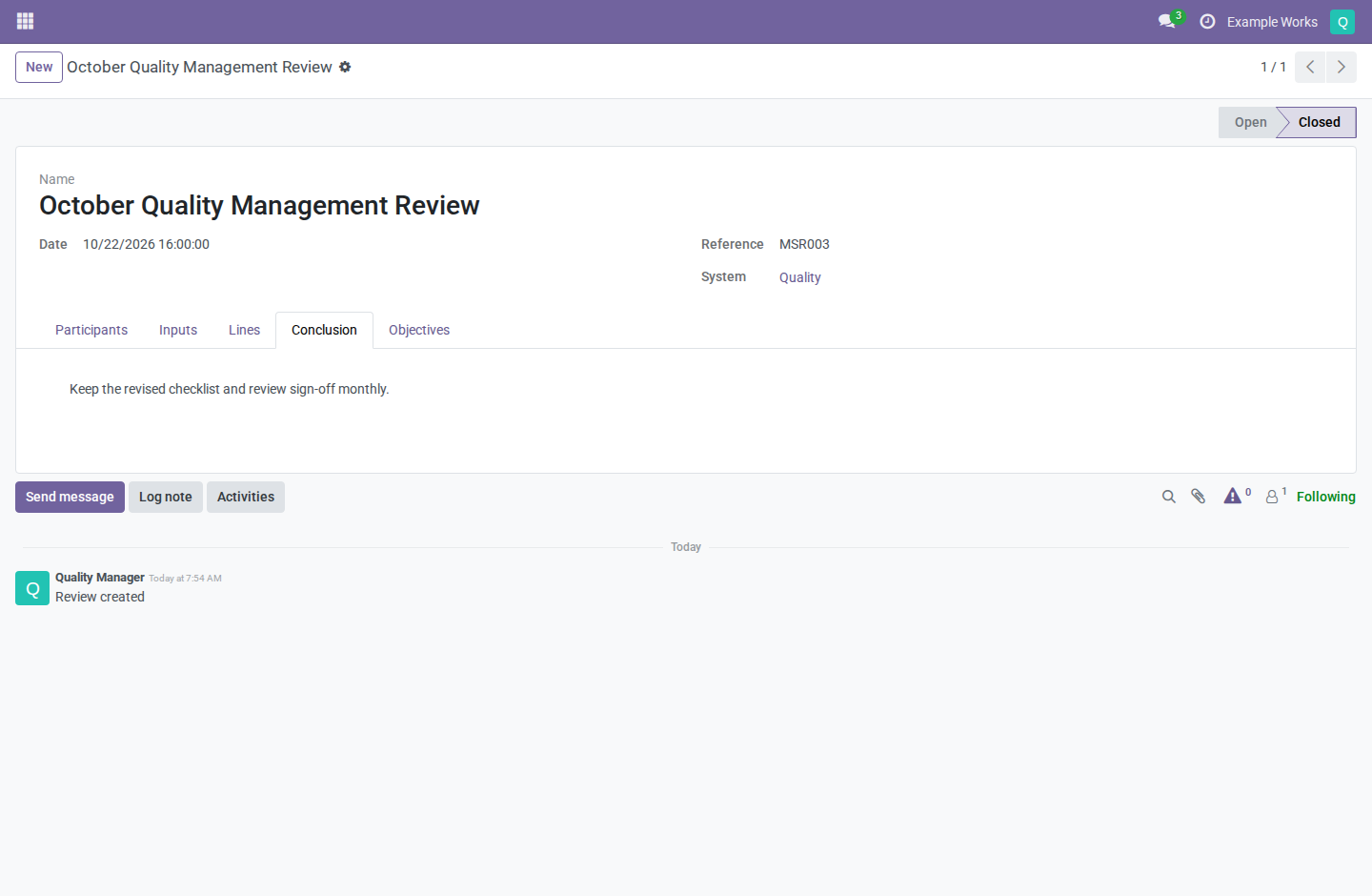
- On Conclusion, record “Keep the revised checklist and review sign-off monthly.” Record decisions about improvements, changes to the QMS, and resource needs, with owners, deadlines, and the next review date. Use Close after the decision makers confirm the record.
Evidence to retain
| Record | Evidence in this example |
|---|---|
| Manual and procedure | Approved scope and policy, receiving process owner, and release criteria |
| Internal audit | Date, auditor, procedure, ten-sample evidence, and linked finding |
| Finding and corrective action | Affected receipts, containment, cause, checklist revision, training, owner, and deadline |
| Effectiveness review | Resample date, 20 receipt references, 20 of 20 signed, inspector and closure decision |
| Management review | Participants, inputs, findings and actions reviewed, decisions, owners, and follow-up |