PMIS Risk Management


Manage project risk from first assessment to closure.
PMIS Risk Management gives project teams one register for risks, mitigation, and reviews in PMISuite Operations for Odoo 18. Use it to see where exposure is concentrated, assign follow-up work, and record who accepted the remaining risk and why. Each risk belongs to a PMIS project and can be scoped to a site.
Get started · Configure the module · Read the illustrated user manual · Operations module index · Slovenščina
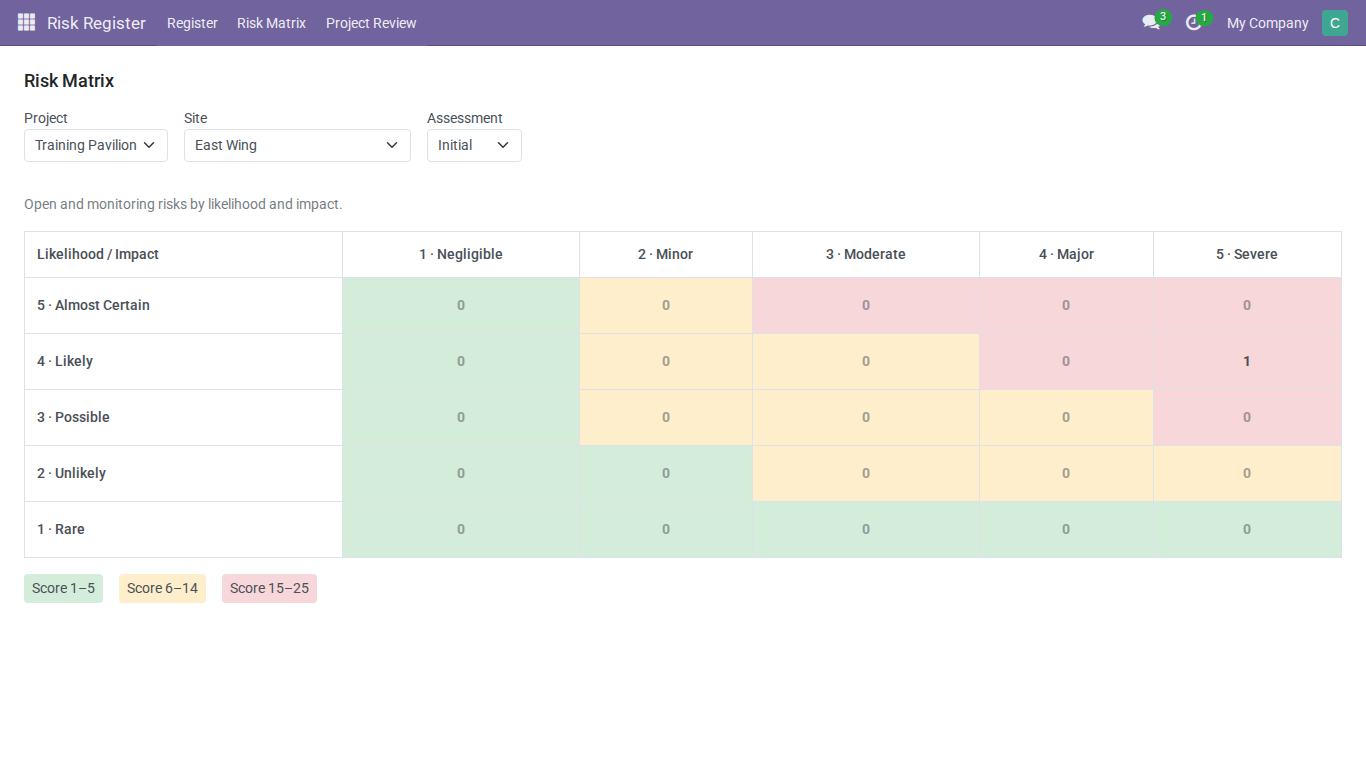
The 5×5 matrix shows how many active risks fall into each likelihood and impact combination. Click a populated cell to open its risks in the register.
Table of contents
Features
Build the register and assign the work
Record the cause, potential event, impact, owner, and next review date. Score exposure before and after mitigation using five-point likelihood and impact ratings. Assign mitigation actions with due dates and record completion evidence. Odoo schedules the owner's review activity and updates it when the owner or review date changes.
Use Register to search risks or count visible risks in the pivot. Use the Risk Board to scan risks across Open, Monitoring, and Closed. Filter by project and site and open a card to update the record.
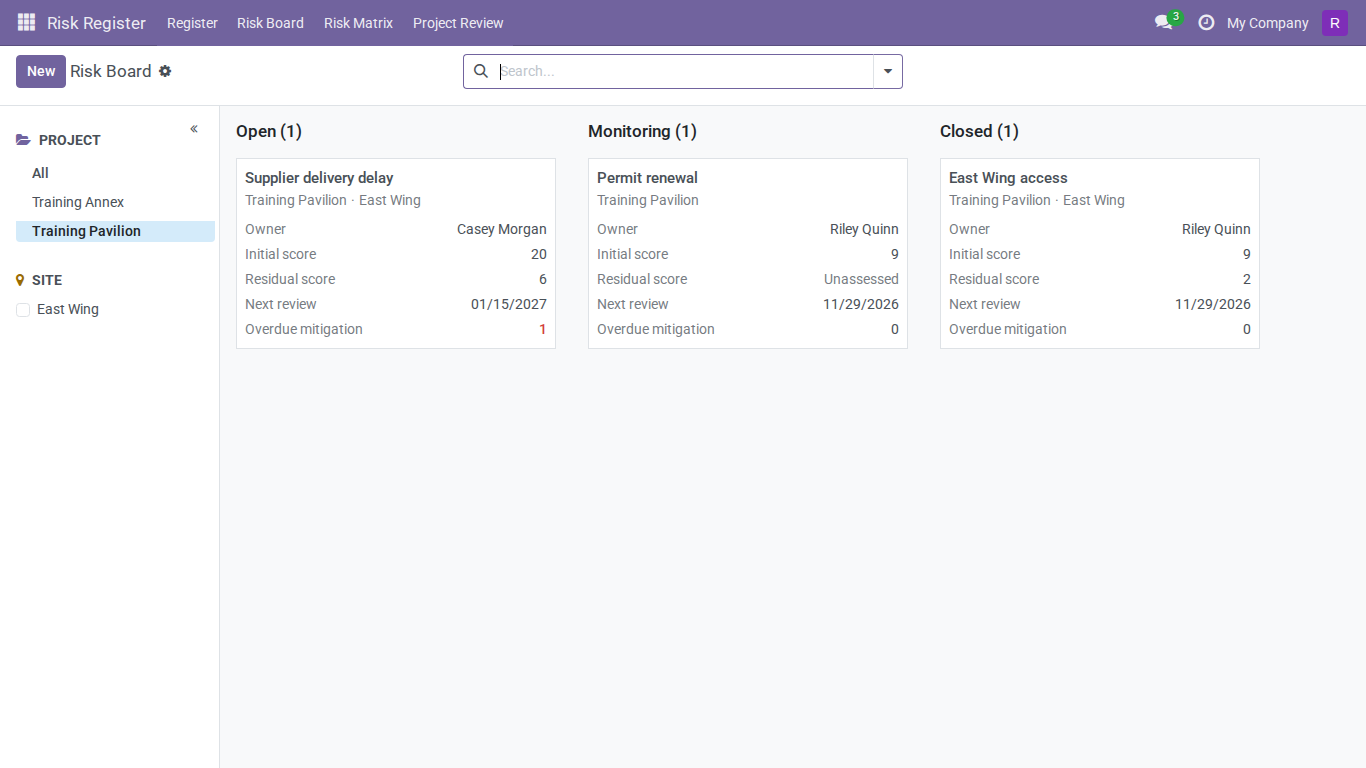
The board puts the owner, initial and residual scores, next review date, and overdue mitigation count on each card.
Focus the project review
Use the Risk Matrix to compare initial exposure with the risk that remains after mitigation. Filter by project and site, drill into a populated cell, or open the list of risks that still need a residual assessment.
Use Project Review to see the highest-rated residual risks, overdue reviews, and overdue mitigation. Click a count to open its matching records or click Print PDF to take the selected project or site summary into a review meeting.
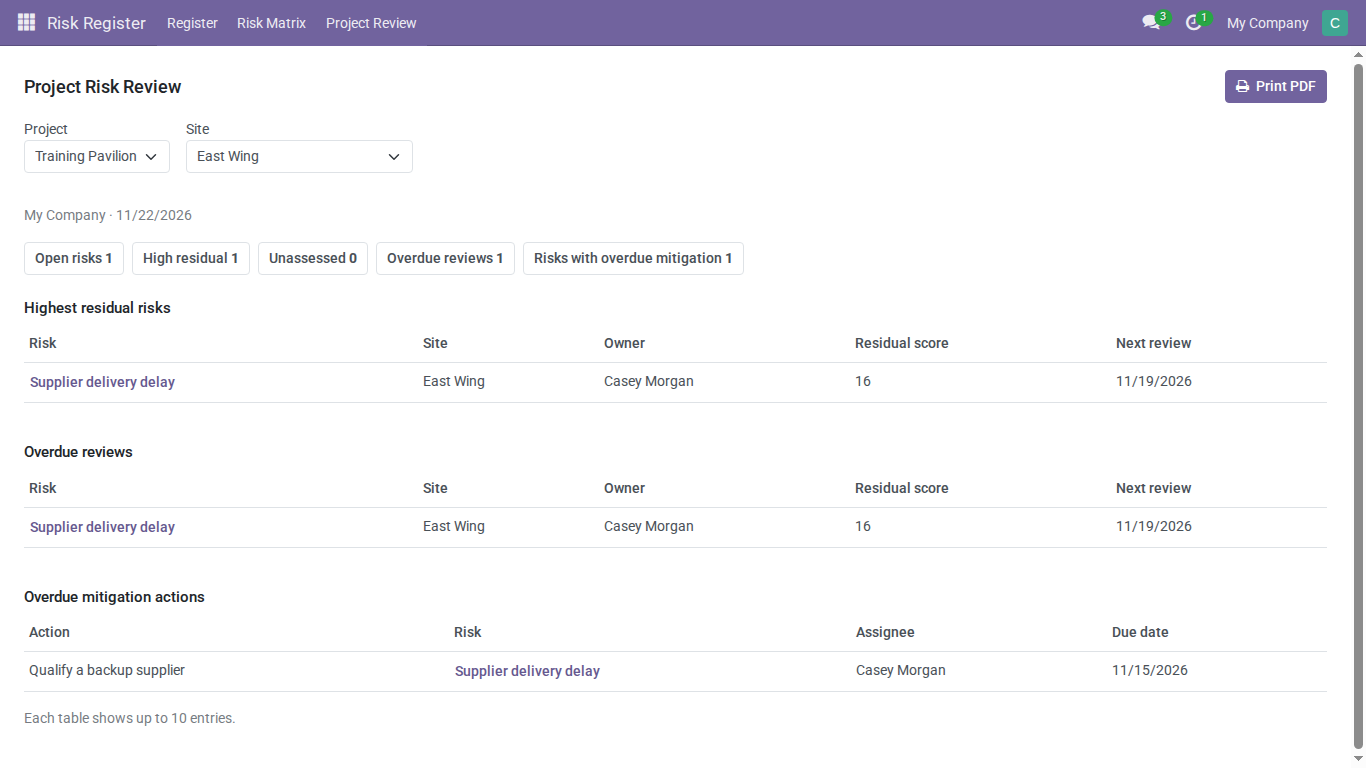
The project review brings risk counts and overdue work into one view.
See how exposure changes
Click Record Assessment to capture dated initial and residual scores. Assessment History keeps the recorded ratings, site, and recorder. Risk Trends charts daily averages of saved scores and supports project, site, and date filters.
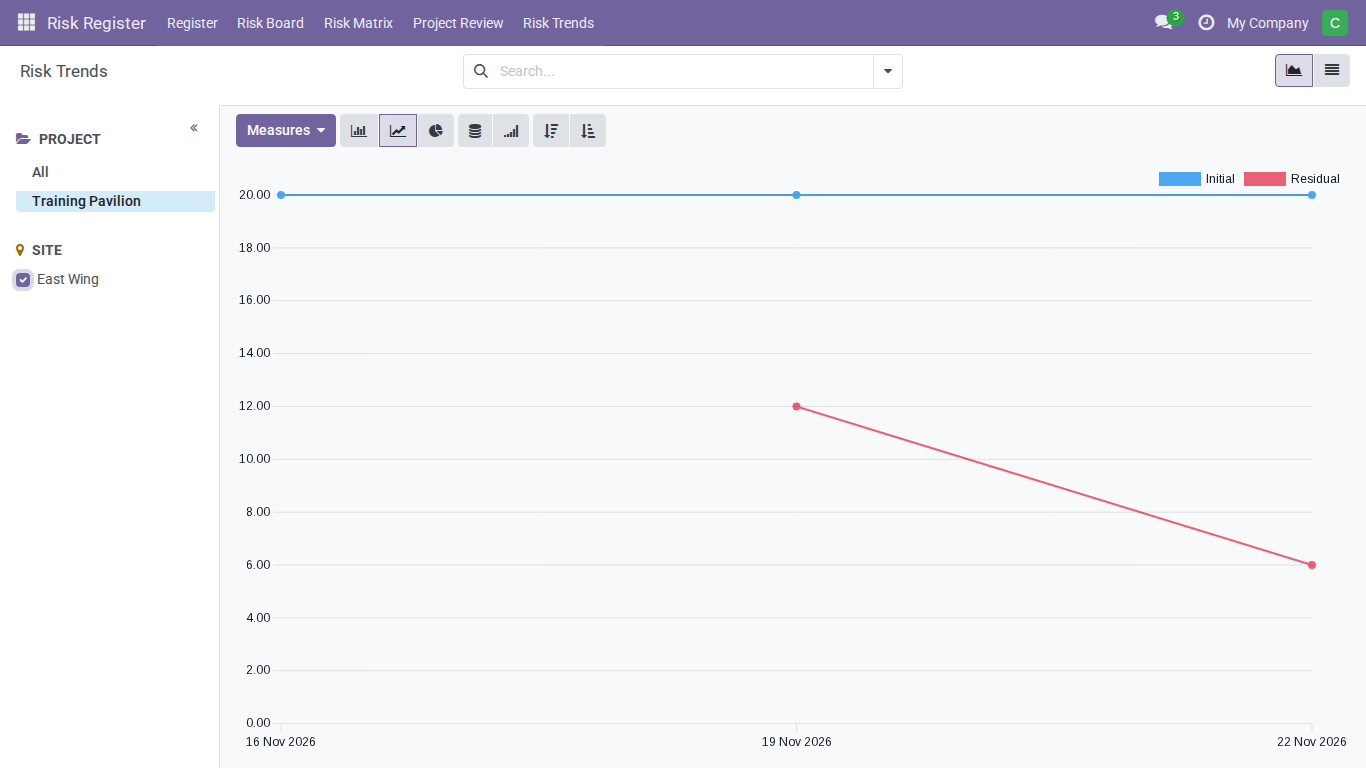
The East Wing example shows the residual score falling from 12 to 6 across two assessments.
Escalate high exposure and track outcomes
Click Request Acceptance when the residual score meets or exceeds the company threshold. The request notifies eligible project reviewers. Their decision and reason are kept in the acceptance history. A high residual risk needs reviewer acceptance before closure.
When a risk occurs, use Record Materialization to capture what happened and assign a local issue or corrective action. With the optional OCA addons, you can also link an existing same-company Helpdesk ticket or Management System corrective action and see its current stage and status on the outcome.
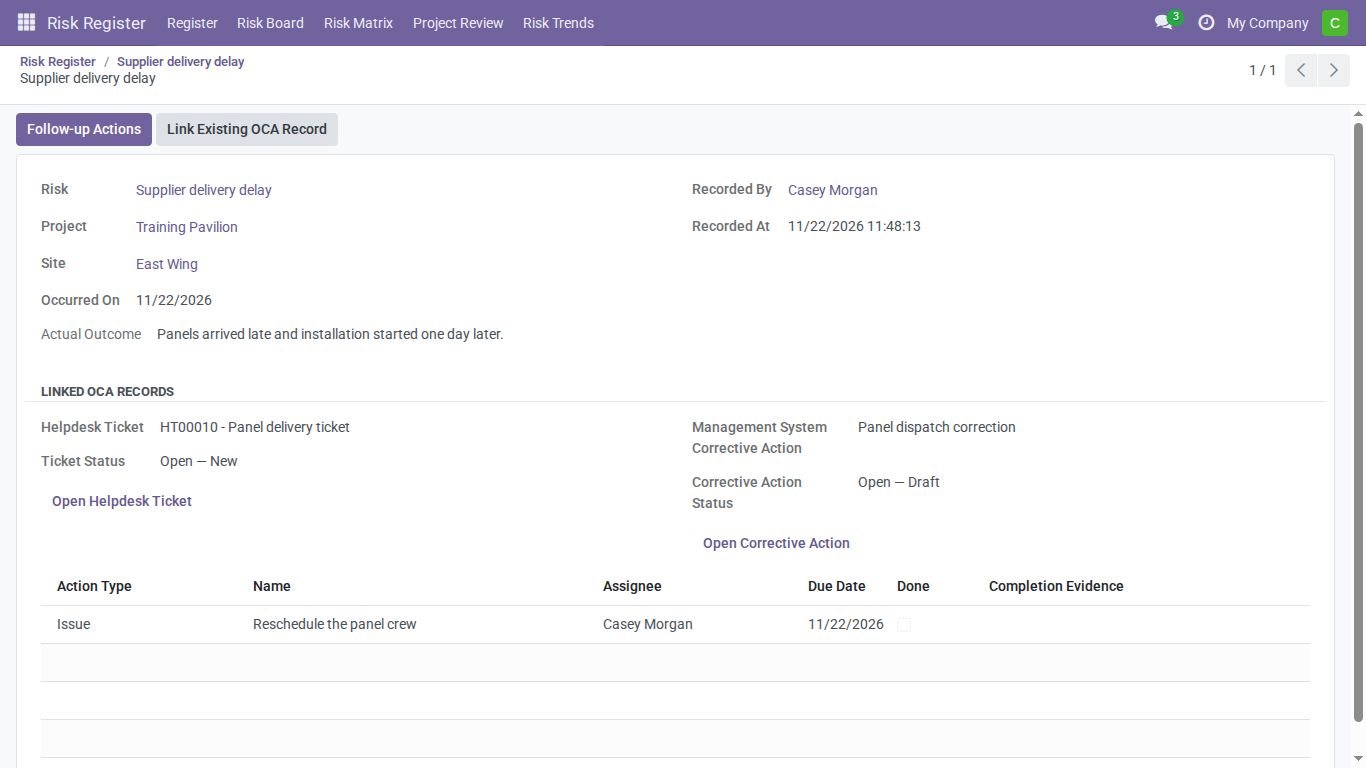
The outcome shows the linked ticket and corrective action alongside the project's own follow-up work.
Selecting Closed warns reviewers about unfinished local follow-ups or open linked records they can read. It also flags a readable link whose stage cannot be verified. Reviewers can acknowledge the warning and proceed under the usual approval and closure rules.
Configuration
Install pmis_risk in PMISuite Operations for Odoo 18. Its dependencies are pmis_assessment, base_setup, mail, and web.
Grant PMIS Risk User to contributors and PMIS Risk Reviewer to users who decide acceptance, close risks, or reopen them. A Sales administrator adds these users to Risk Team on each PMIS Project.
In Settings → PMIS Risk Management, set the company's High residual risk threshold. The default is 15.
For optional external follow-up links, install helpdesk_mgmt or mgmtsystem_action as needed. Users need access to the outcome, the source record, and its stage to see the linked status.
Usage
Open Risk Register → Register or click Risks on the PMIS Project.
Record the risk, optional site, initial scores, and next review date.
Assign mitigation and record evidence as actions finish.
Rate the remaining exposure and update the next review date.
Request acceptance when the residual score meets the company threshold.
As a reviewer, record the decision and its reason. Review any open follow-ups, then enter a Closure Reason when closing the risk.
Data model notes
A pmis.risk belongs to one pmis.project and can link to one of its sites. Its company comes from that project.
A pmis.risk.action belongs to one risk and follows its project and company access rules.
The board, matrix, review PDF, and assessment history use the same project and company access rules as the register. Linked OCA records also follow their source app's permissions.
Removing a user from the Risk Team revokes risk access and clears their pending activities.
Known limitations
Scores use a fixed multiplication scale. The matrix color bands are fixed.
Risk users can look up project and site records in their active companies.
Bug Tracker
Bugs are tracked on PMISuite Repository Issues. In case of trouble, please check there if your issue has already been reported. If you spotted it first, help us smashing it by providing a detailed and welcomed feedback.
Credits
Contributors
Matjaž Mozetič
Maintainers


Current maintainer:

Luxim is an independent R&D and deployment company focused on solving complex problems in the Odoo ecosystem.

Luxim is an active member of OCA (Odoo Community Association).